libreoffice部署
查看Linux发行版
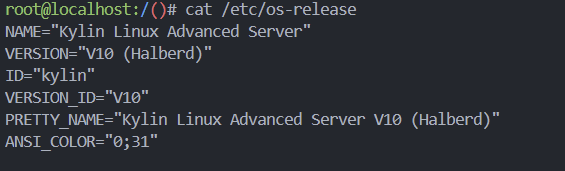 image-20250718095931232
系统是 银河麒麟高级服务器操作系统 V10(Kylin Linux Advanced
Server V10),属于 中国国产、兼容 CentOS/RHEL
生态 的 Linux 发行版。
因此它使用 RPM
包管理(dnf/yum),而不是
.deb。
查看CPU 处理器架构
是x86_64
不用部署了,镜像里有,直接用了
使用libreoffice处理doc文件,转成pdf
将当前目录下所有 .doc 和 .docx 转为
PDF:
1
2
3
4
5
6
7
| libreoffice --headless --convert-to pdf *.doc *.docx --outdir ./pdf_output/
# 检查是否有残留进程
ps aux | grep libreoffice
# 如果有残留进程,杀死它们
killall soffice.bin 2>/dev/null
|
python
1
2
3
4
5
6
7
8
9
10
11
12
13
14
15
16
17
18
19
20
21
22
23
24
25
26
27
28
29
30
31
32
33
34
35
36
37
38
39
40
41
42
43
44
45
46
47
48
49
50
51
52
53
54
55
56
57
58
59
60
61
62
63
64
65
66
67
68
| import os
import subprocess
import argparse
import glob
from pathlib import Path
def batch_convert_documents(input_path, output_dir):
"""
批量转换文档的函数版本
Args:
input_path (str): 输入路径(文件、目录或通配符)
output_dir (str): 输出目录
Returns:
bool: 转换是否成功
"""
# 确保输出目录存在
Path(output_dir).mkdir(parents=True, exist_ok=True)
# 收集所有要转换的文件
files_to_convert = []
if os.path.isfile(input_path):
# 单个文件
if input_path.lower().endswith(('.doc', '.docx')):
files_to_convert.append(input_path)
elif os.path.isdir(input_path):
# 目录中的所有doc/docx文件
for pattern in ['*.doc', '*.docx']:
files_to_convert.extend(glob.glob(os.path.join(input_path, pattern)))
else:
# 通配符模式
files_to_convert = glob.glob(input_path)
# 过滤出doc和docx文件
files_to_convert = [f for f in files_to_convert if f.lower().endswith(('.doc', '.docx'))]
if not files_to_convert:
print("未找到要转换的文档文件")
return False
print(f"找到 {len(files_to_convert)} 个文件需要转换")
# 构建命令
cmd = [
'libreoffice',
'--headless',
'--convert-to', 'pdf',
'--outdir', output_dir
] + files_to_convert
try:
print("正在转换文件...")
result = subprocess.run(cmd, capture_output=True, text=True, timeout=600)
if result.returncode == 0:
print(f"成功转换 {len(files_to_convert)} 个文件")
return True
else:
print(f"转换失败: {result.stderr}")
return False
except Exception as e:
print(f"转换过程中发生错误: {e}")
return False
if __name__ == "__main__":
success = batch_convert_documents("./docs", "./pdf_output")
|
Linux扫盲
发行版
像Ubuntu,CentOS都属于Linux的发行版,就像Windows11属于Windows的关系
常见发行版分类:
| 系列 |
代表发行版 |
包格式 |
特点 |
| Debian 系 |
Debian、Ubuntu、Kali、Linux Mint |
.deb |
包多、社区大、教程多 |
| Red Hat 系 |
CentOS、RHEL、Rocky、Alma、Fedora |
.rpm |
企业级稳定、官方支持长 |
| SUSE 系 |
openSUSE Leap / Tumbleweed |
.rpm |
YaST 管理工具、欧洲流行 |
| Arch 系 |
Arch Linux、Manjaro |
.pkg.tar.zst |
滚动更新、极客向 |
| 轻量/最小 |
Alpine、Debian netinst、CentOS Stream Minimal |
任意 |
镜像小、资源占用低 |
如何查看Linux发行版
deb和rpm
.deb 和 .rpm 想象成 “Linux
世界里的安装程序”,就像 Windows 的 .exe /
.msi
| 格式 |
适用系统 |
安装命令 |
.deb |
Debian、Ubuntu、Linux Mint、Kali 等 |
sudo dpkg -i xxx.deb 或
sudo apt install ./xxx.deb |
.rpm |
CentOS、RHEL、Fedora、openSUSE、Rocky、Alma 等 |
sudo rpm -ivh xxx.rpm 或
sudo dnf/yum install xxx.rpm |
cpu处理器架构
| 目录名 |
代表架构 |
适用场景 |
| x86_64 |
Intel/AMD 64 位 |
绝大多数台式机、服务器(如 Xeon、EPYC、Core、Ryzen) |
| aarch64 |
ARM 64 位 |
树莓派 4/5、苹果 M 系列(Asahi Linux)、鲲鹏、飞腾、Ampere ARM
服务器等 |
查看处理器架构: