1
2
3
4
5
6
7
8
9
10
11
12
13
14
15
16
17
18
19
20
21
22
23
24
25
26
27
28
29
30
31
32
33
34
35
36
37
38
39
40
41
42
43
44
45
46
47
48
49
50
51
52
53
54
55
56
57
58
59
60
61
62
63
64
65
66
67
68
69
70
71
72
73
74
75
76
77
78
79
80
81
82
83
84
85
86
87
88
89
90
91
92
93
94
95
96
97
98
99
100
101
102
103
104
105
106
107
108
109
110
111
112
113
114
115
116
117
118
119
120
121
122
123
124
125
126
127
128
129
130
131
132
133
134
135
136
137
138
139
140
141
142
143
144
145
146
147
148
149
150
151
152
153
154
155
156
157
158
159
160
| import operator
from typing import List, Annotated
from typing_extensions import TypedDict
# 定义用于撰写最终报告的指令模板
report_writer_instructions = """你是一位正在撰写关于以下主题报告的技术作家:
{topic}
你有一个分析师团队。每个分析师做了两件事:
1. 他们就一个特定的子主题与专家进行了采访。
2. 他们将他们的发现写成了一份备忘录。
你的任务:
1. 你将得到一份来自你所有分析师的备忘录集合。
2. 仔细思考每份备忘录中的见解。
3. 将这些见解整合成一个清晰的整体摘要,把所有备忘录中的核心思想联系起来。
4. 将每份备忘录中的要点总结成一个连贯的单一叙述。
报告格式要求:
1. 使用 Markdown 格式。
2. 报告开头不要有前言。
3. 不要使用子标题。
4. 报告开头使用一个一级标题:## Insights (## 见解)
5. 在报告中不要提及任何分析师的名字。
6. 保留备忘录中的所有引用,这些引用会用方括号标注,例如 [1] 或 [2]。
7. 创建一个最终的、合并的来源列表,并添加到以 `## Sources` 为标题的部分。
8. 按顺序列出你的来源,不要重复。
[1] 来源 1
[2] 来源 2
以下是你的分析师提供的备忘录,你需要根据它们来撰写报告:
{context}"""
def write_report(state: ResearchGraphState):
""" 撰写报告主体内容的节点函数 """
# 获取所有章节(备忘录)
sections = state["sections"]
topic = state["topic"]
# 将所有章节(备忘录)连接成一个字符串
formatted_str_sections = "\n\n".join([f"{section}" for section in sections])
# 使用指令模板和备忘录内容,调用 LLM 生成最终报告
system_message = report_writer_instructions.format(topic=topic, context=formatted_str_sections)
report = llm.invoke([SystemMessage(content=system_message)] + [HumanMessage(content="根据这些备忘录写一份报告。")])
# 返回报告内容
return {"content": report.content}
# 定义用于撰写引言和结论的指令模板
intro_conclusion_instructions = """你是一位正在完成关于 {topic} 报告的技术作家。
你将得到报告的所有章节。
你的工作是撰写一个清晰且有说服力的引言或结论部分。
用户会指示你是写引言还是结论。
两个部分都不要有前言。
目标大约 100 个词,简洁地预览(对于引言)或回顾(对于结论)报告的所有章节。
使用 Markdown 格式。
对于你的引言,创建一个引人注目的标题,并使用 # 标题级别。
对于你的引言,使用 ## Introduction (## 引言) 作为部分标题。
对于你的结论,使用 ## Conclusion (## 结论) 作为部分标题。
以下是供你参考以撰写相应部分的章节:{formatted_str_sections}"""
def write_introduction(state: ResearchGraphState):
""" 撰写报告引言的节点函数 """
# 获取所有章节
sections = state["sections"]
topic = state["topic"]
# 将所有章节连接成一个字符串
formatted_str_sections = "\n\n".join([f"{section}" for section in sections])
# 使用指令模板和章节内容,调用 LLM 生成引言
instructions = intro_conclusion_instructions.format(topic=topic, formatted_str_sections=formatted_str_sections)
intro = llm.invoke([instructions] + [HumanMessage(content="写报告的引言")])
# 返回引言内容
return {"introduction": intro.content}
def write_conclusion(state: ResearchGraphState):
""" 撰写报告结论的节点函数 """
# 获取所有章节
sections = state["sections"]
topic = state["topic"]
# 将所有章节连接成一个字符串
formatted_str_sections = "\n\n".join([f"{section}" for section in sections])
# 使用指令模板和章节内容,调用 LLM 生成结论
instructions = intro_conclusion_instructions.format(topic=topic, formatted_str_sections=formatted_str_sections)
conclusion = llm.invoke([instructions] + [HumanMessage(content="写报告的结论")])
# 返回结论内容
return {"conclusion": conclusion.content}
def finalize_report(state: ResearchGraphState):
""" 这是“reduce”(归约)步骤,我们收集所有部分,将它们组合起来,并进行反思以写出引言/结论 """
""" 最终整合报告的节点函数 """
# 获取报告主体内容
content = state["content"]
# 如果内容以 "## Insights" 开头,则移除这个标题
if content.startswith("## Insights"):
content = content.strip("## Insights")
# 尝试分离报告主体和来源部分
if "## Sources" in content:
try:
content, sources = content.split("\n## Sources\n")
except:
sources = None # 如果分离失败,则来源部分为空
else:
sources = None
# 将引言、主体内容和结论连接起来形成最终报告
final_report = state["introduction"] + "\n\n---\n\n" + content + "\n\n---\n\n" + state["conclusion"]
# 如果存在来源部分,则将其附加到最终报告末尾
if sources is not None:
final_report += "\n\n## Sources\n" + sources
# 返回最终报告
return {"final_report": final_report}
# 添加节点和边
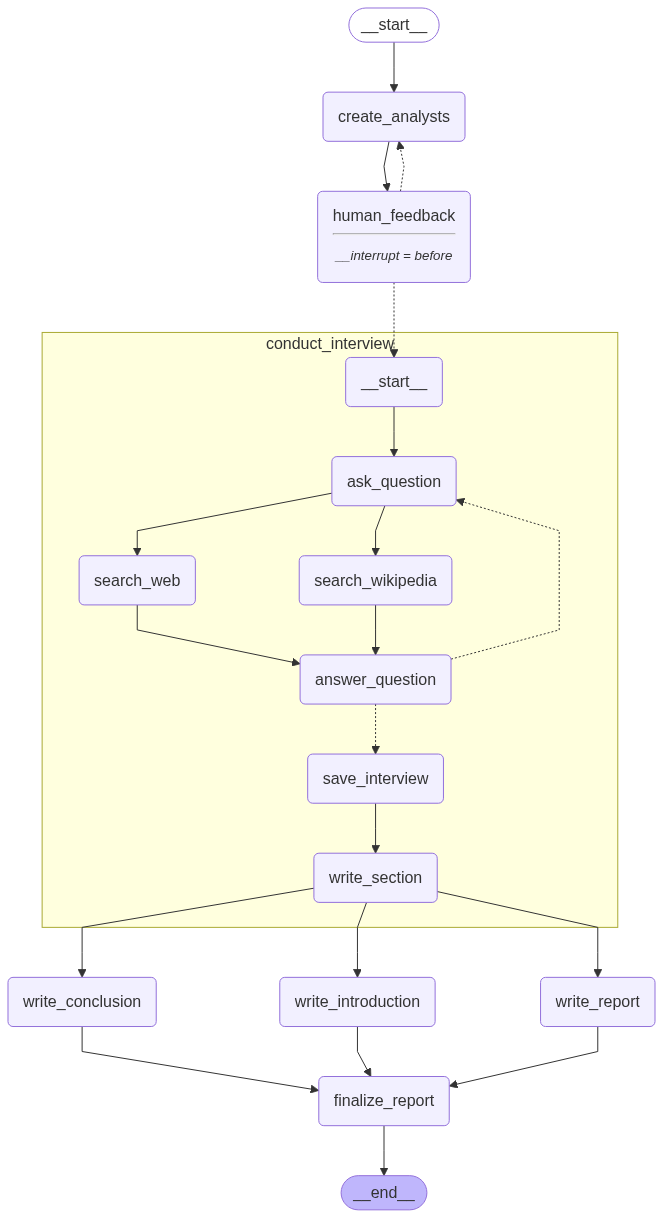
builder = StateGraph(ResearchGraphState)
builder.add_node("create_analysts", create_analysts)
builder.add_node("human_feedback", human_feedback)
builder.add_node("conduct_interview", interview_builder.compile()) # 将之前定义的采访图编译后作为一个节点
builder.add_node("write_report", write_report)
builder.add_node("write_introduction", write_introduction)
builder.add_node("write_conclusion", write_conclusion)
builder.add_node("finalize_report", finalize_report)
# 定义工作流逻辑
builder.add_edge(START, "create_analysts") # 从开始到创建分析师
builder.add_edge("create_analysts", "human_feedback") # 创建分析师后进入人类反馈环节
# 条件边:根据 human_feedback 节点的输出,决定是回到创建分析师还是开始采访
builder.add_conditional_edges("human_feedback", initiate_all_interviews, ["create_analysts", "conduct_interview"])
# 采访完成后,并行执行撰写报告、引言和结论
builder.add_edge("conduct_interview", "write_report")
builder.add_edge("conduct_interview", "write_introduction")
builder.add_edge("conduct_interview", "write_conclusion")
# 撰写完报告的三个部分后,汇聚到最终整合步骤
builder.add_edge(["write_conclusion", "write_report", "write_introduction"], "finalize_report")
builder.add_edge("finalize_report", END) # 最终整合后结束
# 编译图
memory = MemorySaver()
# 编译图,并设置在 'human_feedback' 节点前中断,以及使用检查点保存器
graph = builder.compile(interrupt_before=['human_feedback'], checkpointer=memory)
# 显示图的可视化表示
display(Image(graph.get_graph(xray=1).draw_mermaid_png()))
|