配置环境
1
2
3
4
5
6
7
8
9
10
11
12
13
14
15
16
17
18
19
20
21
22
23
24
25
26
# 创建项目目录 uv init mcp-client cd mcp-client # 创建虚拟环境 uv venv # 激活虚拟环境 # 在 Windows 上: .venv\Scripts\activate # 在 Unix 或 MacOS 上: source .venv/bin/activate # 安装所需包 uv add mcp anthropic python-dotenv #使用镜像源安装 uv add mcp anthropic python-dotenv --index-url https://pypi.tuna.tsinghua.edu.cn/simple/ # 删除样板文件 # 在 Windows 上: del main.py # 在 Unix 或 MacOS 上: rm main.py # 创建我们的主文件 touch client.py
设置 API 密钥
创建一个 .env 文件来存储它:
1
2
# Create .env file touch .env
将您的密钥添加到 .env 文件:
1 ANTHROPIC_API_KEY=<your key here>
将 .env 添加到您的 .gitignore:
1 echo ".env" >> .gitignore
将 .env 文件名添加到 .gitignore
文件中,这样 Git 就会忽略 .env
文件,不会将其纳入版本控制。
创建客户端
基本客户端结构
首先,让我们设置我们的导入并创建基本的客户端类:
1
2
3
4
5
6
7
8
9
10
11
12
13
14
15
16
17
18
19
20
import asyncio from typing import Optional from contextlib import AsyncExitStack from mcp import ClientSession, StdioServerParameters from mcp.client.stdio import stdio_client from anthropic import Anthropic from dotenv import load_dotenv load_dotenv() # 从 .env 文件加载环境变量 class MCPClient: def __init__(self): # 初始化会话和客户端对象 self.session: Optional[ClientSession] = None # MCP客户端会话 self.exit_stack = AsyncExitStack() # 异步上下文管理器堆栈,用于资源清理 self.anthropic = Anthropic() # Anthropic AI 客户端 # 后续方法将在这里定义
服务器连接管理
接下来,我们将实现连接到 MCP 服务器的功能:
1
2
3
4
5
6
7
8
9
10
11
12
13
14
15
16
17
18
19
20
21
22
23
24
25
26
27
28
29
30
31
32
33
34
35
36
37
38
39
40
41
async def connect_to_server(self, server_script_path: str): """连接到MCP服务器 Args: server_script_path: 服务器脚本路径 (.py 或 .js 文件) """ # 检查是否为Python文件 is_python = server_script_path.endswith('.py') # 检查是否为JavaScript文件 is_js = server_script_path.endswith('.js') # 如果不是Python或JavaScript文件,则抛出错误 if not (is_python or is_js): raise ValueError("服务器脚本必须是 .py 或 .js 文件") # 根据文件类型确定执行命令 command = "python" if is_python else "node" # 创建服务器参数对象 server_params = StdioServerParameters( command=command, # 执行命令 args=[server_script_path], # 脚本路径作为参数 env=None # 环境变量(使用默认环境) ) # 建立stdio客户端连接并将其添加到异步上下文管理器中 stdio_transport = await self.exit_stack.enter_async_context(stdio_client(server_params)) self.stdio, self.write = stdio_transport # 创建客户端会话并将其添加到异步上下文管理器中 self.session = await self.exit_stack.enter_async_context(ClientSession(self.stdio, self.write)) # 初始化会话 await self.session.initialize() # 列出可用的工具 response = await self.session.list_tools() tools = response.tools # 打印连接的服务器提供的工具列表 print("\n已连接到服务器,可用工具:", [tool.name for tool in tools])
查询处理逻辑
现在让我们添加处理查询和调用工具的核心功能:
1
2
3
4
5
6
7
8
9
10
11
12
13
14
15
16
17
18
19
20
21
22
23
24
25
26
27
28
29
30
31
32
33
34
35
36
37
38
39
40
41
42
43
44
45
46
47
48
49
50
51
52
53
54
55
56
57
58
59
60
61
62
63
64
65
66
67
68
69
70
71
72
73
async def process_query(self, query: str) -> str: """使用Claude和可用工具处理查询""" # 构建消息列表 messages = [ { "role": "user", # 用户角色 "content": query # 用户查询内容 } ] # 获取可用工具列表 response = await self.session.list_tools() available_tools = [{ "name": tool.name, # 工具名称 "description": tool.description, # 工具描述 "input_schema": tool.inputSchema # 工具输入模式 } for tool in response.tools] # 初始Claude API调用 response = self.anthropic.messages.create( model="qwen3-235b-a22b", # 使用的模型 max_tokens=1000, # 最大返回令牌数 messages=messages, # 消息历史 tools=available_tools # 可用工具 ) # 处理响应并处理工具调用 final_text = [] # 存储最终文本结果 assistant_message_content = [] # 存储助手消息内容 for content in response.content: # 遍历响应内容 if content.type == 'text': # 如果是文本内容 final_text.append(content.text) # 添加到最终结果 assistant_message_content.append(content) # 添加到助手消息 elif content.type == 'tool_use': # 如果是工具调用 tool_name = content.name # 工具名称 tool_args = content.input # 工具参数 # 执行工具调用 result = await self.session.call_tool(tool_name, tool_args) final_text.append(f"[调用工具 {tool_name},参数 {tool_args}]") assistant_message_content.append(content) # 添加助手消息到历史 messages.append({ "role": "assistant", "content": assistant_message_content }) # 添加工具执行结果到历史 messages.append({ "role": "user", "content": [ { "type": "tool_result", # 工具结果类型 "tool_use_id": content.id, # 工具使用ID "content": result.content # 工具执行结果 } ] }) # 获取Claude的下一个响应 response = self.anthropic.messages.create( model="qwen3-235b-a22b", max_tokens=1000, messages=messages, tools=available_tools ) # 添加响应文本到最终结果 final_text.append(response.content[0].text) # 返回连接后的最终文本结果 return "\n".join(final_text)
交互式聊天界面
现在我们将添加聊天循环和清理功能:
1
2
3
4
5
6
7
8
9
10
11
12
13
14
15
16
17
18
19
20
21
22
async def chat_loop(self): """运行交互式聊天循环""" print("\nMCP客户端已启动!") print("输入您的问题或输入'quit'退出。") while True: # 无限循环,持续接收用户输入 try: query = input("\n问题: ").strip() # 获取用户输入并去除首尾空格 if query.lower() == 'quit': # 如果用户输入'quit'(不区分大小写) break # 退出循环 # 处理用户查询并获取响应 response = await self.process_query(query) print("\n" + response) # 打印AI响应结果 except Exception as e: # 捕获所有异常 print(f"\n错误: {str(e)}") # 打印错误信息 async def cleanup(self): """清理资源""" await self.exit_stack.aclose() # 异步关闭所有在exit_stack中管理的资源
主入口点
最后,我们将添加主要的执行逻辑:
1
2
3
4
5
6
7
8
9
10
11
12
13
14
15
16
17
18
19
20
21
22
async def main(): # 检查命令行参数数量,如果少于2个则显示使用说明 if len(sys.argv) < 2: print("用法: python client.py <服务器脚本路径>") sys.exit(1) # 退出程序,返回错误码1 # 创建MCP客户端实例 client = MCPClient() try: # 连接到服务器,sys.argv[1]是第一个命令行参数(服务器脚本路径) await client.connect_to_server(sys.argv[1]) # 启动交互式聊天循环 await client.chat_loop() finally: # 确保程序结束时清理资源 await client.cleanup() # 程序入口点 if __name__ == "__main__": import sys # 导入sys模块用于处理命令行参数 # 运行异步主函数 asyncio.run(main())
QQ20250801-164738
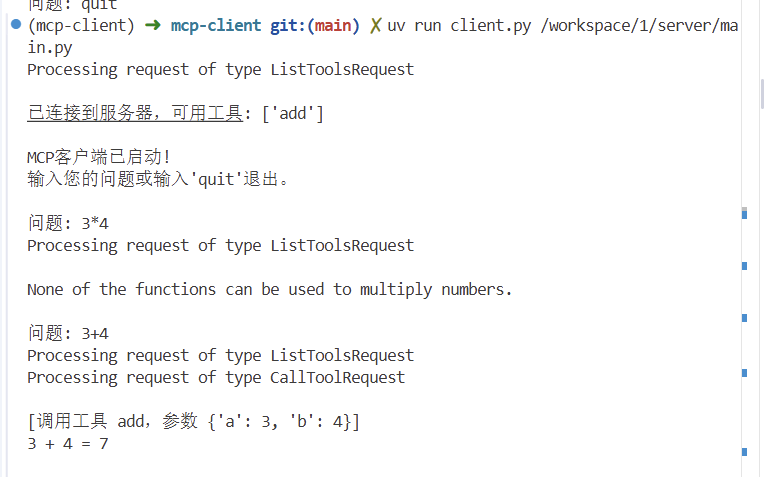
运行客户端
要使您的客户端与任何 MCP 服务器运行:
1
2
uv run client.py path/to/server.py # python server uv run client.py path/to/build/index.js # node server
客户端将:
连接到指定服务器
列出可用工具
开始一个交互式聊天会话,您可以在其中:
输入查询
查看工具执行情况
从 Claude 获取响应
运作流程
当你提交查询时:
客户端从服务器获取可用工具列表
你的查询连同工具描述一起发送给 Claude
Claude 决定使用哪些工具(如果有的话)
客户端通过服务器执行任何请求的工具调用
结果会发送回 Claude
Claude 提供自然语言响应
响应显示给您
参考资料
Build
an MCP Client - Model Context Protocol
适配openai版本
1
2
3
4
5
6
7
8
9
10
11
12
13
14
15
16
17
18
19
20
21
22
23
24
25
26
27
28
29
30
31
32
33
34
35
36
37
38
39
40
41
42
43
44
45
46
47
48
49
50
51
52
53
54
55
56
57
58
59
60
61
62
63
64
65
66
67
68
69
70
71
72
73
74
75
76
77
78
79
80
81
82
83
84
85
86
87
88
89
90
91
92
93
94
95
96
97
98
99
100
101
102
103
104
105
106
107
108
109
110
111
112
113
114
115
116
117
118
119
120
121
122
123
124
125
126
127
128
129
130
131
132
133
134
135
136
137
138
139
140
141
142
143
144
145
146
147
148
149
150
151
152
153
154
155
156
157
158
159
160
161
162
163
164
165
166
167
168
169
170
171
172
173
174
175
176
177
178
179
180
181
182
183
184
185
186
187
188
189
190
191
192
193
194
195
196
197
198
199
200
201
202
203
204
205
206
207
208
209
import asyncio import json import sys from typing import Optional from contextlib import AsyncExitStack from mcp import ClientSession, StdioServerParameters from mcp.client.stdio import stdio_client from openai import OpenAI from dotenv import load_dotenv import os load_dotenv() # 从 .env 文件加载环境变量 class MCPClient: def __init__(self): # 初始化会话和客户端对象 self.session: Optional[ClientSession] = None # MCP客户端会话 self.exit_stack = AsyncExitStack() # 异步上下文管理器堆栈,用于资源清理 self.anthropic = OpenAI( api_key=os.getenv("DASHSCOPE_API_KEY"), base_url="https://dashscope.aliyuncs.com/compatible-mode/v1" ) # 使用OpenAI兼容模式连接通义千问 async def connect_to_server(self, server_script_path: str): """连接到MCP服务器 Args: server_script_path (str): 服务器脚本路径,支持.py或.js文件 Raises: ValueError: 当脚本文件不是.py或.js格式时抛出 """ # 检查是否为Python文件 is_python = server_script_path.endswith('.py') # 检查是否为JavaScript文件 is_js = server_script_path.endswith('.js') # 如果不是Python或JavaScript文件,则抛出错误 if not (is_python or is_js): raise ValueError("服务器脚本必须是 .py 或 .js 文件") # 根据文件类型确定执行命令 command = "python" if is_python else "node" # 创建服务器参数对象 server_params = StdioServerParameters( command=command, # 执行命令 args=[server_script_path], # 脚本路径作为参数 env=None # 环境变量(使用默认环境) ) # 建立stdio客户端连接并将其添加到异步上下文管理器中 stdio_transport = await self.exit_stack.enter_async_context(stdio_client(server_params)) self.stdio, self.write = stdio_transport # 创建客户端会话并将其添加到异步上下文管理器中 self.session = await self.exit_stack.enter_async_context(ClientSession(self.stdio, self.write)) # 初始化会话 await self.session.initialize() # 列出可用的工具 response = await self.session.list_tools() tools = response.tools # 打印连接的服务器提供的工具列表 print("\n已连接到服务器,可用工具:", [tool.name for tool in tools]) async def process_query(self, query: str) -> str: """使用Qwen和可用工具处理查询""" # 构建消息列表 messages = [ { "role": "user", "content": query } ] # 获取可用工具列表并转换为OpenAI格式 response = await self.session.list_tools() available_tools = [] for tool in response.tools: schema = tool.inputSchema if isinstance(schema, str): schema = json.loads(schema) if isinstance(schema, dict) and "properties" in schema: schema = {"type": "object", **schema} available_tools.append({ "type": "function", "function": { "name": tool.name, "description": tool.description, "parameters": schema } }) # 第一次调用模型 response = self.anthropic.chat.completions.create( model="qwen3-235b-a22b", max_tokens=1000, messages=messages, tools=available_tools, extra_body={"enable_thinking": False} ) final_text = [] message = response.choices[0].message # 处理文本内容 if message.content: final_text.append(message.content) # 处理工具调用 if message.tool_calls: for tool_call in message.tool_calls: tool_name = tool_call.function.name tool_args = json.loads(tool_call.function.arguments) # 执行工具调用 result = await self.session.call_tool(tool_name, tool_args) final_text.append(f"[调用工具 {tool_name},参数 {tool_args}]") # 处理工具结果 tool_result_content = "" if result.content: for item in result.content: if hasattr(item, 'type') and item.type == 'text': tool_result_content += item.text else: tool_result_content += str(item) # 添加助手消息到历史 messages.append({ "role": "assistant", "content": None, "tool_calls": [tool_call] }) # 添加工具执行结果到历史 messages.append({ "role": "tool", "tool_call_id": tool_call.id, "content": tool_result_content }) # 再次调用模型 response = self.anthropic.chat.completions.create( model="qwen3-235b-a22b", max_tokens=1000, messages=messages, tools=available_tools, extra_body={"enable_thinking": False} ) # 处理最终响应 if response.choices and response.choices[0].message.content: final_text.append(response.choices[0].message.content) return "\n".join(final_text) async def chat_loop(self): """运行交互式聊天循环""" print("\nMCP客户端已启动!") print("输入您的问题或输入'quit'退出。") while True: # 无限循环,持续接收用户输入 try: query = input("\n问题: ").strip() # 获取用户输入并去除首尾空格 if query.lower() == 'quit': # 如果用户输入'quit'(不区分大小写) break # 退出循环 # 处理用户查询并获取响应 response = await self.process_query(query) print("\n" + response) # 打印AI响应结果 except Exception as e: # 捕获所有异常 print(f"\n错误: {str(e)}") # 打印错误信息 import traceback traceback.print_exc() # 打印详细错误信息 async def cleanup(self): """清理资源""" await self.exit_stack.aclose() # 异步关闭所有在exit_stack中管理的资源 async def main(): # 检查命令行参数数量,如果少于2个则显示使用说明 if len(sys.argv) < 2: print("用法: python client.py <服务器脚本路径>") sys.exit(1) # 退出程序,返回错误码1 # 创建MCP客户端实例 client = MCPClient() try: # 连接到服务器,sys.argv[1]是第一个命令行参数(服务器脚本路径) await client.connect_to_server(sys.argv[1]) # 启动交互式聊天循环 await client.chat_loop() finally: # 确保程序结束时清理资源 await client.cleanup() # 程序入口点 if __name__ == "__main__": # 运行异步主函数 asyncio.run(main())
openai和claude在工具调用的差异
工具格式转换修复
问题 :MCP工具格式与OpenAI API不兼容
修复 : 1 2 3 4 5 6 7 8 9 10 11 12 13 14 15 16 available_tools = [{ "name" : tool.name, "description" : tool.description, "input_schema" : tool.inputSchema }] available_tools = [{ "type" : "function" , "function" : { "name" : tool.name, "description" : tool.description, "parameters" : schema } }]
API响应处理修复
问题 :错误访问了OpenAI响应对象的属性
修复 : 1 2 3 4 5 6 7 8 9 10 for content in response.content: message = response.choices[0 ].message if message.content: final_text.append(message.content) if message.tool_calls: for tool_call in message.tool_calls:
工具调用结果处理修复
问题 :错误处理MCP工具调用返回的结果结构
修复 :
1 2 3 4 5 6 7 8 9 10 11 "content" : result.content tool_result_content = "" if result.content: for item in result.content: if hasattr (item, 'type' ) and item.type == 'text' : tool_result_content += item.text else : tool_result_content += str (item)
消息历史构建修复
问题 :工具调用后消息历史格式不正确
修复 : 1 2 3 4 5 6 7 8 9 10 11 messages.append({ "role" : "assistant" , "content" : None , "tool_calls" : [tool_call] }) messages.append({ "role" : "tool" , "tool_call_id" : tool_call.id , "content" : tool_result_content })
JSON Schema兼容性处理
问题 :MCP返回的schema可能缺少必要的根类型定义
修复 : 1 2 3 4 5 schema = tool.inputSchema if isinstance (schema, str ): schema = json.loads(schema) if isinstance (schema, dict ) and "properties" in schema: schema = {"type" : "object" , **schema}