A2A协议
前言
就是client调用agent那一块,感觉还是比较困惑,我看例子是要通过定义给的execut和cancel函数,那就意味着agent提供者都要去自己去定义这些怎么执行的函数,还有描述agent的skill和card,工作量明显比mcp大了很多,可能这也是现在a2a传播没有mcp好的一大原因吧,我的理解,不知道对不对
思考:现在利用a2a搭建多agent的现实例子多吗,从概念上,我认为a2a的思路是没问题的,但感觉下来,现在大多数的多agent的实现方式还是像langgraph中条件边来控制使用哪个agent,是不是因为a2a对于中小开发者搭建起来还是有些复杂,但我还是认为他这种于mcp类似,模块化,可以自定义的形式会是后续方向。就像现在的mcp client,可以在市场上下载自己想要的mcp,利用a2a协议,用户可以在市场上下载想用的agent,搭建自己的多agent管家,现在市场上有类似的产品吗?
a2a协议其实与mcp类似,对象不同,一个是mcp client与mcp server(tool),一个是agent client与agent server。具体实现中,需要完成对agent server的信息暴露与executor的编写,以便让client正确调用agent,调用前要启动服务。
一个agent server所要包含的要素包括:1.AgentSkill,用于描述agent可以实现的能力
2.AgentCard,描述agent的信息,包括运行的url,输入和返回的数据类型,所包含的skills
3.AgentExecutor,定义了如何执行智能体,通过定义execute方法,以便正确调用agent server
4.通过DefaultRequestHandler,封装调用agent的接口,不用再手写接口,只要提供一个
executor 和一个 store
即可,收到对话内容后,DefaultRequestHandler
会把对话打包成任务,交给 HelloWorldAgentExecutor
去执行。、
5.通过A2AStarletteApplication打包成应用(如fastapi),他的作用如下:1.把这个
handler 注册成真正的 HTTP 路由,于是外部就能通过 POST /
调用上述 JSON-RPC 方法。2.对外暴露名片
什么是A2A协议
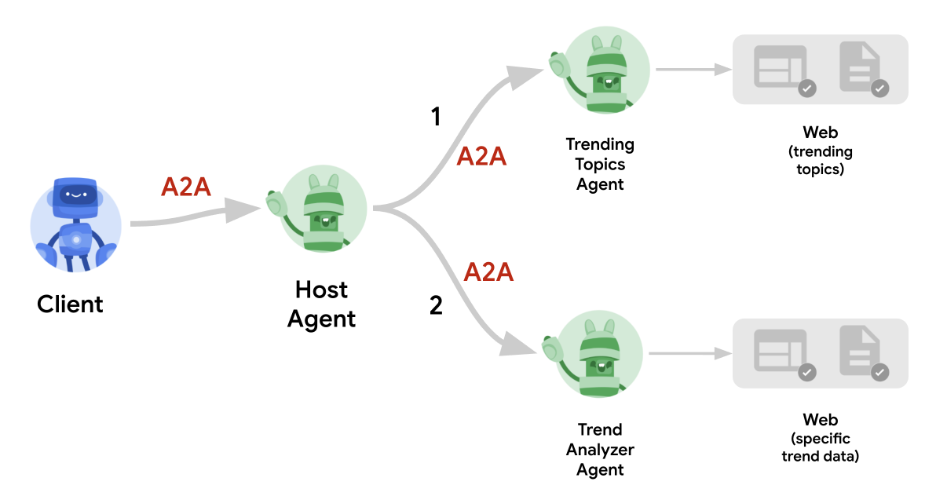
A2A 协议(Agent2Agent Protocol,智能体间通信协议)是 Google 在 2025 年 4 月发布并开源的首个 AI 智能体交互标准。它通过统一的通信规范,解决不同团队、不同框架、不同供应商开发的 AI 智能体如何“对话”和协同工作的问题。
与mcp区分,MCP 解决 “单个智能体如何调用外部工具/数据” 的问题,而A2A 解决 “多个智能体如何协同完成任务” 的问题。
为什么要使用A2A协议
随着 AI 应用深化,单一“万能”模型难以兼顾所有领域。A2A 鼓励构建“小而专”的智能体生态:
- 每个智能体专注一个领域(如订票、报税、图像处理)。
- 通过 A2A 协议,它们像乐高积木一样自由组合,快速响应新的业务需求。
比如你让一个agent使用多个工具,不仅会浪费tokens,也会降低其调用工具的准确性。所有,专业的领域使用专业的agent,而agent间的通信便要依靠A2A协议
环境配置
克隆仓库
如果你还没有克隆,请克隆 A2A Samples 仓库:
1 | git clone https://github.com/a2aproject/a2a-samples.git -b main --depth 1 |
Python 环境和 SDK 安装
我们推荐为 Python 项目使用虚拟环境。A2A Python SDK 使用
uv 进行依赖管理,但你也可以使用 pip 与
venv。
创建并激活虚拟环境:
使用
venv(标准库):1
2python -m venv .venv
source .venv/bin/activate安装所需的 Python 依赖项以及 A2A SDK 及其依赖项:
1
pip install -r samples/python/requirements.txt
Agent Skills & Agent Card
Agent Skills
一个代理技能描述了代理可以执行的具体能力或功能。它是告诉客户端代理擅长哪些任务的构建模块。
AgentSkill 的关键属性(定义在 a2a.types
中):
id: 技能的唯一标识符。name: 人类可读的名称。description:对技能功能的更详细说明。tags:用于分类和发现的关键词。examples:示例提示或使用案例。inputModes/outputModes: 支持的输入和输出媒体类型(例如,“text/plain”,“application/json”)。
在 __main__.py 中,你可以看到如何为 Helloworld
代理定义一个技能:
1 | skill = AgentSkill( |
这个技能非常简单:它的名称是 “Returns hello world”,并且主要处理文本。
Agent Card
代理卡是一个 A2A 服务器提供的 JSON 文档,通常位于
.well-known/agent-card.json
端点。它就像代理的数字名片。
AgentCard 的关键属性(定义在 a2a.types
中):
name,description,version: 基本身份信息。url:A2A 服务可访问的端点。capabilities:指定支持的 A2A 功能,如streaming或pushNotifications。defaultInputModes/defaultOutputModes: 代理的默认媒体类型。skills: 代理提供的AgentSkill对象列表。
helloworld 示例定义其 Agent Card 如下:
1 | # This will be the public-facing agent card |
这张卡片告诉我们代理名为 “Hello World Agent”,运行在
http://localhost:9999/,支持文本交互,并具有
hello_world
技能。它还表明支持公开认证,意味着无需特定凭证。
Agent Executor
A2A 代理处理请求和生成响应/事件的核心逻辑由一个 Agent
Executor 负责。A2A Python SDK 提供了一个抽象基类
a2a.server.agent_execution.AgentExecutor 供你实现。
AgentExecutor 接口
AgentExecutor 类定义了两个主要方法:
async def execute(self, context: RequestContext, event_queue: EventQueue): 处理期望响应或事件流的传入请求。它处理用户输入(可通过context获取)并使用event_queue发送Message、Task、TaskStatusUpdateEvent或TaskArtifactUpdateEvent对象。async def cancel(self, context: RequestContext, event_queue: EventQueue): 处理取消正在进行的任务的请求。
RequestContext
提供有关传入请求的信息,例如用户消息和任何现有的任务详情。EventQueue
由执行器使用,用于将事件发送回客户端。
Helloworld AgentExecutor
让我们看看 agent_executor.py。它定义了
HelloWorldAgentExecutor。
代理(
HelloWorldAgent):这是一个简单的辅助类,封装了实际的“业务逻辑”。1
2
3
4
5class HelloWorldAgent:
"""Hello World Agent."""
async def invoke(self) -> str:
return 'Hello World'它有一个简单的
invoke方法,返回字符串”Hello World”。执行器(
HelloWorldAgentExecutor):这个类实现了AgentExecutor接口。__init__:1
2
3
4
5class HelloWorldAgentExecutor(AgentExecutor):
"""Test AgentProxy Implementation."""
def __init__(self):
self.agent = HelloWorldAgent()它实例化了
HelloWorldAgent。execute:1
2
3
4
5
6
7async def execute(
self,
context: RequestContext,
event_queue: EventQueue,
) -> None:
result = await self.agent.invoke()
await event_queue.enqueue_event(new_agent_text_message(result))当收到一个
message/send或message/stream请求时(这两种请求在这个简化的执行器中均由execute处理):- 它调用
self.agent.invoke()来获取 “Hello World” 字符串。 - 它使用
new_agent_text_message工具函数创建一个 A2AMessage对象。 - 它将此消息入队到
event_queue。底层的DefaultRequestHandler随后会处理这个队列以向客户端发送响应。对于像这样的一条消息,在流关闭之前,它将导致一个message/send的单一响应或一个message/stream的单一事件。
- 它调用
cancel: Helloworld 示例的cancel方法简单地抛出一个异常,表明这个基本代理不支持取消操作。1
2
3
4async def cancel(
self, context: RequestContext, event_queue: EventQueue
) -> None:
raise Exception('cancel not supported')
AgentExecutor 充当 A2A
协议(由请求处理器和服务器应用程序管理)与您的代理特定逻辑之间的桥梁。它接收关于请求的上下文信息,并使用事件队列来通信结果或更新。
启动server
现在我们已经有了 Agent Card 和 Agent Executor,可以设置并启动 A2A 服务器。
A2A Python SDK 提供了一个 A2AStarletteApplication
类,简化了运行符合 A2A 标准的 HTTP 服务器。它使用 Starlette 作为 Web 框架,通常与 Uvicorn 等 ASGI 服务器一起运行。
让我们再次查看
__main__.py,看看服务器是如何初始化和启动的。
1 | import uvicorn |
我们来分解一下:
DefaultRequestHandler:- SDK 提供了
DefaultRequestHandler。这个处理器接收你的AgentExecutor实现(这里,HelloWorldAgentExecutor)和一个TaskStore(这里,InMemoryTaskStore)。 - 它将传入的 A2A RPC 调用路由到你的执行器的适当方法上(比如
execute或cancel)。 TaskStore被DefaultRequestHandler用来管理任务的生命周期,特别是对于有状态交互、流式传输和重新订阅。即使你的代理执行器很简单,处理器也需要一个任务存储。
- SDK 提供了
A2AStarletteApplication:A2AStarletteApplication类使用agent_card和request_handler(在其构造函数中称为http_handler)进行实例化。agent_card至关重要,因为服务器将在/.well-known/agent-card.json端点(默认情况下)上公开它。request_handler负责通过与其AgentExecutor交互来处理所有传入的 A2A 方法调用。
uvicorn.run(server_app_builder.build(), ...):A2AStarletteApplication有一个build()方法,用于构建实际的 Starlette 应用程序。- 然后使用
uvicorn.run()运行该应用程序,使您的代理可通过 HTTP 访问。 host='0.0.0.0'使服务器可在您机器上的所有网络接口上访问。port=9999指定监听的端口。这需要与AgentCard中的url匹配。
specific_extended_agent_card- 给同一个 Agent 准备“两张不同权限的名片”,分别用于“普通访客”和“已认证用户”。、
与服务器交互
Helloworld A2A 服务器运行后,让我们向它发送一些请求。SDK
包含一个客户端(A2AClient),可以简化这些交互。
让我们看一下 test_client.py 的关键部分:
获取代理卡 & 初始化客户端 :
1
2
3
4
5
6
7
8
9base_url = 'http://localhost:9999'
async with httpx.AsyncClient() as httpx_client:
# 初始化 A2ACardResolver
resolver = A2ACardResolver(
httpx_client=httpx_client,
base_url=base_url,
# agent_card_path 使用默认值,extended_agent_card_path 也使用默认值
)A2ACardResolver类是一个便捷工具。它首先从服务器端的/.well-known/agent-card.json端点(基于提供的基 URL)获取AgentCard,然后使用它初始化客户端。发送非流式消息 (
send_message):1
2
3
4
5
6
7
8
9
10
11
12
13
14
15
16
17
18
19
20
21client = A2AClient(
httpx_client=httpx_client,
agent_card=final_agent_card_to_use#这个card为经过认证处理后暴露的card
)
logger.info('A2AClient initialized.')
send_message_payload: dict[str, Any] = {
'message': {
'role': 'user',
'parts': [
{'kind': 'text', 'text': 'how much is 10 USD in INR?'}
],
'messageId': uuid4().hex,
},
}
request = SendMessageRequest(
id=str(uuid4()), params=MessageSendParams(**send_message_payload)
)
response = await client.send_message(request)
print(response.model_dump(mode='json', exclude_none=True))send_message_payload构建了MessageSendParams的数据。- 这些数据被封装在
SendMessageRequest中。 - 它包含一个
message对象,其中role设置为”用户”,内容在parts中。 - Helloworld 代理的
execute方法将入队一条”Hello World”消息。DefaultRequestHandler将获取这条消息并将其作为响应发送。 response将是一个SendMessageResponse对象,其中包含SendMessageSuccessResponse(以代理的Message作为结果)或JSONRPCErrorResponse。
处理任务 ID(Helloworld 的说明性注释):
Helloworld 客户端(
test_client.py)不会直接尝试get_task或cancel_task,因为简单的 Helloworld 代理的execute方法,通过message/send调用时,会导致DefaultRequestHandler返回一个直接的Message响应,而不是Task对象。更复杂的、明确管理任务的代理(如 LangGraph 示例)会从message/send返回一个Task对象,然后其id可用于get_task或cancel_task。发送流式消息(
send_message_streaming):1
2
3
4
5
6
7
8streaming_request = SendStreamingMessageRequest(
id=str(uuid4()), params=MessageSendParams(**send_message_payload)
)
stream_response = client.send_message_streaming(streaming_request)
async for chunk in stream_response:
print(chunk.model_dump(mode='json', exclude_none=True))- 此方法调用代理的
message/stream端点。DefaultRequestHandler将调用HelloWorldAgentExecutor.execute方法。 execute方法将一个”Hello World”消息入队,然后关闭事件队列。- 客户端将接收这条单条消息为一个
SendStreamingMessageResponse事件,然后流将终止。 stream_response是一个AsyncGenerator。
- 此方法调用代理的
参考资料
a2aproject/a2a-samples: Samples using the Agent2Agent (A2A) Protocol