pytest
生成项目结构
1 | ─src |
生成calculator.py类用于后续学习pytest,以上树状结构使用tree /f生成
__init__.py 文件的作用
__init__.py
文件的主要作用是告诉Python解释器这个目录是一个Python包(package)。当Python看到一个包含
__init__.py
文件的目录时,就会将其识别为一个可导入的包。
1 | """ |
相对导入 : from .calculator import Calculator
- .calculator 表示从当前包内的 calculator.py 模块导入 Calculator 类
- 点号 . 表示相对导入,指向当前包
__all__ 列表 :
__all__ = ['Calculator']
- 定义了当使用 from pytest_demo import * 时会导入哪些对象
- 这是一个显式的公共API声明
pytest 的自动发现规则
pytest 会自动查找以下内容:
- 文件名:
test_*.py或*_test.py - 函数名:
test_*() - 类名:
Test*(类中方法也需以test_开头)
测试文件
1 | └─tests |
1 | from pytest_demo.calculator import Calculator |
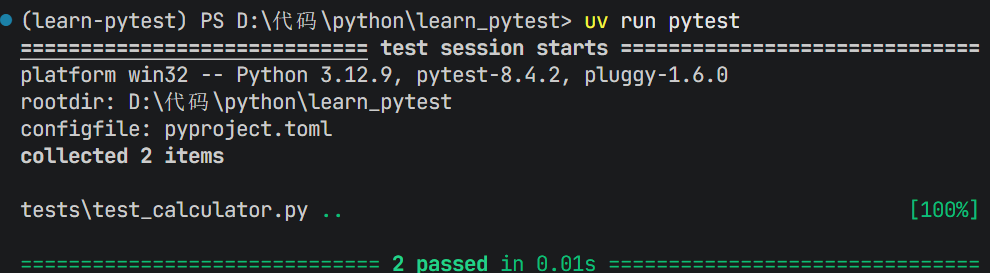
运行 uv run pytest
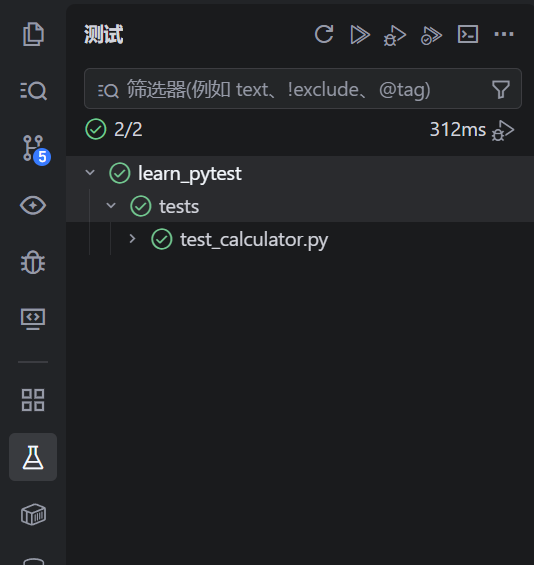
vscode支持pytest的可视化页面
ctrl+shift+p搜索

使用pytest.raises验证异常
1 | import pytest |
当你测试的函数应该在特定条件下抛出异常(比如传入非法参数、除零错误等),你可以用
pytest.raises 来验证:
“这段代码是否如预期那样,抛出了我们想要的异常?”
如果:
- ✅ 抛出了指定类型的异常 → 测试通过
- ❌ 没有抛出异常 → 测试失败
- ❌ 抛出了其他类型的异常 → 测试失败
@pytest.fixture提供测试参数
@pytest.fixture 是 pytest
中最核心、最强大的功能之一,它的作用是:
为测试函数提供可复用的、隔离的“测试依赖”(如对象、数据、资源、环境等),并管理它们的生命周期。
1 | #工厂函数 |
在 pytest 中,当测试函数(或另一个 fixture)的参数名与某个 fixture 的名称相同时,pytest 会自动调用该 fixture,并将其返回值传入测试函数。
这是 pytest 依赖注入机制的核心,也是 fixture 能“自动生效”的原因。
工厂函数(Factory Function) 是一种返回对象(通常是类的实例或其他函数)的函数,它的名字来源于“工厂模式”——就像工厂生产产品一样,这个函数“生产”对象。
scope 参数
1 | @pytest.fixture(scope="session") # 整个测试会话只启动一次 |
好处:避免创建多个实例
支持的作用域:
function(默认):每个测试函数class:每个测试类module:每个.py文件session:整个测试运行
自动管理资源生命周期
1 | pytest.fixture |