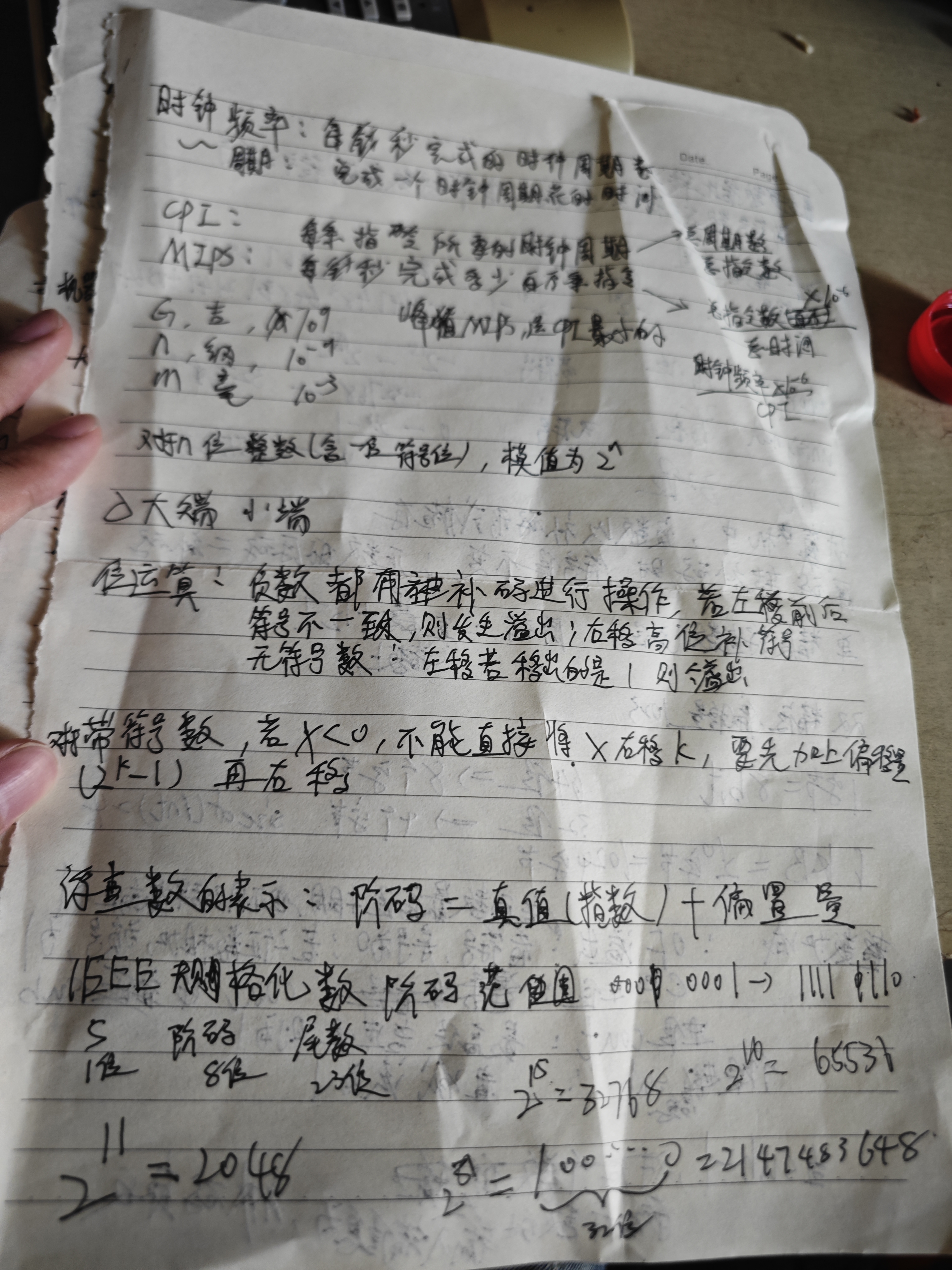
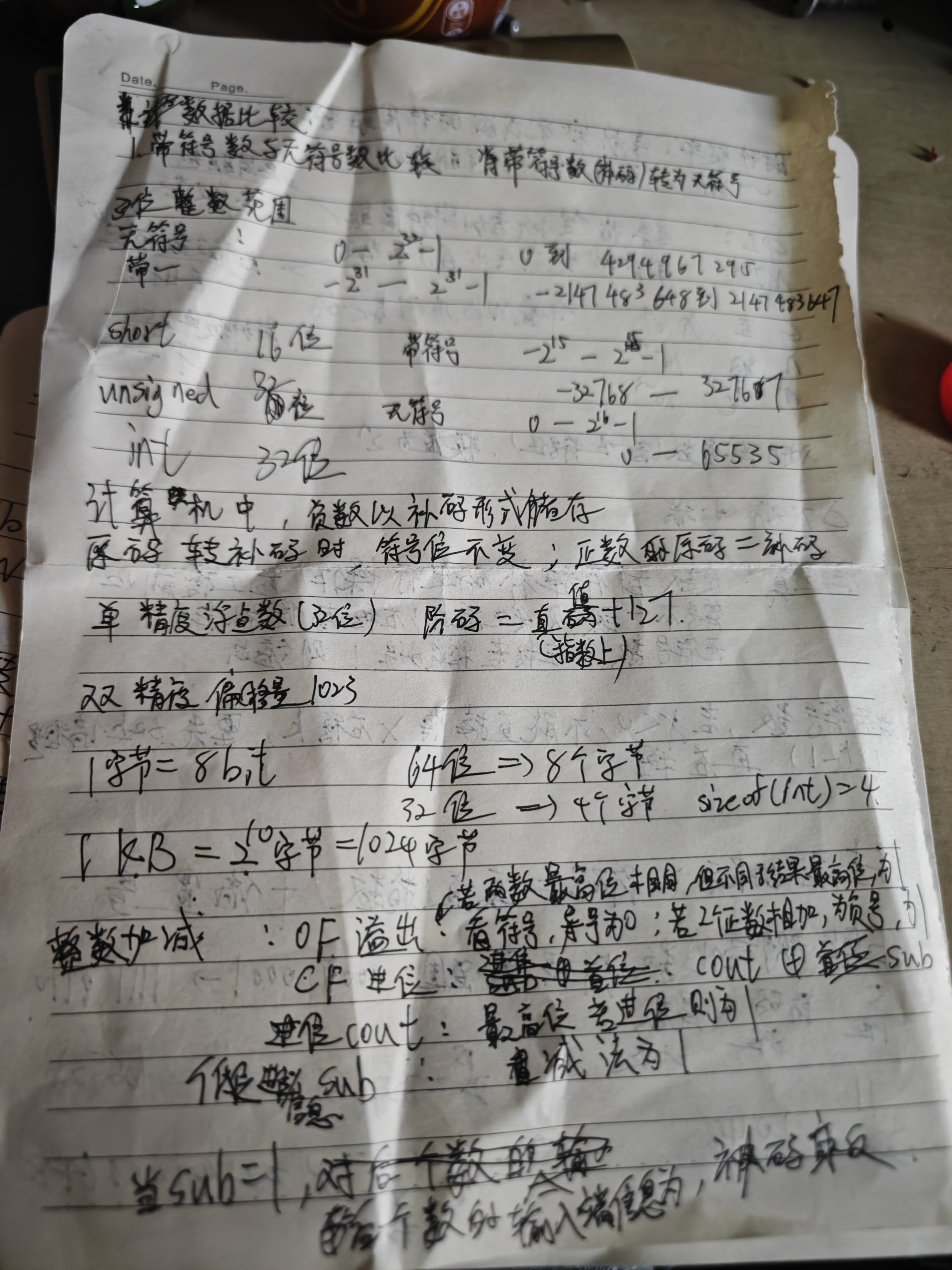
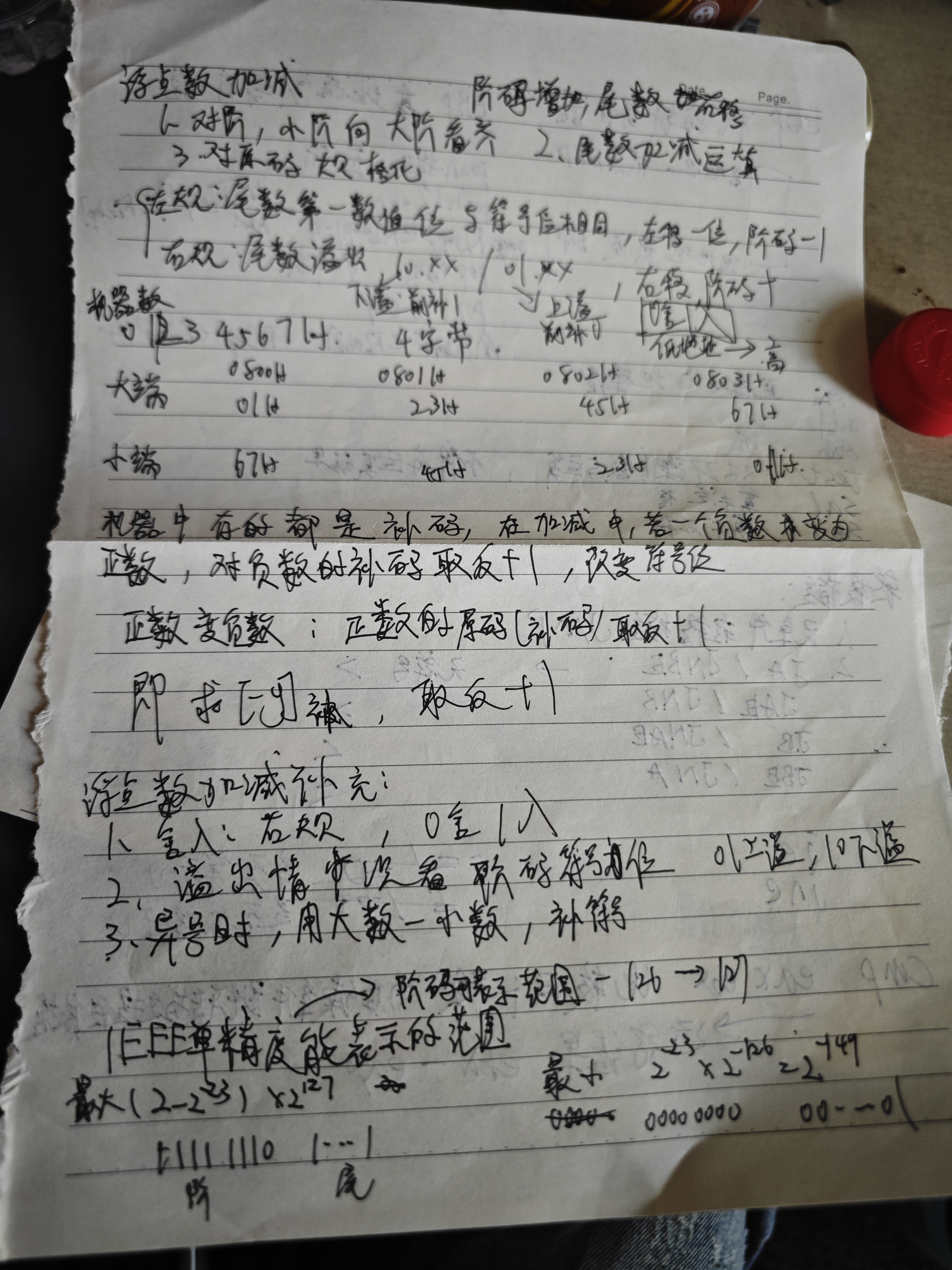
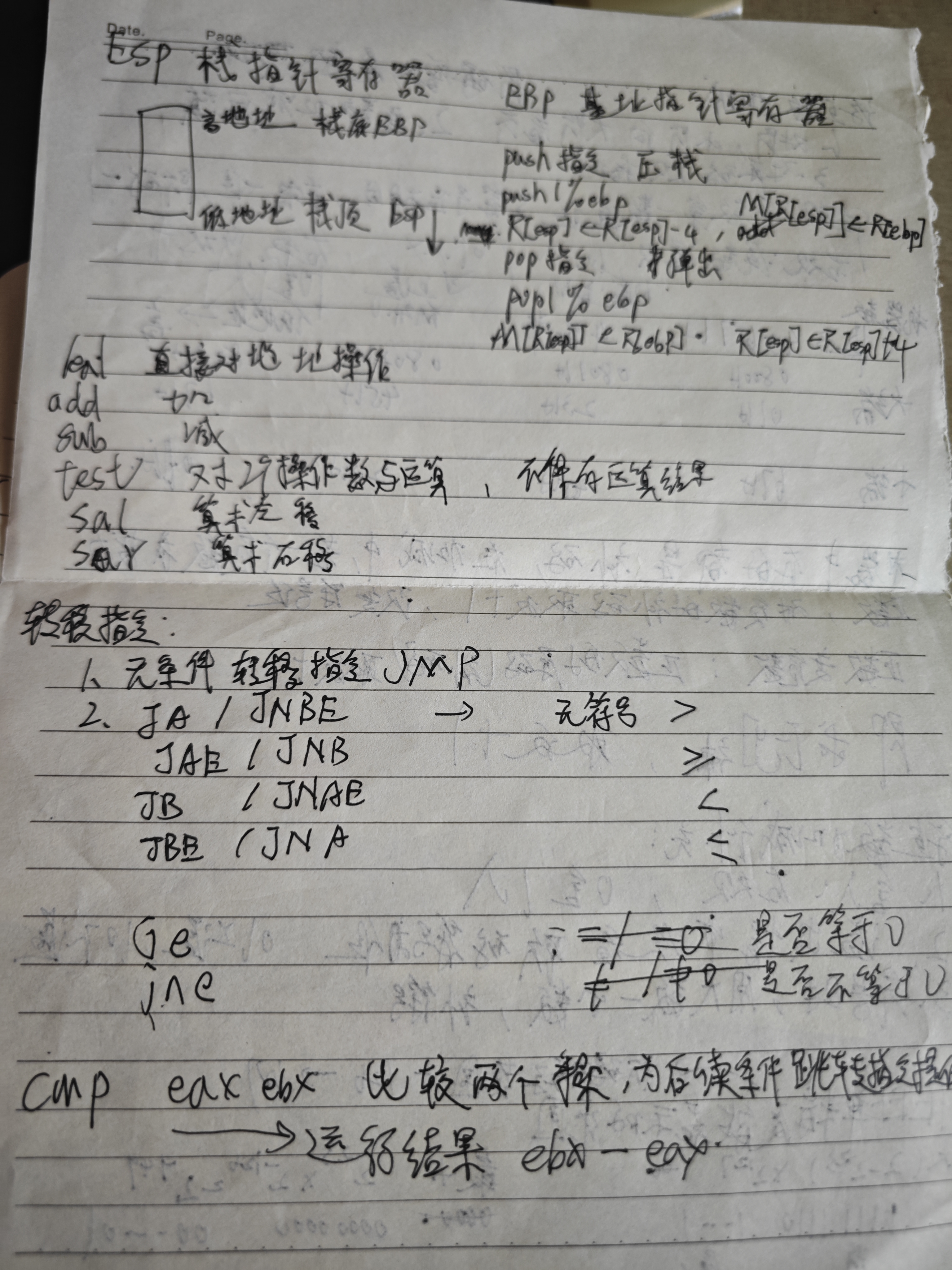
计算机系统基础期末笔记汇总
笔记

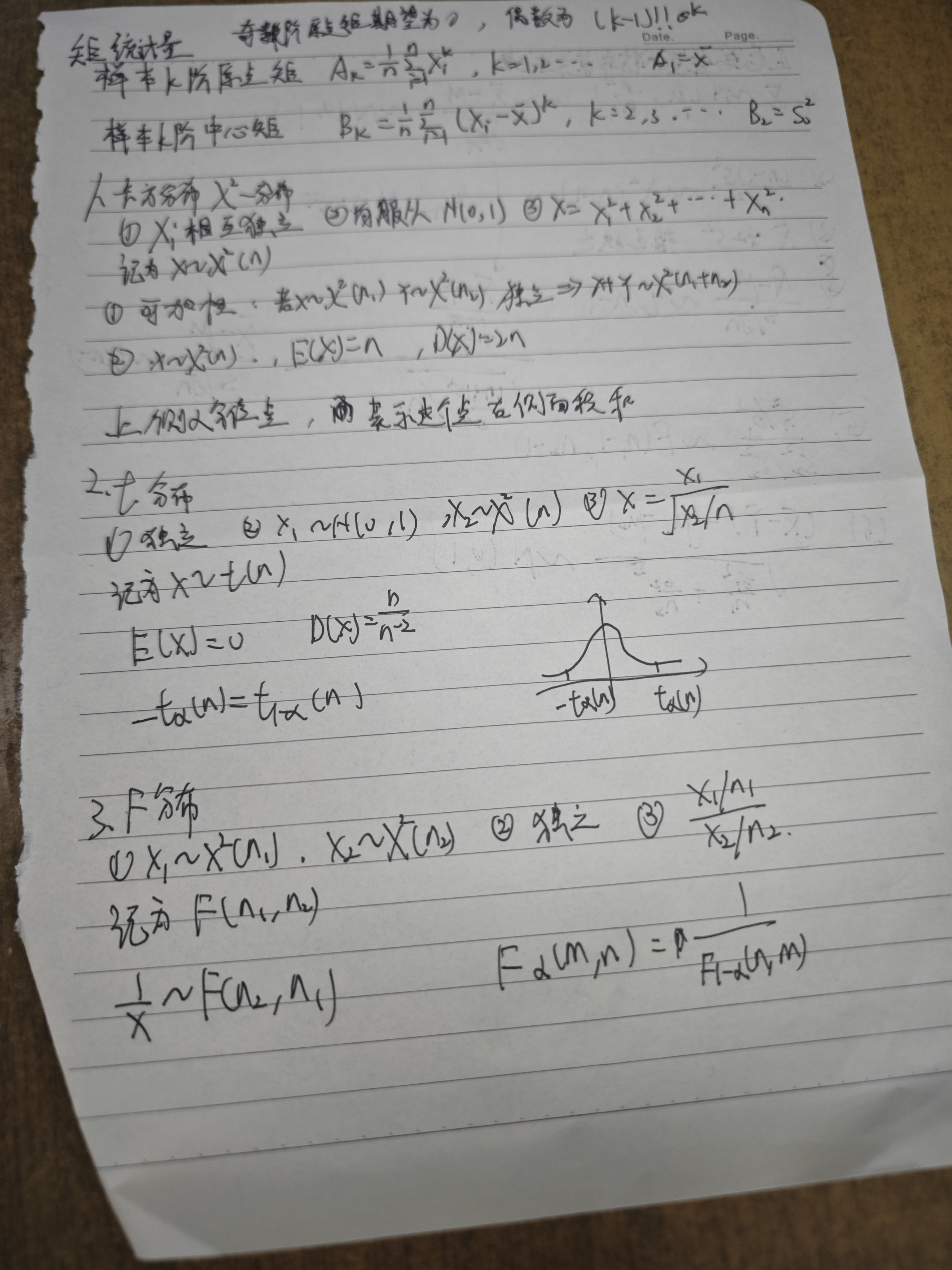
方差(Variance)和偏差(Bias)是机器学习中衡量模型性能的两个核心概念,它们共同构成了偏差-方差权衡(Bias-Variance Tradeoff)的基础框架。以下是两者的定义与区别:
1. 偏差(Bias)
2. 方差(Variance)
3. 如何降低偏差与方差
| 目标 | 方法 | 示例 |
|---|---|---|
| 降低偏差 | 增加模型复杂度(如更多特征、更深的神经网络)、减少正则化强度 | 使用多项式回归替代线性回归 |
| 降低方差 | 增加训练数据、引入正则化(L1/L2)、使用集成方法(如 Bagging、Boosting) | 随机森林(Bagging)降低决策树的方差 |
4. 总结
以下是关于监督学习与无监督学习的核心区别总结:
1. 监督学习(Supervised Learning)
任务类型:
-
分类(Classification):预测离散类别标签(如垃圾邮件/非垃圾邮件)。
-
回归(Regression):预测连续数值标签(如房价预测)。
特点:
- 需要带标签的样本(Labeled
Data),即每个训练样本都有明确的输入 $ x $ 和输出 $ y $。
- 模型通过学习输入与标签之间的映射关系进行预测。
2. 无监督学习(Unsupervised Learning)
任务类型:
特点:
- 仅需无标签的样本(Unlabeled
Data),无需预先定义输出目标。
- 模型自主挖掘数据内在结构或分布规律。
本质思想:寻找合适的参数使得「当前的样本情况发生的概率」最大。
又由于假设每一个样本相互独立(概率条件理想的情况下),因此可以用连乘的形式表示上述概率,当然由于概率较小导致连乘容易出现浮点数精度损失,因此尝尝采用取对数的方式来避免「下溢」问题。也就是所谓的「对数似然估计」方法。
在已知样本特征 $ $ 的条件下,选择分类结果 $ c_i $,使得分类的期望损失(Risk)最小。
**(1) 损失函数 $ _{ij} $**
(2) 条件风险(单个样本的期望损失)
对于给定样本 $ $,若将其分类为 $ c_i ,则其 * *条件风险 * *为:$ R(c_i | ) = {j=1}^N {ij} P(c_j | ) $$ - 含义:在已知 $ $ 的情况下,分类为 $ c_i $ 的平均损失。 - 推导: - $ P(c_j | ) $:样本 $ $ 真实属于 $ c_j $ 的后验概率。 - $ {ij} $:若真实类别是 $ c_j $,但被分到 $ c_i $,则产生损失 $ {ij} $。 - 因此,总期望损失是所有可能真实类别的加权和(权重为后验概率)。
(3) 总体风险
对于整个数据集,分类器 $ h() $ 的总体风险为: R(h) = 𝔼x[R(h(x)|x)] = ∫R(h(x)|x)p(x)dx - 含义:所有样本的平均条件风险。h为分类器(模型) - 目标:找到使 $ R(h) $ 最小的分类器 $ h() $。
根据上述定义,贝叶斯决策论的分类规则是: > 对于样本 $ $,选择使其条件风险 $ R(c_i | ) $ 最小的类别 $ c_i $ 作为预测结果。
即: $$ h^*(\mathbf{x}) = \arg\min_{c_i} R(c_i | \mathbf{x}) = \arg\min_{c_i} \sum_{j=1}^N \lambda_{ij} P(c_j | \mathbf{x}) $$
此时条件风险简化为: R(c_i | ) = {j i} P(c_j | ) = 1 - P(c_i | ) $$ 原因:概率之和为 1:$ {j=1}^N P(c_j | ) = 1 $,因此 $ _{j i} P(c_j | ) = 1 - P(c_i | ) $。
此时,最小化风险等价于最大化后验概率,即: h*(x) = arg maxciP(ci|x) 这正是传统贝叶斯分类器的决策规则。
即在x样本的情况下,分类正确的概率最大
后验概率(Posterior Probability)是贝叶斯理论中的核心概念,指的是在观察到新证据(数据)后,对事件发生概率的修正 。 其本质是:
“已知结果(数据),反推原因(类别或参数)的概率” 。
已知结果(数据)B,反推最可能的原因A(后验概率 P(A∣B) )
先验概率是贝叶斯统计中的核心概念,指的是在观察到新数据之前,对某一事件或假设的概率估计。它是基于已有知识、经验或假设得出的初始概率,后续会通过新数据更新为更准确的后验概率。
1. 核心定义
2. 直观理解
(1) 类比:医学诊断
| 模型类型 | 建模目标 | 数学表达 |
|---|---|---|
| 判别式模型 | 直接建模 $ P(c | ) $ |
| 生成式模型 | 先建模联合概率 $ P(, c) $,再推导 $ P(c | ) $ |
1. 判别式模型(Discriminative Model)
2. 生成式模型(Generative Model)
目标:先学习数据的生成过程,即联合概率 $ P(, c) $,再通过贝叶斯定理推导条件概率 $ P(c|) $。
数学步骤:
假设我们要判断一封邮件是否为垃圾邮件($ c=spam $ 或 $ ham $)。
判别式模型(逻辑回归)
直接建模: $$ P(spam|\mathbf{x}) = \frac{1}{1 + e^{-(w^T \mathbf{x} + b)}} $$ 若 $ P(spam|) > 0.5 $,则判定为垃圾邮件。
生成式模型(朴素贝叶斯)
根据概率论的基本定义: $$ P(c|\mathbf{x}) = \frac{P(\mathbf{x}, c)}{P(\mathbf{x})} $$ - 含义: - $ P(, c) $:联合概率,表示特征 $ $ 和类别 $ c $ 同时发生的概率。 - $ P() $:边缘概率(证据),表示特征 $ $ 出现的概率,用于归一化。
根据贝叶斯定理,联合概率 $ P(, c) $ 可以分解为: P(x, c) = P(c) ⋅ P(x|c) 其中: - $ P(c) $:类先验概率(Prior Probability),表示类别 $ c $ 在数据中的整体占比。 - $ P(|c) $:似然度(Likelihood),表示在类别 $ c $ 下,特征 $ $ 出现的概率。
将上述分解代入条件概率公式,得到: $$ P(c|\mathbf{x}) = \frac{P(c) \cdot P(\mathbf{x}|c)}{P(\mathbf{x})} $$ 产生问题:
在贝叶斯分类中,需要计算联合概率 P(x∣c) ,即在类别 c 下,特征向量 x=(x1,x2,…,*x**d) 的条件概率。 若直接建模联合概率,需估计 d* 个特征的所有可能组合的概率。例如:
举例:
结果 : 在高维空间中,训练数据无法覆盖所有可能的特征组合,导致模型无法可靠估计联合概率 P(x∣c) 。
因此产生属性条件独立性假设
朴素贝叶斯分类器的核心思想是通过贝叶斯定理和属性条件独立性假设来简化计算,从而高效地进行分类。
朴素贝叶斯的核心假设是:在已知类别 $ c $
的条件下,所有属性(特征)之间相互独立。
因此,联合概率 $ P(|c) $ 可以分解为各属性独立概率的乘积: $$
P(\mathbf{x}|c) = \prod_{i=1}^d P(x_i|c)
$$ 其中 $ d $ 是特征的数量,$ x_i $ 是第 $ i $ 个特征的取值。
将此代入贝叶斯公式: $$ P(c|\mathbf{x}) = \frac{P(c) \cdot \prod_{i=1}^d P(x_i|c)}{P(\mathbf{x})} $$
在分类任务中,我们的目标是比较不同类别 $ c $ 的后验概率 $ P(c|) $,并选择最大值。由于 $ P() $ 对所有类别来说是相同的常量(与类别无关),因此在最大化过程中可以忽略: $$ \arg\max_{c} P(c|\mathbf{x}) = \arg\max_{c} \left[ \frac{P(c) \cdot \prod_{i=1}^d P(x_i|c)}{P(\mathbf{x})} \right] = \arg\max_{c} \left[ P(c) \cdot \prod_{i=1}^d P(x_i|c) \right] $$ 这就是公式中 $ P() $ 被省略的原因。
在比较的过程中,分母相同,可以忽略
简化后的决策规则为: $$ h_{nb}(\mathbf{x}) = \arg\max_{c} \left[ P(c) \cdot \prod_{i=1}^d P(x_i|c) \right] $$ 即: - 计算每个类别的先验概率 $ P(c) $。 - 计算每个特征在该类别下的条件概率 $ P(x_i|c) $。 - 将这些概率相乘,选择乘积最大的类别作为预测结果。
基于大数定律 $$ P(c) = \frac{|D_c|}{|D|} $$ - 符号含义: - $ D $:训练集,包含所有样本。 - $ D_c $:训练集中类别为 $ c $ 的样本子集。 - $ |D_c| $:类别 $ c $ 的样本数量。 - $ |D| $:训练集总样本数量。
在生成式模型(如朴素贝叶斯分类器)中,条件概率 $ P(x_i | c) $ 表示在类别 $ c $ 下,第 $ i $ 个属性取值为 $ x_i $ 的概率。根据属性类型(离散或连续),其估计方法不同:
1. 离散属性的条件概率估计
公式: $$ P(x_i | c) = \frac{|D_{c,x_i}|}{|D_c|} $$ - 符号含义: - $ D_c $:训练集中类别为 $ c $ 的样本集合。 - $ D_{c,x_i} : D_c $ 中第 $ i $ 个属性取值为 $ x_i $ 的样本子集。 - $ |D_{c,x_i}| : D_{c,x_i} $ 的样本数量。 - $ |D_c| $:类别 $ c $ 的总样本数量。
直观解释:
注意事项:
2. 连续属性的条件概率估计
假设:属性服从正态分布(高斯分布) $$ p(x_i | c) = \frac{1}{\sqrt{2\pi}\sigma_{c,i}} \exp\left( -\frac{(x_i - \mu_{c,i})^2}{2\sigma_{c,i}^2} \right) $$ - 符号含义: - $ {c,i} $:类别 $ c $ 在第 $ i $ 个属性上的均值。 - $ {c,i}^2 $:类别 $ c $ 在第 $ i $ 个属性上的方差。
直观解释:
注意事项:
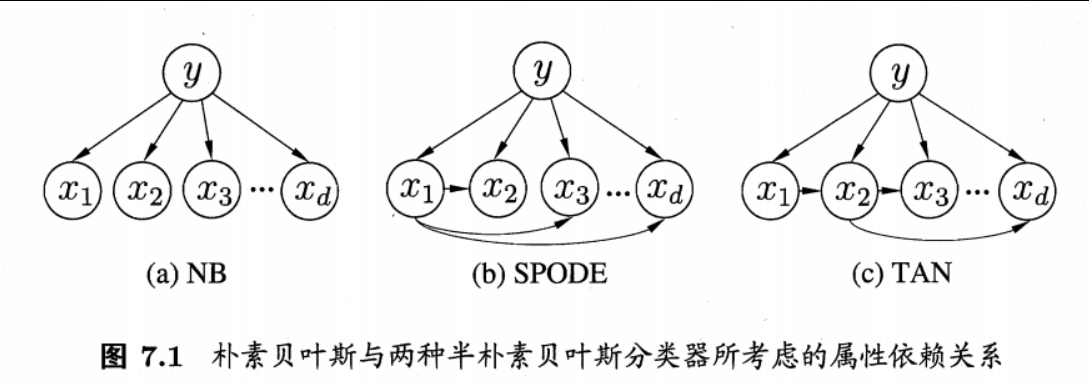
半朴素贝叶斯分类器是对传统朴素贝叶斯的改进,它在保留计算效率的同时,适当引入部分属性间的依赖关系,从而在分类性能和计算复杂度之间取得平衡。
(1) 定义
独依赖估计(One-Dependent Estimator, ODE)是半朴素贝叶斯的一种实现方式,其核心假设是: > 每个属性 $ x_i $ 在类别 $ c $ 之外最多依赖于一个其他属性(称为父属性 $ pa_i $)。
数学表达式为: $$ P(c|\mathbf{x}) \propto P(c) \prod_{i=1}^d P(x_i | c, pa_i) $$ 其中: - $ pa_i $:属性 $ x_i $ 的父属性(依赖的单一属性)。 - $ P(x_i | c, pa_i) $:在类别 $ c $ 和父属性 $ pa_i $ 下,属性 $ x_i $ 的条件概率。
(2) 直观理解
超父独依赖估计(Super Parent One-Dependent Estimator, SPODE)是半朴素贝叶斯分类器的一种扩展,其核心思想是: > 所有属性都依赖于同一个“超父”属性 $ x_i $,从而在保留部分依赖关系的同时避免完全联合概率的计算。
(1) 贝叶斯定理展开 $$ P(c|\mathbf{x}) = \frac{P(\mathbf{x}, c)}{P(\mathbf{x})} $$ 其中: - $ P(, c) $:联合概率,表示特征 $ $ 和类别 $ c $ 同时发生的概率。 - $ P() $:证据(归一化因子)。
(2) 引入“超父”属性 $ x_i $
假设所有属性 $ x_j (j i) $ 在类别 $ c $ 下仅依赖于 $ x_i ,则:$ P(, c) = P(c, x_i) P(x_1, , x_{i-1}, x_{i+1}, , x_d | c, x_i) 进一步分解为: P(, c) = P(c, x_i) _{j i} P(x_j | c, x_i) $$
(3) 最终形式
由于 $ P() $ 对所有类别相同,可忽略,最终决策规则为: $$ P(c|\mathbf{x}) \propto P(c, x_i) \cdot \prod_{j=1}^d P(x_j | c, x_i) $$ 其中: - $ P(c, x_i) $:类别 $ c $ 和属性 $ x_i $ 的联合概率。 - $ P(x_j | c, x_i) $:在类别 $ c $ 和 $ x_i $ 的条件下,属性 $ x_j $ 的概率。
TAN(Tree-Augmented Naive Bayes)是半朴素贝叶斯分类器的一种扩展,旨在通过引入属性间的树状依赖关系,在保留计算效率的同时,显著提升分类性能。它结合了贝叶斯网络的建模能力和生成式模型的概率推理优势。
1. 核心思想
TAN 的核心假设是: > 所有属性(特征)在类别 $ c $ 的基础上,形成一个以属性为节点的树状依赖结构,即每个属性最多依赖一个其他属性(父属性),且整个依赖图是一棵无环的树。
数学表达: $$ P(c|\mathbf{x}) \propto P(c) \cdot \prod_{i=1}^d P(x_i | c, pa_i) $$ 其中: - $ pa_i $:属性 $ x_i $ 的父属性(依赖的单一属性)。 - $ P(x_i | c, pa_i) $:在类别 $ c $ 和父属性 $ pa_i $ 的条件下,属性 $ x_i $ 的条件概率。
2. TAN 的构建步骤
TAN 通过以下步骤构建属性间的依赖结构:
(1) 计算互信息(Mutual Information)
互信息衡量两个属性之间的相关性: $$ I(x_i, x_j) = \sum_{x_i, x_j} P(x_i, x_j) \log \frac{P(x_i, x_j)}{P(x_i)P(x_j)} $$ - 含义:互信息越大,两个属性之间的依赖关系越强。
(2) 构建带权图
(3) 最大带权生成树(Maximum Weight Spanning Tree, MWST)
使用克鲁斯卡尔(Kruskal)算法或普里姆(Prim)算法,选择一棵连接所有属性节点的树,使得: - 树的边权重(互信息)总和最大。 - 树中无环。
(4) 确定依赖方向
待学习
EM算法(Expectation-Maximization Algorithm)是一种迭代优化算法,用于处理含有隐变量(Hidden Variables)或缺失数据的概率模型参数估计问题。它的核心思想是通过交替执行期望(E)步和最大化(M)步,逐步逼近模型参数的最大似然估计。
(1) 什么是隐变量?
隐变量(Latent Variables)是模型中不可观测但影响观测数据的变量。例如: - 混合高斯模型(GMM):每个样本属于哪个高斯分布是隐变量。 - 聚类任务:样本所属的聚类标签是隐变量。
(2) 问题挑战
当存在隐变量时,直接最大化似然函数变得困难。例如: log P(x|θ) = log ∑zP(x, z|θ) 其中 $ z $ 是隐变量,$ $ 是模型参数。由于对数中包含求和,直接求导无法分离参数。
(3) EM算法的解决方案
EM算法通过以下步骤迭代求解: 1. E步(期望):用当前参数估计隐变量的后验分布(即“责任”分配)。 2. M步(最大化):基于隐变量的后验分布,最大化期望似然函数以更新参数。
(1) 初始化参数
选择初始参数 $ ^{(0)} $,例如随机初始化或通过启发式方法设定。
(2) E步:计算隐变量后验分布
给定当前参数 $ ^{(t)} $,计算隐变量 $ z $ 的后验概率: Q(t)(z) = P(z|x, θ(t)) 这一步为每个样本分配隐变量的概率分布(如样本属于某个聚类的概率)。
(3) M步:最大化期望似然
基于 $ Q^{(t)}(z) ,构造期望似然函数并最大化:$ ^{(t+1)} = _{} _z Q^{(t)}(z) P(, z|) $$ 这一步更新参数 $ $,使得期望似然最大。
(4) 收敛判断
重复E步和M步直到参数收敛(如 $ |^{(t+1)} - ^{(t)}| < $)或达到最大迭代次数。
假设数据由多个高斯分布生成,但不知道每个样本属于哪个分布。
(1) 模型定义
(2) E步:计算责任分配
对于每个样本 $ x_i $ 和类别 $ k ,计算责任(responsibility):$ _{ik}^{(t)} = P(z_i=k|x_i, ^{(t)}) = $$ 含义:在当前参数下,样本 $ x_i $ 属于类别 $ k $ 的概率。
(3) M步:更新参数
根据责任 $ _{ik} $ 更新参数: - 均值更新: $$ \mu_k^{(t+1)} = \frac{\sum_{i=1}^N \gamma_{ik}^{(t)} x_i}{\sum_{i=1}^N \gamma_{ik}^{(t)}} $$ - 协方差更新: $$ \Sigma_k^{(t+1)} = \frac{\sum_{i=1}^N \gamma_{ik}^{(t)} (x_i - \mu_k^{(t+1)})(x_i - \mu_k^{(t+1)})^T}{\sum_{i=1}^N \gamma_{ik}^{(t)}} $$ - 权重更新: $$ \pi_k^{(t+1)} = \frac{\sum_{i=1}^N \gamma_{ik}^{(t)}}{N} $$
(4) 迭代终止
当参数变化小于阈值或达到最大迭代次数时停止。
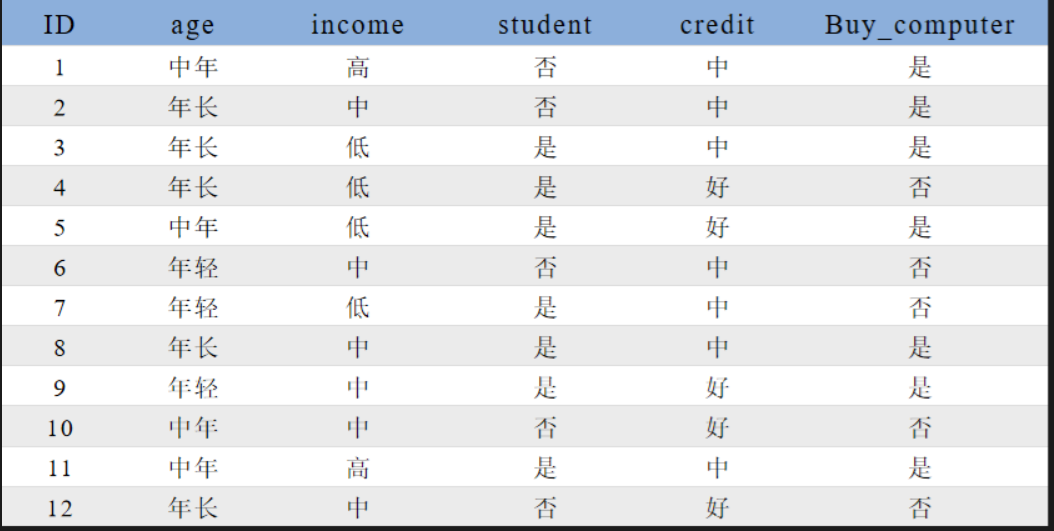
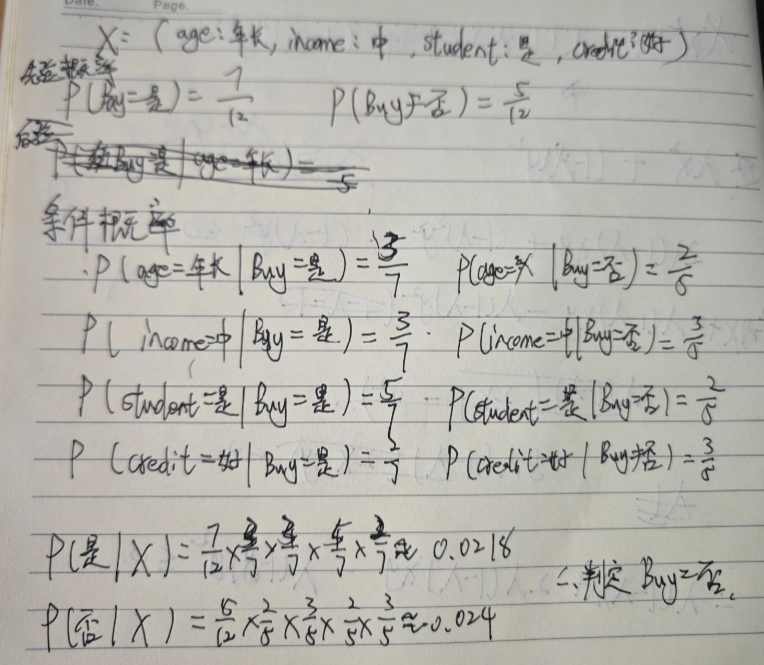
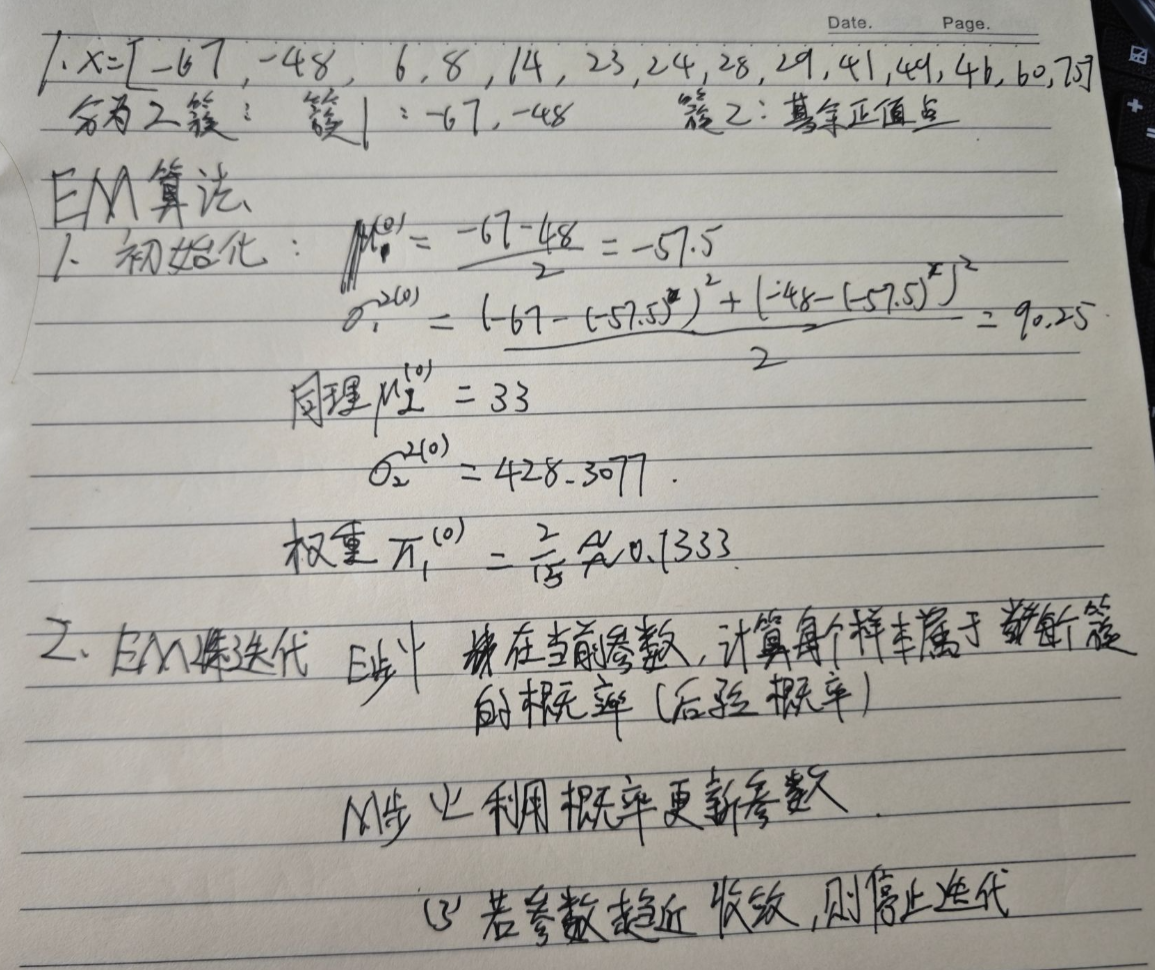
已知观测数据-67,-48,6,8,14,16,23,24,28,29,41,49,56,60,75,试估计两个分量的高斯混合模型的5个参数。
1 | from sklearn.mixture import GaussianMixture |
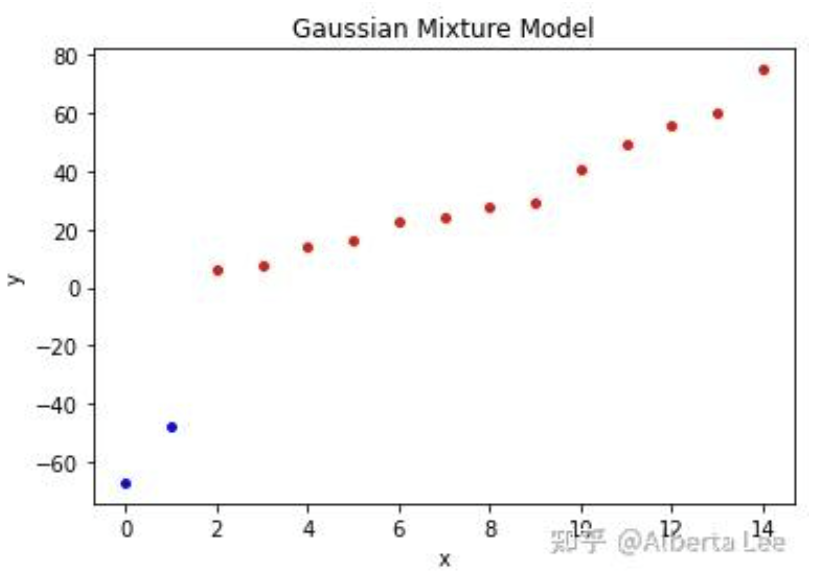
1 | # means = [[ 32.98489643 -57.51107027]] |
简要阐述下EM算法的原理,并给出EM算法对高斯混合模型GMM进行求解的具体过程。
EM算法(期望最大化算法)是一种用于含有隐变量的概率模型参数估计的迭代优化方法。其核心思想是通过交替执行两个步骤来最大化观测数据的似然函数:
EM算法通过不断优化似然函数的下界,最终收敛到局部最优解。以下具体阐述EM算法对高斯混合模型(GMM)的求解过程。
1. GMM模型定义
GMM假设数据由 $ K $ 个高斯分布线性组合生成,其概率密度函数为: $$ p(\mathbf{x}|\theta) = \sum_{k=1}^K \alpha_k \cdot \mathcal{N}(\mathbf{x}|\mu_k, \Sigma_k) $$ 其中: - $ k $:第 $ k $ 个高斯分布的权重($ {k=1}^K _k = 1 $)。 - $ _k $:第 $ k $ 个高斯分布的均值向量。 - $ _k $:第 $ k $ 个高斯分布的协方差矩阵。 - $ = {_k, _k, k}{k=1}^K $:模型参数。
隐变量 $ z_i {1,,K} $ 表示样本 $ _i $ 的类别标签(未知)。
2. EM算法步骤
(1) 初始化参数
随机或通过K-means初始化: - 每个高斯分布的均值 $ _k^{(0)} $、协方差 $ _k^{(0)} $、权重 $ _k^{(0)} $。
(2) 迭代优化(E步与M步)
E步:计算责任(后验概率) 对每个样本 xi 和每个簇 $ k $,计算其属于第 $ k $ 个高斯分布的后验概率 $$ \gamma(z_{ik}) = \frac{\alpha_k \cdot \mathcal{N}(\mathbf{x}_i | \mu_k, \Sigma_k)}{\sum_{j=1}^K \alpha_j \cdot \mathcal{N}(\mathbf{x}_i | \mu_j, \Sigma_j)} $$ 此概率表示在当前参数下,样本 $ _i $ 属于第 $ k $ 个高斯分布的“责任”。
M步:更新参数
基于责任 $ (z_{ik}) $,最大化完全数据似然函数的期望,更新参数:
(3) 收敛判断
计算对数似然函数: $$ \log p(\mathbf{X}|\theta) = \sum_{i=1}^N \log \left( \sum_{k=1}^K \alpha_k \cdot \mathcal{N}(\mathbf{x}_i|\mu_k, \Sigma_k) \right) $$ 若对数似然的变化量小于阈值或达到最大迭代次数,则停止;否则重复E步和M步。。
[5分钟学算法] #06 EM算法 你到底是哪个班级的_哔哩哔哩_bilibili
集成学习(Ensemble Learning)通过构建并结合多个学习器(基模型)来完成学习任务,其核心思想是“优而不同”,即通过多个弱学习器的协作提升整体性能,通常能获得比单一学习器更优的泛化能力 。

在上图的集成模型中,若个体学习器都属于同一类别,例如都是决策树或都是神经网络,则称该集成为同质的(homogeneous);若个体学习器包含多种类型的学习算法,例如既有决策树又有神经网络,则称该集成为异质的(heterogenous)。
同质集成:个体学习器称为“基学习器”(base learner),对应的学习算法为“基学习算法”(base learning algorithm)。
异质集成:个体学习器称为“组件学习器”(component learner)或直称为“个体学习器”。
集成学习的两个重要概念:准确性和多样性(diversity)。准确性指的是个体学习器不能太差,要有一定的准确度;多样性则是个体学习器之间的输出要具有差异性。
通过下面的这三个例子可以很容易看出这一点,准确度较高,差异度也较高,可以较好地提升集成性能。
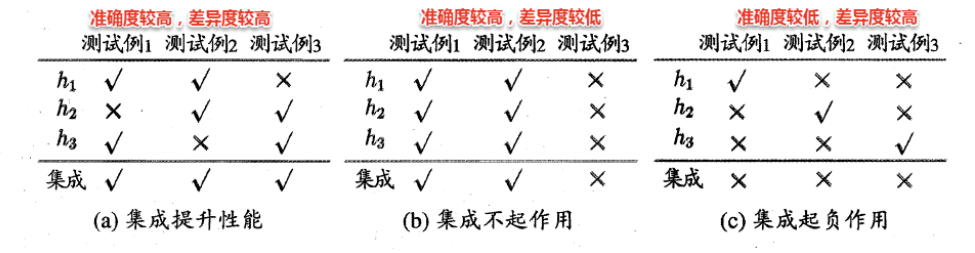
集成策略:如何结合多个基模型的预测结果,例如:
公式解析 $$ P(H(\boldsymbol{x}) \neq f(\boldsymbol{x})) = \sum_{k=0}^{\lfloor T/2 \rfloor} \binom{T}{k} (1-\epsilon)^k \epsilon^{T-k} \leq \exp\left(-\frac{1}{2} T (1 - 2\epsilon)^2\right) $$
1. 公式含义
2. 推导思路
两个基本结论
1. 收敛速率随个体学习器数量 T 指数下降
2. ϵ = 0.5 的个体学习器对收敛没有作用
根据个体学习器的生成方式,目前集成学习可分为两类,代表作如下:
Boosting是一种串行的工作机制,即个体学习器的训练存在依赖关系,必须一步一步序列化进行。
其基本思想是:增加前一个基学习器在训练过程中预测错误样本的权重,使得后续基学习器更加关注这些打标错误的训练样本,尽可能纠正这些错误,然后基于调整后的样本分布训练下一个基学习器,如此重复,一直向下串行直至产生需要的T个基学习器,Boosting最终对这T个学习器进行加权结合,产生学习器委员会。
Boosting族算法最著名、使用最为广泛的就是AdaBoost,因此下面主要是对AdaBoost算法进行介绍。
AdaBoost使用的是指数损失函数,因此AdaBoost的权值与样本分布的更新都是围绕着最小化指数损失函数进行的。
看到这里回想一下之前的机器学习算法,不难发现机器学习的大部分带参模型只是改变了最优化目标中的损失函数:如果是Square loss,那就是最小二乘了;如果是Hinge Loss,那就是著名的SVM了;如果是log-Loss,那就是Logistic Regression了。
$$ H(\boldsymbol{x}) = \sum_{t=1}^T \alpha_t h_t(\boldsymbol{x}) $$ ℓexp(H|𝒟) = 𝔼x ∼ 𝒟[e−f(x)H(x)]
1. 符号含义
2. 指数损失函数的意义
指数损失函数的形式为: ℓexp(H|𝒟) = 𝔼x ∼ 𝒟[e−f(x)H(x)] - 直观解释: - 当 H(x) 与 f(x) 同号时(预测正确),指数项 e−f(x)H(x) 接近 0,损失小。 - 当 H(x) 与 f(x) 异号时(预测错误),指数项趋近于正无穷,损失极大。 - 因此,该损失函数对错误样本的惩罚非常严格,迫使模型优先修正错误。
AdaBoost的目标是选择基学习器 ht 和权重 αt,使得集成模型 H(x) 能够最小化指数损失函数: $$ \min_{\alpha_1, h_1, \dots, \alpha_T, h_T} \mathbb{E}_{\boldsymbol{x} \sim \mathcal{D}} \left[ e^{-f(\boldsymbol{x}) \sum_{t=1}^T \alpha_t h_t(\boldsymbol{x})} \right] $$
优化策略
AdaBoost采用前向分步算法(Forward Stagewise Algorithm),逐轮迭代优化: 1. 初始化样本权重:初始时所有样本权重相等。 2. 训练基学习器 ht:在当前样本权重分布下,训练一个弱学习器 ht。 3. 计算权重 αt:根据 ht 的错误率 ϵt 计算其权重: $$ \alpha_t = \frac{1}{2} \ln \left( \frac{1 - \epsilon_t}{\epsilon_t} \right) $$ 4. 更新样本权重:提高被 ht 错分类样本的权重,降低正确分类样本的权重。 5. 重复步骤 2-4,直到训练完成 T 轮。
假设一个二分类任务,真实标签 f(x) ∈ {−1, +1},集成模型预测值 $H(\boldsymbol{x}) = \sum_{t=1}^T \alpha_t h_t(\boldsymbol{x})$: - 若 H(x) > 0,预测为 +1; - 若 H(x) < 0,预测为 −1。
此时,指数损失函数的值反映了模型对错误样本的惩罚程度: - 正确预测时,e−f(x)H(x) ≈ 0; - 错误预测时,e−f(x)H(x) ≫ 1。
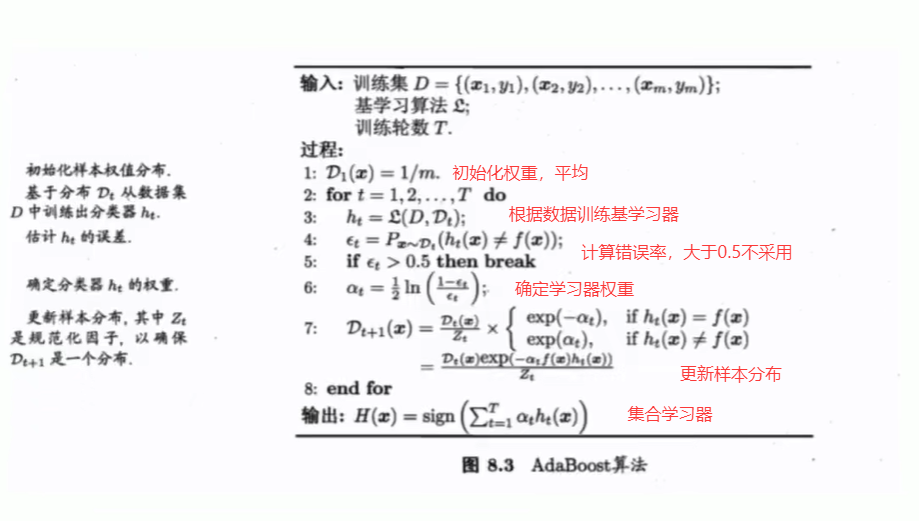
在集成学习中,Boosting 算法的核心在于动态调整样本权重 ,以逐步聚焦难分类样本。Boosting 主要通过两种方法实现样本权重的更新:重赋权法(re-weighting) 和 重采样法(re-sampling) 。
重赋权法 : 对每个样本附加一个权重,这时涉及到样本属性与标签的计算,都需要乘上一个权值。 重采样法 : 对于一些无法接受带权样本的及学习算法,适合用“重采样法”进行处理。方法大致过程是,根据各个样本的权重,对训练数据进行重采样,初始时样本权重一样,每个样本被采样到的概率一致,每次从N个原始的训练样本中按照权重有放回采样N个样本作为训练集,然后计算训练集错误率,然后调整权重,重复采样,集成多个基学习器。
从偏差-方差分解来看:Boosting算法主要关注于降低偏差,每轮的迭代都关注于训练过程中预测错误的样本,因此Boosting能基于泛化性能相当弱的学习器构建出很强的集成学习器。
任务分为分类,回归,聚类,降维等,而分类中还分为二分类和多分类
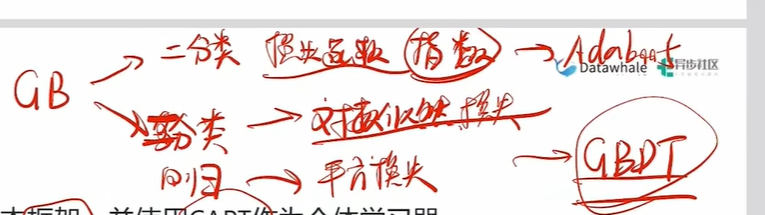
从AdaBoost的算法流程来看,标准的AdaBoost只适用于二分类问题。
通过改造AdaBoost对样本分类的限制和损失函数,可以实现多分类或回归问题,这样改造出来的算法框架成为Gradient Boosting
1. GBDT 的核心思想
GBDT 是基于梯度提升(Gradient Boosting)框架的集成学习方法,其特点包括: - 基学习器:使用CART(分类与回归树)作为个体学习器。 - 损失函数: - 回归问题:平方损失(Squared Loss): err(Ht(x), f(x)) = (Ht(x) − f(x))2 - 二分类问题:对数似然损失(Log-Likelihood Loss,类似逻辑回归): err(Ht(x), f(x)) = log (1 + exp (−f(x)Ht(x))) - 多分类问题:扩展为多分类对数损失。
2. XGBoost 的定位
XGBoost(eXtreme Gradient Boosting)是 GBDT 的一种高效实现和改进,类似于 LIBSVM 对 SVM 的优化关系。其核心目标是: - 提升训练速度:通过并行计算、内存优化等工程技巧。 - 增强模型性能:引入正则化项、缺失值处理、自适应学习率等改进。
XGBoost即eXtremeGradient Boosting的缩写,XGBoost与GBDT的关系可以类比为 LIBSVM和SVM的关系,即XGBoOst是GBDT的一种高效实现和改进。
它并非一个全新的算法框架,而是对标准 GBDT 进行了大量的工程优化和算法增强。
Bagging是一种并行式的集成学习方法,即基学习器的训练之间没有前后顺序可以同时进行
Bagging使用“有放回”采样的方式选取训练集,对于包含m个样本的训练集,进行m次有放回的随机采样操作,从而得到m个样本的采样集,这样训练集中有接近36.8%的样本没有被采到,可用作验证集来对泛化性能进行“包外估计”(out-of-bag estimate)。
按照相同的方式重复进行,我们就可以采集到T个包含m个样本的数据集,从而训练出T个基学习器,最终对这T个基学习器的输出进行结合。
Boosting算法一大特点是串行,这样诚然可以降低模型的偏差,增强拟合能力,但是当数据过大时,一大缺点就是会降低学习效率
Bagging作为并行式的集成学习方法,通过综合多个基学习器的结果,可以增加学习效率
二者差异性:
1.对目标的拟合程度:Boosting对目标有更好的拟合能力(偏差小);Bagging则偏差相对大一些
2.运行效率:由于并行的特点,Bagging的运行效率是大于Boosting的
3.泛化能力:由于Bagging每个学习器不会受其他学习器的影响,泛化能力(方差大)相对于Boosting
更好
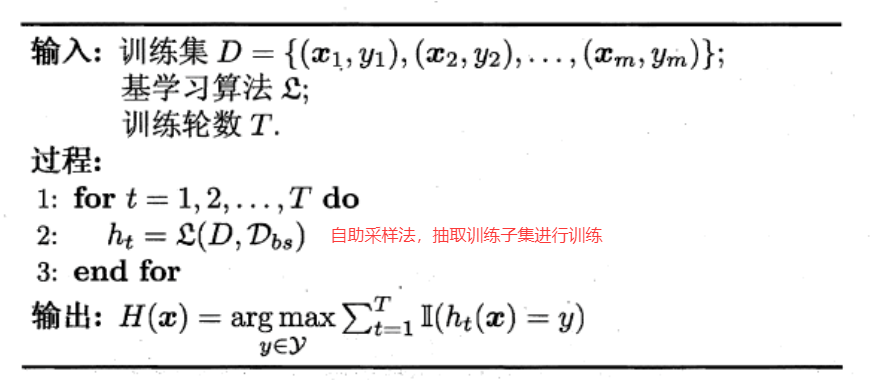
可以看出Bagging主要通过样本的扰动来增加基学习器之间的多样性,因此Bagging的基学习器应为那些对训练集十分敏感的不稳定学习算法,例如:神经网络与决策树等。
从偏差-方差分解来看,Bagging算法主要关注于降低方差,即通过多次重复训练提高稳定性。
不同于AdaBoost的是,Bagging可以十分简单地移植到多分类、回归等问题。总的说起来则是:AdaBoost关注于降低偏差,而Bagging关注于降低方差。
在机器学习中,自助采样法(Bootstrap Sampling) 是 Bagging 算法的核心技术之一。其核心思想是从原始数据集中有放回地随机抽取样本,形成新的训练子集。这一过程的一个重要数学性质是:当样本量 n 趋近于无穷大时,每个样本在 Bootstrap 样本集中未被抽中的概率趋近于 $\frac{1}{e} \approx 36.6\%$。以下是详细解析:
1. 公式推导
假设我们从 n 个样本中有放回地抽取 n 次,形成一个 Bootstrap 样本集。对于任意一个特定样本(如第 i 个样本),它在某次抽样中未被选中的概率为: $$ 1 - \frac{1}{n} $$ 因此,它在整个 n 次抽样中从未被选中的概率为: $$ \left(1 - \frac{1}{n}\right)^n $$ 当 n → ∞ 时,该概率的极限为: $$ \lim_{n \to \infty} \left(1 - \frac{1}{n}\right)^n = \frac{1}{e} \approx 0.3679 \quad (\text{即 } 36.6\%) $$ 在每次 Bootstrap 采样中,约有 36.6% 的样本未被选中 ,这些样本称为 Out-of-Bag(OOB,包外估计)样本 。
2. OOB 样本的应用
在 Bagging 算法中,OOB 样本具有以下重要作用: 1.
无偏验证:
每个基学习器的训练数据不包含其对应的 OOB
样本,因此可以用这些样本直接评估模型性能(即 OOB
误差),无需额外的交叉验证。 2. 特征重要性评估:
在随机森林中,通过比较 OOB
样本在打乱某个特征后的预测误差变化,可以衡量该特征的重要性。
3. 与其他采样方法的对比
| 采样方法 | 是否放回 | 样本覆盖范围 | 典型应用场景 |
|---|---|---|---|
| Bootstrap 采样 | 是 | 约 63.4% 样本被重复使用 | Bagging、随机森林 |
| 简单随机采样 | 否 | 所有样本唯一出现 | 传统交叉验证 |
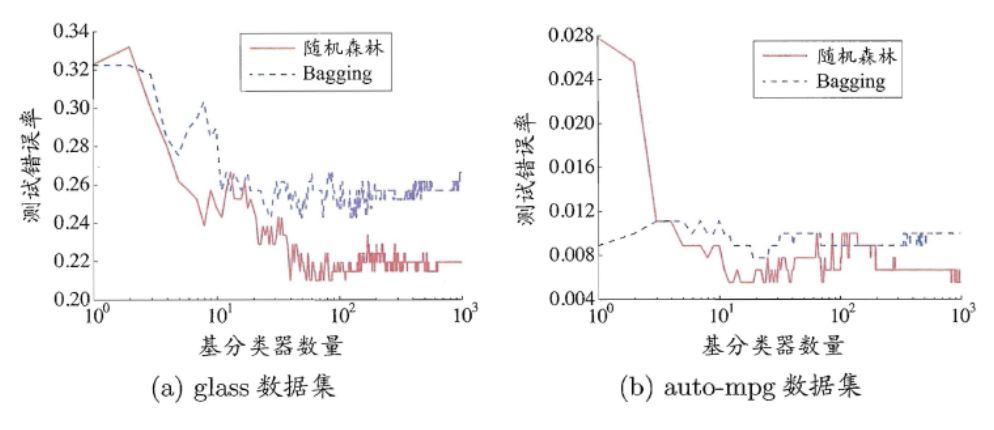
随机森林(Random Forest)是Bagging的一个拓展体,它的基学习器固定为决策树,多棵树也就组成了森林,而“随机”则在于选择划分属性的随机,随机森林在训练基学习器时,也采用有放回采样的方式添加样本扰动,同时它还引入了一种属性扰动,即在基决策树的训练过程中,在选择划分属性时,RF先从候选属性集中随机挑选出一个包含K个属性的子集,再从这个子集中选择最优划分属性 。
这样随机森林中基学习器的多样性不仅来自样本扰动,还来自属性扰动,从而进一步提升了基学习器之间的差异度。相比决策树的Bagging集成,随机森林的起始性能较差(由于属性扰动,基决策树的准确度有所下降),但随着基学习器数目的增多,随机森林往往会收敛到更低的泛化误差。同时不同于Bagging中决策树从所有属性集中选择最优划分属性,随机森林只在属性集的一个子集中选择划分属性,因此训练效率更高。
在集成学习中,结合策略是将多个基学习器的输出整合为最终预测结果的关键步骤。以下是针对回归和分类问题的不同结合策略及其核心要点:
定义:在训练好多个基学习器后,如何将其输出组合成集成模型的最终输出。
简单平均法(Simple Averaging)
加权平均法(Weighted Averaging)
绝对多数投票法(majority voting)提供了拒绝选项,这在可靠性要求很高的学习任务中是一个很好的机制。同时,对于分类任务,各个基学习器的输出值有两种类型,分别为类标记和类概率。
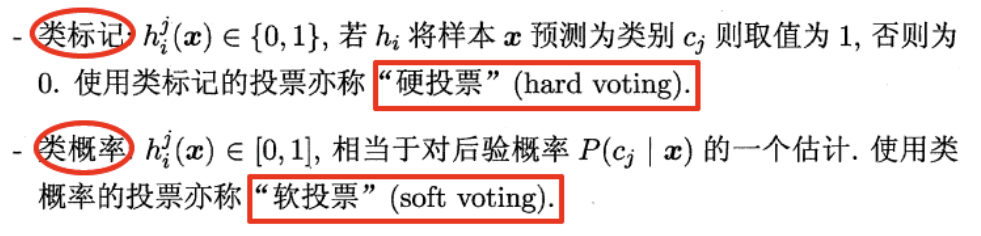
一些在产生类别标记的同时也生成置信度的学习器,置信度可转化为类概率使用,一般基于类概率进行结合往往比基于类标记进行结合的效果更好,需要注意的是对于异质集成,其类概率不能直接进行比较,此时需要将类概率转化为类标记输出,然后再投票。
学习法是一种更高级的结合策略,其核心思想是通过训练一个次级学习器(Meta-Learner) 来动态融合多个基学习器的输出。其中,Stacking(堆叠泛化) 是学习法的典型代表,它通过将基学习器的预测结果作为新特征,进一步训练一个次级模型,最终实现更优的泛化性能。
Stacking 的基本原理
步骤概述:
Stacking 的优势
Stacking 的实现细节
在集成学习中,多样性增强(Diversity Enhancement) 是提升模型性能的关键策略。通过引入多样性,可以降低基学习器之间的相关性,从而减少误差传递和过拟合风险。以下是四种常见的多样性增强方法及其核心要点:
1. 数据样本扰动(Data Perturbation)
原理:通过修改训练数据的分布或采样方式,使每个基学习器看到不同的数据子集。
实现方式:
- Bagging(如随机森林):
- 随机有放回地采样(Bootstrap),生成多个不同的训练集。
- 对输入扰动敏感的基学习器(如决策树、神经网络)效果显著。
- 示例:
- 决策树对数据扰动敏感,Bagging 可有效提升其泛化能力。
- 线性模型(如线性回归、SVM)对数据扰动不敏感,Bagging 效果有限。
2. 输入属性扰动(Input Attribute Perturbation)
原理:通过改变输入特征的表示或选择,增加基学习器间的差异。
实现方式:
-
特征子集采样:每次随机选择部分特征进行训练(如随机森林中的列扰动)。
- 特征变换:对特征进行缩放、旋转或加噪声等操作。
- 适用场景:
- 数据包含大量冗余属性时,可大幅加速训练并提升多样性。
- 对高维数据(如图像、文本)尤其有效。
3. 输出属性扰动(Output Attribute Perturbation)
原理:通过修改训练样本的标签,间接影响基学习器的学习过程。
实现方式:
-
随机翻转标签:对部分样本的标记进行随机更改(需谨慎使用,避免干扰模型)。
- Dropout(神经网络):
- 在训练过程中随机“关闭”部分神经元,强制网络学习更鲁棒的特征。
- 类似于对输出属性的随机扰动,可提升模型泛化能力。
4. 算法参数扰动(Algorithm Parameter Perturbation)
原理:通过调整基学习器的超参数,生成不同的模型行为。
实现方式:
集成学习中常见的两种方法是什么?请分别介绍它们的原理和特点。集成学习相比于单个模型有什么优势和应用场景?
集成学习常见方法、原理、特点及优势
常见方法:Bagging 和 Boosting
原理与特点:
| 方法 | 原理 | 特点 |
|---|---|---|
| Bagging | 1. 自助采样:从训练集有放回抽取多个子集 2. 并行训练基模型 3. 聚合预测(投票/平均) |
- 降低方差 - 适合高方差模型(如未剪枝决策树) - 并行化,训练快 - 代表:随机森林 |
| Boosting | 1. 顺序训练:后一个模型修正前一个模型的错误 2. 加权困难样本 3. 加权组合模型 |
- 降低偏差 - 需弱学习器(如树桩) - 易过拟合(需正则化) - 代表:AdaBoost, GBDT, XGBoost |
集成学习的优势:
-
提升泛化能力:降低过拟合(Bagging)或欠拟合(Boosting)风险
- 增强鲁棒性:减少异常值/噪声影响(如投票机制)
- 突破性能上限:组合多个弱模型达到强模型效果
应用场景:
- 分类任务:医疗诊断(整合多模型减少误诊)
- 回归任务:房价预测(融合不同树模型提升精度)
- 不平衡数据:Boosting 加权少数类样本
- 高维数据:随机森林自动特征选择
如果在完全相同的训练集上训练了五个不同的模型,并且它们都达到了95%的准确率,是否还有机会通过结合这些模型来获得更好的结果?如果可以,该怎么做?如果不行,为什么?
模型结合提升性能的可能性与方法
是否可能提升:是,但需满足条件:模型错误不相关(即犯错样本不同)。
如何实现:
若无法提升的情况:
-
原因:模型高度相关(如相同算法、相同特征、相同超参)
- 数学解释:误差相关性 rho ≈ 1
时,集成误差 ≈单一模型误差
是否可以通过在多个服务器上并行来加速随机森林的训练?AdaBoost集成呢?为什么?
| 算法 | 是否支持并行 | 原因 |
|---|---|---|
| 随机森林 | ✅ 是 | 1. 树之间独立训练 2. 可分布式分配Bootstrap样本到不同服务器 3. 特征分裂也可并行(如选特征子集) |
| AdaBoost | ❌ 否 | 1.
模型必须顺序训练:后一个模型依赖前一个模型的样本权重更新 2. 无法解耦迭代过程 |
我们之前学习的分类/回归任务都属于 有监督学习 需要我们提供样本与标签
而马上要学习的聚类任务和后续学习的降维则属于 无监督学习 仅需提供样本
聚类是一种经典的无监督学习(unsupervised learning)方法,无监督学习的目标是通过对无标记训练样本的学习,发掘和揭示数据集本身潜在的结构与规律,即不依赖于训练数据集的类标记信息。
聚类试图将数据集中的样本划分为若干个通常是不相交的子集,每个子集称为一个“簇”( cluster)。通过这样的划分,每簇可能对应于一些潜在的概念(类别),如“浅色瓜”“深色瓜”,“有籽瓜”“无籽瓜”,甚至“本地瓜”“外地瓜”等;需说明的是,这些概念对聚类算法而言事先是未知的,聚类过程仅能自动形成簇结构, 簇所对应的概念语义需由使用者来把握和命名。
直观上来说,聚类是将相似的样本聚在一起,从而形成一个类簇(cluster)。涉及两个问题
明可夫斯基距离(Minkowski Distance)
明可夫斯基距离是一组常用的连续型距离度量,通过调整参数 $ p $ 可以统一表示多种距离形式,是欧氏距离和曼哈顿距离的推广。
1. 公式定义
对于两个 $ n $ 维向量 $ i = (x{i1}, x_{i2}, , x_{in}) $ 和 $ j = (x{j1}, x_{j2}, , x_{jn}) ,明可夫斯基距离的计算公式为:$ {}(i, j) = ( {u=1}^{n} |x{iu} - x{ju}|^p )^{} $$ 其中,$ p $ 是一个可调节的参数。
2. 特殊情况
3. 参数 $ p $ 的影响
我们知道属性分为两种:连续属性(continuous attribute)和离散属性(catergorical attribute有限个取值)。对于连续值的属性,一般都可以被学习器所用,有时会根据具体的情形作相应的预处理,例如:归一化等;而对于离散值的属性,需要作下面进一步的处理:
若属性值之间存在序关系(ordinal attribute),则可以将其转化为连续值,例如:身高属性“高”“中等”“矮”,可转化为{1, 0.5, 0}。
若属性值之间不存在序关系(non-ordinal attribute),则通常将其转化为向量的形式,例如:性别属性“男”“女”,可转化为{(1,0),(0,1)}。
连续属性和存在序关系的离散属性都可以直接参与计算,而不存在序关系的无序属性,我们一般采用VDM(Value Difference Metric)进行距离的计算
VDM 是一种专门用于离散无序属性的距离度量方法,通过统计信息量化不同类别间的差异。其核心思想是:若两个类别的样本在目标变量上的分布差异越大,则它们的距离越大。
1. 公式解析 $$
\text{VDM}_p(a, b) = \sum_{i=1}^{k} \left| \frac{m_{u,a,i}}{m_{u,a}} -
\frac{m_{u,b,i}}{m_{u,b}} \right|^p
$$ - 符号含义:
- $ a, b $:两个不同的类别值(如性别“男”和“女”)。
- $ m_{u,a,i} $:在属性 $ u $ 的第 $ i $ 个取值下,类别 $ a $
的样本数量。
- $ m_{u,a} $:类别 $ a $ 的总样本数量。
- $ k $:属性 $ u $ 的不同取值数目(如颜色属性有红、蓝、绿三种取值,则 $
k=3 $)。
- $ p $:距离幂指数(通常取 $ p=1 $ 或 $ p=2 $)。
2. 核心思想
3. 示例说明
假设我们有一个“颜色”属性(红、蓝、绿),目标变量是“是否购买商品”(0/1)。统计结果如下:
| 颜色 | 购买(1) | 不购买(0) | 总计 |
|---|---|---|---|
| 红 | 10 | 5 | 15 |
| 蓝 | 8 | 12 | 20 |
| 绿 | 3 | 7 | 10 |
计算“红”与“蓝”之间的 VDM 距离($ p=1 ):1.计算每个颜色在购买/不购买的比例: − 红:
P(1) = 10/15 , P(0) = 5/15 $
- 蓝:$ P(1) = 8/20 = 0.4 , P(0) =
12/20 = 0.6 $
2. 计算差异并求和:
VDM1(红, 蓝) = |0.67 − 0.4|+|0.33 − 0.6| = 0.27 + 0.27 = 0.54
于聚类算法不依赖于样本的真实类标,就不能像监督学习的分类那般,通过计算分对分错(即精确度或错误率)来评价学习器的好坏或作为学习过程中的优化目标。
直观上看,我们希望“物以类聚”,即同一簇的样本尽可能彼此相似,不同簇的样本尽可能不同换言之,聚类结果的“簇内相似度”( intra-cluster similarity)高且“簇间相似度” inter-cluster similarity)低
聚类性能度量有两类
1.基本概念

显然,$ a + b + c + d = $ 。
2. 常用外部指标
(1)Jaccard系数(JC) $$
\text{JC} = \frac{a}{a + b + c}
$$ -
含义:衡量两个划分的重叠程度,仅考虑正确匹配($ a )与矛盾情况(
b + c )。 − * * 范围 * *: [0,
1] $,值越大越好。
- 特点:对称性差,对噪声敏感 。
(2)Fowlkes-Mallows指数(FMI) $$
\text{FMI} = \sqrt{\frac{a}{a + b} \cdot \frac{a}{a + c}}
$$ - 含义:结合查准率($ )和查全率(
),反映正确匹配的综合能力。 − * * 范围 * *:
[0, 1] $,值越大越好。
- 特点:平衡性较好,适合小样本 。
(3)Rand指数(RI) $$
\text{RI} = \frac{2(a + d)}{m(m - 1)}
$$ - 含义:同时考虑正确匹配($ a + d )与总样本对数,适用于大规模数据。 − * * 范围 * *:
[0, 1] $,值越大越好。
- 特点:计算简单,但对噪声较鲁棒 。
常用指标
优点
局限性
3. 应用示例
假设一个包含4个样本的数据集,参考标签为 {A, A, B, B},聚类结果为
{C, C, D, D}:
- 计算样本对:
- $ a = 2 $(样本1-2同簇,参考与聚类均同类)。
- $ b = 0 $(参考同类但聚类不同类)。
- $ c = 0 $(参考不同类但聚类同类)。
- $ d = 2 $(参考不同类且聚类不同类)。
- 指标结果:
- JC = $ = 1 $(完美匹配)。
- FMI = $ = 1 $。
- RI = $ = $。
内部指标不依赖任何外部参考模型,直接通过簇内紧凑性和簇间分离性评估聚类结果。其核心思想是:
- 簇内高内聚:同一簇的样本尽可能相似(距离小)。
- 簇间低耦合:不同簇的样本尽可能不同(距离大)。
1. 基本定义
设聚类结果为 $ C = {C_1, C_2, , C_k} $,定义以下四个关键距离:
(1)簇内平均距离(avg(C)) $$
\text{avg}(C) = \frac{2}{|C|(|C| - 1)} \sum_{1 \leq i < j \leq |C|}
\text{dist}(\boldsymbol{x}_i, \boldsymbol{x}_j)
$$ - 含义:簇内所有样本对的平均距离。
- 目标:越小越好,表示簇内样本更紧密。
(2)簇内最大距离(diam(C)) diam(C) = max1 ≤ i < j ≤ |C|dist(xi, xj)
- 含义:簇内最远的两个样本之间的距离。
- 目标:越小越好,避免簇内存在离群点。
**(3)簇间最小距离($ d_{}(C_i, C_j) ) * *$ d_{}(C_i, C_j) = _{_i C_i, _j C_j}
(_i, _j) $$ - 含义:簇 $ C_i $ 和 $ C_j $
之间最近的两个样本的距离。
- 目标:越大越好,表示簇间分离度高。
**(4)簇中心距离($ d_{}(C_i, C_j) ) * *$ d_{}(C_i, C_j) = (_i, _j) $$ -
含义:簇 $ C_i $ 和 $ C_j $
的中心点(均值向量)之间的距离。
- 目标:越大越好,表示簇中心相隔较远。
2. 常用内部指标
1. DB指数(Davies-Bouldin Index, DBI)
2. Dunn指数(Dunn Index, DI)
3. 轮廓系数(Silhouette Coefficient)
单一样本的轮廓系数:
$$
s = \frac{b - a}{\max(a, b)}
$$
整体轮廓系数:所有样本轮廓系数的平均值。
示例:
若某样本 $ a = 2 , b = 5 $,则 $ s = =
0.6 $,表明该样本分类合理。
4.肘部法则(Elbow Method)
肘部法则是一种经验性方法,常用于确定K-means等聚类算法的最优簇数($ K $)。其核心思想是通过观察误差平方和(SSE, Sum of Squared Errors)随 $ K $ 值变化的趋势,寻找“肘部点”(即 SSE 下降速度明显减缓的拐点),从而选择最优的 $ K $ 值
SSE(误差平方和):衡量每个样本到其所属簇中心的距离平方和,公式为: $$ \text{SSE} = \sum_{i=1}^n \|x_i - \mu_{c_i}\|^2 $$ 其中 $ x_i $ 是样本点,$ _{c_i} $ 是其所属簇中心。
趋势分析:
肘部点的意义:
肘部点对应的 $ K $
值是模型复杂度(簇数)与聚类效果(SSE)之间的平衡点。
指标对比与选择
| 指标 | 计算方式 | 目标 | 适用场景 | 局限性 |
|---|---|---|---|---|
| DBI | 簇内平均距离与簇中心距离的比值 | 越小越好 | 球形簇,需指定 $ k $ | 对离群点敏感 |
| Dunn指数 | 簇间最小距离与簇内最大直径的比值 | 越大越好 | 强调簇间分离与簇内紧凑 | 计算复杂,受离群点影响 |
| 轮廓系数 | 样本到同簇/异簇的平均距离差 | 越接近 1 越好 | 快速评估,适合 K-Means | 对非球形簇不敏感 |
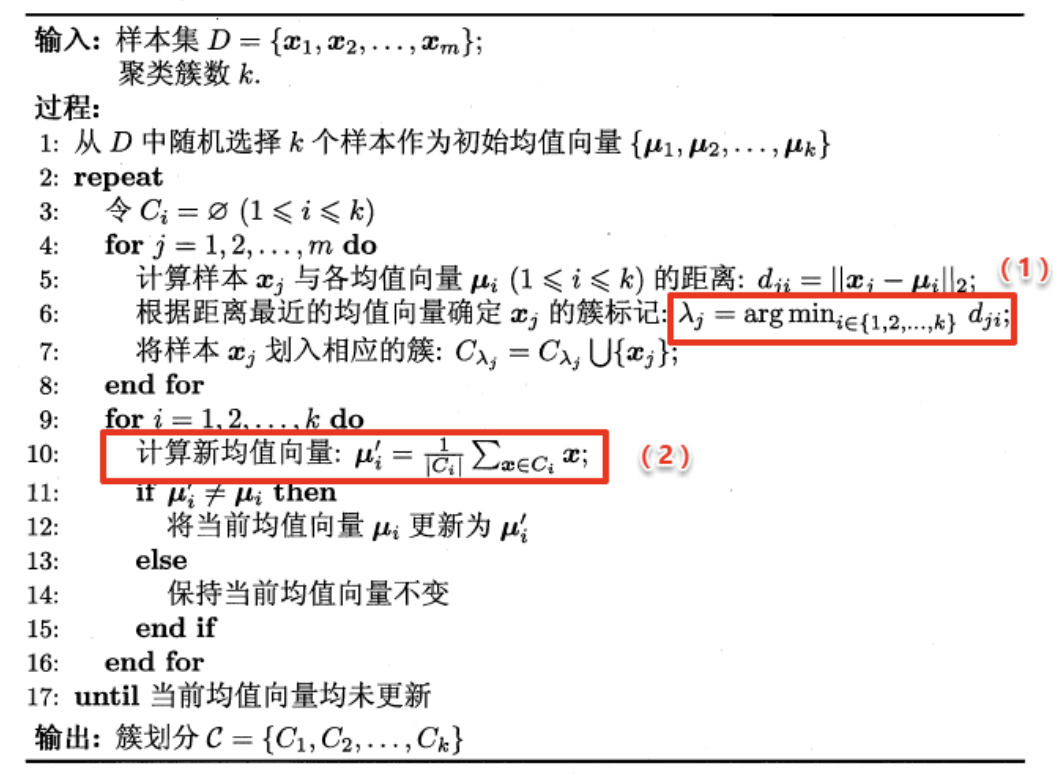
原型聚类即“基于原型的聚类”(prototype-based clustering),原型表示模板的意思,就是通过参考一个模板向量或模板分布的方式来完成聚类的过程,通常情形下算法先对原型进行初始化,然后对原型进行迭代更新求解。采用不同的原型表、不同的求解方式,将产生不同的算法。
常见的K-Means便是基于簇中心(原型向量)来实现聚类,混合高斯聚类则是基于簇分布(概率模型)来实现聚类。
目标函数:最小化所有样本到其所属簇中心的平方距离之和:
$$
E = \sum_{i=1}^{k} \sum_{\boldsymbol{x} \in C_i} \|\boldsymbol{x} -
\boldsymbol{\mu}_i\|_2^2
$$ 其中,$ i = { C_i} $ 是簇 $ C_i $ 的均值向量。
算法步骤
如何选择 $ k $ 值?
此法相对于 K-means 做出了一个小的改进。在一开始选择 k 个聚类中心时,并不是随机初始化 k 个,而是首先随机出 1 个,然后循环 k−1k−1 次选择剩下的 k-1 个聚类中心。选择的规则是:每次选择最不可能成为新的聚类中心的样本,或者是到所有聚类中心的最小距离最大的样本。
避免不良初始化 :传统K-means随机初始化可能导致中心过于集中,而K-means++通过“最大化最小距离”策略,使初始中心分布更均匀。
此法叫做二分 K-means 算法。具体的,在一开始将所有的样本划分为一个簇,然后每次选择一个误差最大的簇进行二分裂,不断分裂直到收敛。这种方法不能使得 Loss 最小,但是可以作为 K-means 算法的一个预热,比如可以通过这种方法得到一个相对合理的簇中心,然后再利用 K-means 算法进行聚类。
降低计算复杂度 :每次仅对一个簇进行二分,时间复杂度为 O(k⋅m⋅n) ,适合大规模数据。
提供合理初始中心 :可作为传统K-means的预处理,减少随机初始化的影响。
核心思想:
LVQ
是一种有监督的原型聚类算法,结合了神经网络与向量量化技术。它通过维护一组原型向量(Prototype
Vectors)来代表不同类别,并利用这些原型对数据进行分类或聚类。与 K-Means
类似,LVQ
会为每个簇分配一个原型向量,但其更新规则受类别标签的指导,因此更适用于分类任务
。
算法特点:
一句话概述算法:高斯混合聚类算法是一种概率模型,假设数据由多个高斯分布混合而成,通过迭代优化参数以拟合数据分布,常用于无监督学习中的聚类任务。
算法过程:
初始化参数: 随机初始化每个分量的均值、协方差矩阵和混合系数。
E 步(Expectation): 对每个数据点,计算它属于每个分量的后验概率,即计算每个分量的权重。
M 步(Maximization): 使用E步计算得到的后验概率,更新每个分量的均值、协方差矩阵和混合系数。
迭代: 重复执行E步和M步,直到模型参数收敛或达到预定的迭代次数。
GMM的优点包括对各种形状和方向的聚类簇建模能力,以及对数据分布的灵活性。它在许多领域,如模式识别、图像处理和自然语言处理等,都有广泛的应用。

以下是高斯混合聚类(GMM)算法的详细步骤及EM算法中E步与M步的解释:
算法流程解析
输入:样本集 $ D = {x_1, x_2, , x_m} $,混合成分个数
$ k $。
输出:簇划分 $ C = {C_1, C_2, , C_k} $。
步骤详解
初始化模型参数
随机初始化或通过K-means初步估计以下参数:
迭代优化参数(EM循环)
重复以下步骤直到收敛(如对数似然变化小于阈值):
E步(期望步):
对每个样本 $ x_j $,计算其由第 $ i $
个高斯分布生成的后验概率(责任度 $ {ji} ):$ {ji} = p(z_j = i | x_j) = $$ 其中
$ (x | , ) $ 是高斯分布的概率密度函数。
M步(最大化步):
根据当前的责任度 $ _{ji} $,更新模型参数:
簇划分
E步与M步的核心作用
E步(期望步)
M步(最大化步)
西瓜书读书笔记整理(九) —— 第九章 聚类_西瓜书笔记第9章-CSDN博客
若样本分布为同心的两个环,kmeans则无法做到良好的聚类效果,因此引出密度聚类
密度聚类是一种基于样本分布密集程度的无监督学习方法,其核心思想是:将高密度区域划分为同一簇,低密度区域视为噪声或边界。
DBSCAN(Density-Based Spatial Clustering of Applications with Noise)是密度聚类的典型代表,通过两个关键参数 $ $ 和 $ MinPts $ 描述样本分布的紧密性。
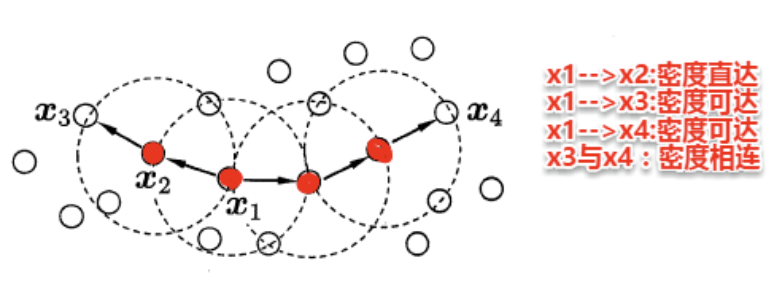
DBSCN定义的簇
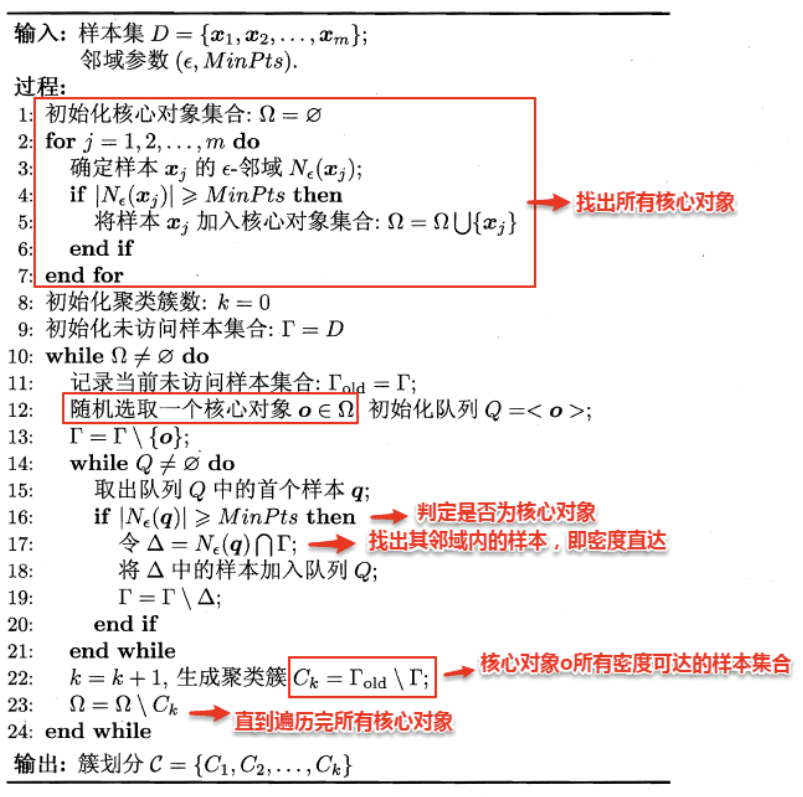
简单来理解DBSCAN:找出一个核心对象所有密度可达的样本集合形成簇。首先从数据集中任选一个核心对象A,找出所有A密度可达的样本集合,将这些样本形成一个密度相连的类簇,直到所有的核心对象都遍历完。DBSCAN算法的流程如下图所示:
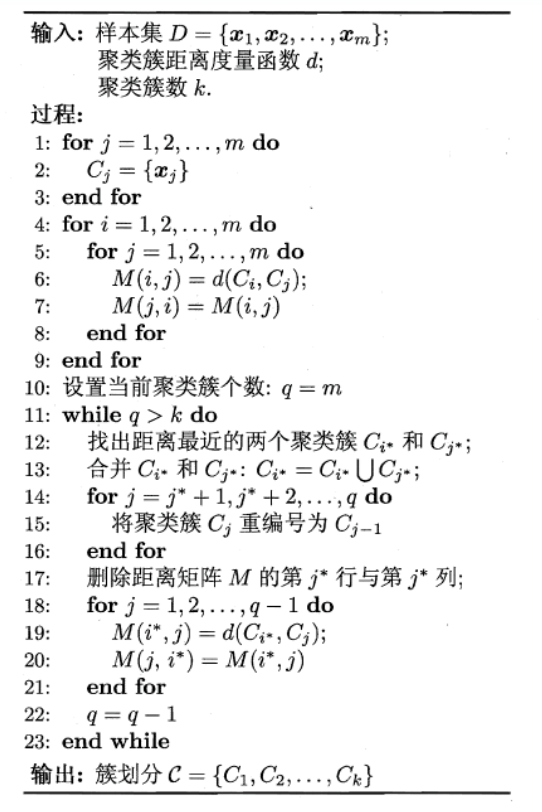
层次聚类是一种通过构建树状结构(Dendrogram)将数据划分为不同层次的聚类方法。其核心思想是:
-
凝聚型(Agglomerative):从每个样本作为一个独立簇开始,逐步合并最相似的簇,直到达到预设的簇数或形成一个唯一簇。
-
分裂型(Divisive):与凝聚型相反,从整个数据集作为一个簇开始,逐步分裂为更小的簇。
本节重点介绍AGNES(Agglomerative Nesting),一种经典的自底向上的层次聚类算法。
AGNES 的关键在于如何定义簇间距离,常见的三种方法如下:
(1)最小距离(Single Linkage) dmin(Ci, Cj) = minx ∈ Ci, z ∈ Cjdist(x, z) - 含义:两个簇之间最近的两个样本的距离。
(2)最大距离(Complete Linkage) dmax(Ci, Cj) = maxx ∈ Ci, z ∈ Cjdist(x, z) - 含义:两个簇之间最远的两个样本的距离。
(3)平均距离(Average Linkage) $$ d_{\text{avg}}(C_i, C_j) = \frac{1}{|C_i| |C_j|} \sum_{\boldsymbol{x} \in C_i} \sum_{\boldsymbol{z} \in C_j} \text{dist}(\boldsymbol{x}, \boldsymbol{z}) $$ - 含义:两个簇所有样本对距离的平均值。
假设任务是将下面8个点聚类成3个簇:A1(2,10), A2(2,5), A3(8,4), B1(5,8), B2(7,5), B3(6,4), C1(1,2), C3(4,9),距离函数是欧式距离。假设初始选择A1,B1,C1分别作为每个聚类的中心,用Kmeans算法给出计算过程。
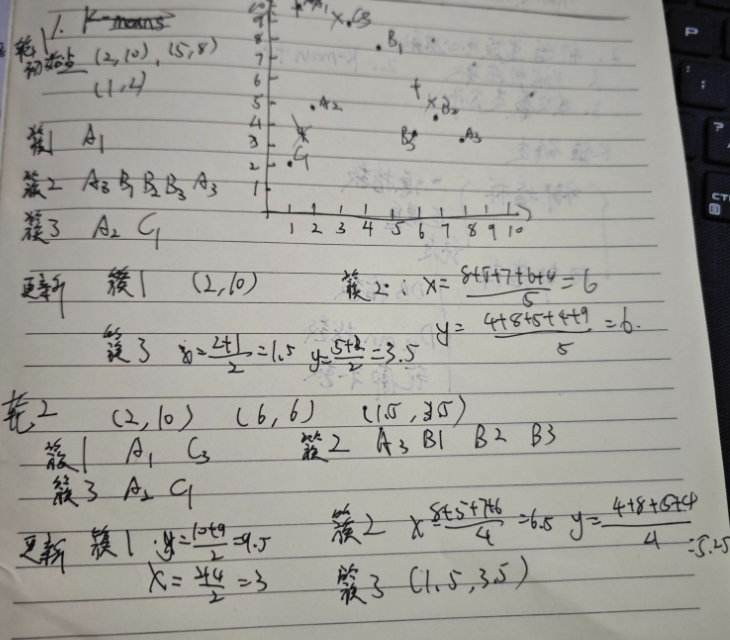
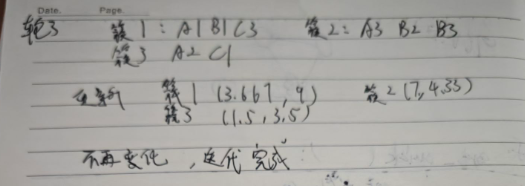
Kmeans初始类簇中心如何选取?K值如何确定?请简要阐述。
一、初始类簇中心的选取 (如何选好的起始点?)
传统K-means随机选择初始中心点,容易导致结果不稳定(多次运行结果不同)或陷入局部最优(效果差)。改进方法主要有:
二、K值(簇数量)的确定 (如何知道分几类?)
K值通常需要预先指定,但没有绝对正确的答案。常用方法基于评估不同K值下聚类结果的“质量”,寻找拐点或最优值:
K值 - SSE曲线图。观察曲线,寻找SSE下降幅度突然变得平缓的那个K值(形如手臂的“肘关节”)。a)和与其他簇的分离度(b)。a(i) = i
到同簇内所有其他点的平均距离(簇内不相似度)。b(i) = i
到所有其他簇中点的平均距离的最小值(最近邻簇的不相似度)。s(i) = (b(i) - a(i)) / max(a(i), b(i))。值在[-1,
1]之间。k近邻算法简称kNN(k-Nearest Neighbor),是一种经典的监督学习方法,是数据挖掘十大算法之一。其工作机制十分简单:给定某个测试样本,kNN基于某种距离度量在训练集中找出与其距离最近的k个带有真实标记的训练样本,然后基于这k个邻居的真实标记来进行预测,类似于集成学习中的基学习器结合策略:分类任务采用投票法,回归任务则采用平均法。
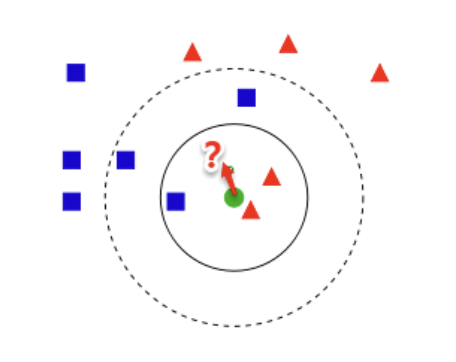
核心思想
1NN 分类器通过将测试样本 $ $ 分配到其最近邻样本 $ $
的类别来完成预测。其错误概率取决于两个关键因素: - $ $
的真实类别:$ P(c | ) $,即给定 $ $ 属于类别 $ c $
的概率。
- $ $ 的类别:$ P(c | ) $,即 $ $ 属于类别 $ c $
的概率。
错误概率公式
若测试样本 $ $ 的最近邻为 $ ,则1NN分类器出错的概率为:$
P() = 1 - P() = 1 - _{c } P(c | ) P(c | ) $$ 其中: - $ $
是所有可能的类别集合。
- $ P(c | ) : $ 属于类别 $ c $
的条件概率。
- $ P(c | ) : $ 属于类别 $ c $
的条件概率。
通过证明可以发现一个令人震惊的结论:最近邻分类器的错误率不超过贝叶斯最优分类器错误率的两倍。
对于距离度量,不同的度量方法得到的k个近邻不尽相同,从而对最终的投票结果产生了影响,因此选择一个合适的距离度量方法也十分重要。
在上一篇聚类算法中,在度量样本相似性时介绍了常用的几种距离计算方法,包括闵可夫斯基距离,曼哈顿距离,VDM等。在实际应用中,kNN的距离度量函数一般根据样本的特性来选择合适的距离度量,同时应对数据进行去量纲/归一化处理来消除大量纲属性的强权政治影响。
使用knn的前提是样本空间的密度要一定大,但是这个条件在现实中很难满足,因此引出降维操作
kNN的重要假设: 任意测试样本 附近任意小的 距离范围内总能找到一个训练样本,即训练样本的采样密度足够大,或称为 “密采样”( dense sample) 。然而,这个假设在现实任务中通常很难满足
样本的特征数也称为维数(dimensionality),当维数非常大时,也就是通常所说的“维数灾难”(curse of dimensionality),具体表现在:在高维情形下,数据样本变得十分稀疏,因为此时要满足训练样本为“密采样”的总体样本数目是一个触不可及的天文数字。训练样本的稀疏使得其代表总体分布的能力大大减弱,从而消减了学习器的泛化能力;同时当维数很高时,计算距离也变得十分复杂,甚至连计算内积都不再容易
缓解维数灾难的一个重要途径就是降维(dimension reduction),即通过某种数学变换将原始高维空间转变到一个低维的子空间。在这个子空间中,样本的密度将大幅提高,同时距离计算也变得容易。这
时也许会有疑问,降维之后不是会丢失原始数据的一部分信息吗?
实际上,在很多实际问题中,虽然训练数据是高维的,但是与学习任务相关也许仅仅是其中的一个低维子空间,也称为一个低维嵌入,例如:数据属性中存在噪声属性、相似属性或冗余属性等,对高维数据进行降维能在一定程度上达到提炼低维优质属性或降噪的效果。
MDS(Multidimensional Scaling,多维尺度分析)是一种经典的降维技术,其核心目标是将高维数据映射到低维空间(如二维或三维),同时尽可能保留原始数据中样本点之间的距离关系。以下是其核心原理与应用要点:
1. 核心思想
2. 算法步骤
MDS 的核心是通过矩阵分解从距离矩阵推导低维坐标: 1.
构建距离矩阵 $ D $:
对于 $ r $ 个样本,计算两两之间的距离,形成 $ r r $ 的矩阵 $ D $,其中 $
D_{ij} $ 表示样本 $ i $ 和 $ j $ 的距离 。
双中心化(Double Centering):
构造矩阵 $ B = - H D^{(2)} H $,其中 $ D^{(2)} $ 是距离的平方矩阵,$ H =
I - ^$ 是中心化矩阵 。
特征值分解:
对 $ B $ 进行特征值分解,得到 $ B = V V^$,其中 $ $
是按降序排列的特征值对角矩阵,$ V $ 是对应的特征向量矩阵 。
构造低维坐标:
选择前 $ d’ $ 个最大特征值($ d’ $
为目标维度)和对应的特征向量,计算低维坐标矩阵:
Z = Λ1/2V⊤
其中 $ ^{1/2} $ 是特征值矩阵的平方根 。
3. 关键特性
线性降维通过线性变换将高维数据 $ ^{d m} $ 投影到低维空间 $ ^{d’ m} ( d’ d ),保留数据的主要信息。其数学表达为:$ = ^ $$
变换矩阵 $ ^{d d’} $:
每一列是正交的基向量,构成低维子空间的坐标系。
目标:选择 $ $ 使得低维表示 $ $ 最大化保留原始数据的信息(如方差、距离等)。
MDS:
直接以保留高维空间中样本点之间的距离关系为目标。降维后的低维空间需尽可能保持原始样本两两之间的距离(如欧氏距离、自定义相似性距离)。
其他线性方法(如PCA、LDA):
不同于MDS采用距离保持的方法,主成分分析(Principal Component Analysis ,PCA)是一种经典的无监督降维算法 ,其核心目标是通过线性变换将高维数据映射到低维空间,同时保留数据的最大方差信息 (即信息损失最小)
直接通过一个线性变换,将原始空间中的样本投影到新的低维空间中。
简单来理解这一过程便是:PCA采用一组新的基(向量)来表示样本点,其中每一个基向量都是原始空间基向量的线性组合,通过使用尽可能少的新基向量来表出样本,从而达到降维的目的。
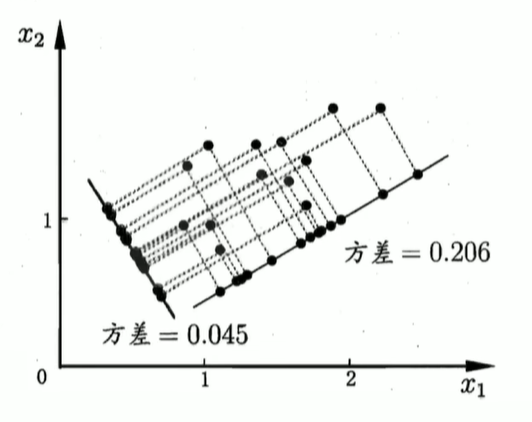
假设使用d’个新基向量来表示原来样本,实质上是将样本投影到一个由d’个基向量确定的一个超平面上(即舍弃了一些维度),要用一个超平面对空间中所有高维样本进行恰当的表达,最理想的情形是:若这些样本点都能在超平面上表出且这些表出在超平面上都能够很好地分散开来。但是一般使用较原空间低一些维度的超平面来做到这两点十分不容易,因此我们退一步海阔天空,要求这个超平面应具有如下两个性质:
最近重构性:样本点到超平面的距离足够近,即尽可能在超平面附近;
最大可分性:样本点在超平面上的投影尽可能地分散开来,即投影后的坐标具有区分性。
这里十分神奇的是:最近重构性与最大可分性虽然从不同的出发点来定义优化问题中的目标函数,但最终这两种特性得到了完全相同的优化问题:
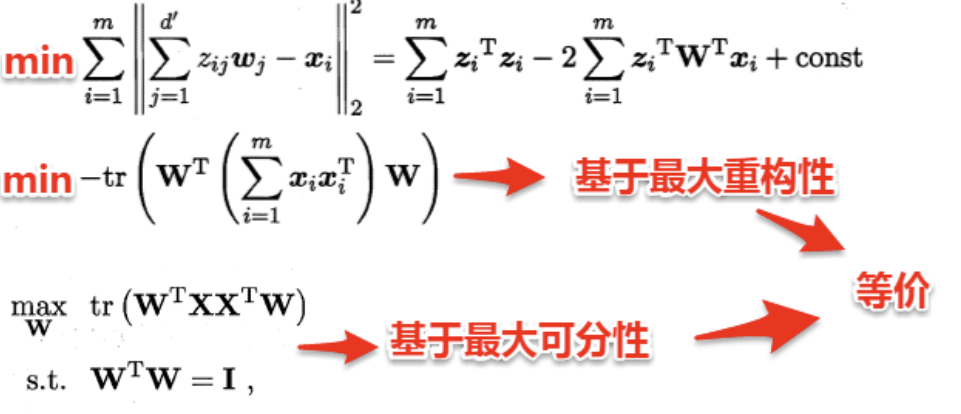
若数据已中心化(均值为零),则 $ ^$ 是样本协方差矩阵的 $ m $ 倍。此时,PCA的优化问题转化为: $$ \begin{aligned} & \underset{\mathbf{W}}{\text{maximize}} & & \text{tr}\left( \mathbf{W}^\top \mathbf{X} \mathbf{X}^\top \mathbf{W} \right) \\ & \text{subject to} & & \mathbf{W}^\top \mathbf{W} = \mathbf{I} \end{aligned} $$ 通过拉格朗日乘数法,该问题的解为 $ ^$ 的前 $ d’ $ 个最大特征值对应的特征向量
优化目标:
maxW tr(W⊤XX⊤W) s.t. W⊤W = I
其中,$ ^{d m} $ 是中心化后的数据矩阵(均值为零)。
拉格朗日乘数法:
引入拉格朗日乘子 $ ,构造拉格朗日函数:$
(, ) = ( ^ ^ ) - ( (^ - ) ) $$
对 $ \mathbf{W} $ 求导并令导数为零,得到:
$$ ^ = $$
即 $ \mathbf{X} \mathbf{X}^\top $ 的特征向量 $ \mathbf{w}_i $ 满足:
$$ ^_i = _i _i $$
1. 核心问题
在PCA中,我们希望找到一个 $ d’ d $ 的变换矩阵 $ $,其列向量是协方差矩阵 $ ^$ 的特征向量,且满足正交约束 $ ^ = $。关键问题是:如何从 $ d $ 个特征向量中选择 $ d’ $ 个最优的?
2. 数学推导
特征值分解:
协方差矩阵 $ {d d} $ 可分解为: XX⊤W = WΛ
其中,$ = (_1, _2, , _d) $ 是特征值对角矩阵,$ $
是特征向量矩阵。
优化目标转化:
PCA的目标是最大化 $ (^ ^) 。利用特征值分解,可得:$
^ ^ = ^( ) = 因此,优化目标变为:
{} () = {i=1}^{d’} _i $$ 即选择 $ d’ $ 个最大的特征值 $ _i $
对应的特征向量组成 $ $。
3. 特征向量选择策略
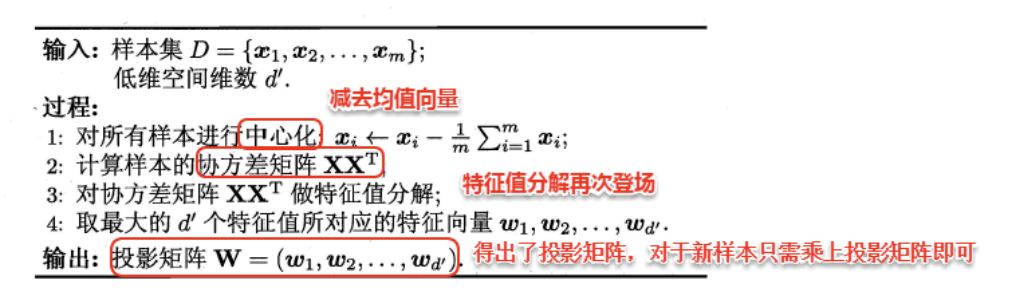
待学习
流形学习(manifold learning)是一种借助拓扑流形概念的降维方法,流形是指在局部与欧式空间同胚的空间,即在局部与欧式空间具有相同的性质,能用欧氏距离计算样本之间的距离。这样即使高维空间的分布十分复杂,但是在局部上依然满足欧式空间的性质,基于流形学习的降维正是这种 “邻域保持” 的思想。其中 等度量映射(Isomap)试图在降维前后保持邻域内样本之间的距离,而局部线性嵌入(LLE)则是保持邻域内样本之间的线性关系 。
等度量映射的基本出发点是:高维空间中的直线距离具有误导性,因为有时高维空间中的直线距离在低维空间中是不可达的。因此利用流形在局部上与欧式空间同胚的性质,可以使用近邻距离来逼近测地线距离,即对于一个样本点,它与近邻内的样本点之间是可达的,且距离使用欧式距离计算,这样整个样本空间就形成了一张近邻图,高维空间中两个样本之间的距离就转为最短路径问题。可采用著名的Dijkstra算法或Floyd算法计算最短距离,得到高维空间中任意两点之间的距离后便可以使用 MDS 算法来其计算低维空间中的坐标。
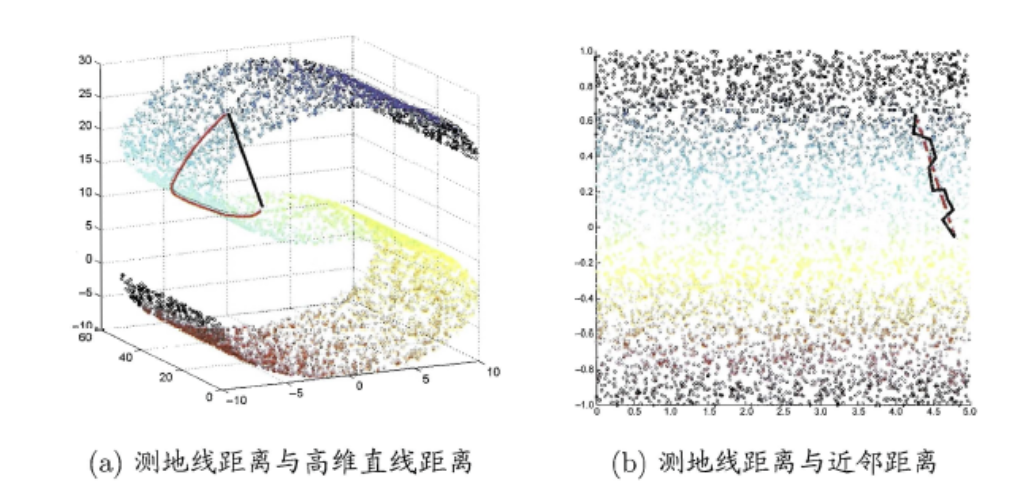
Isomap算法流程如下图:
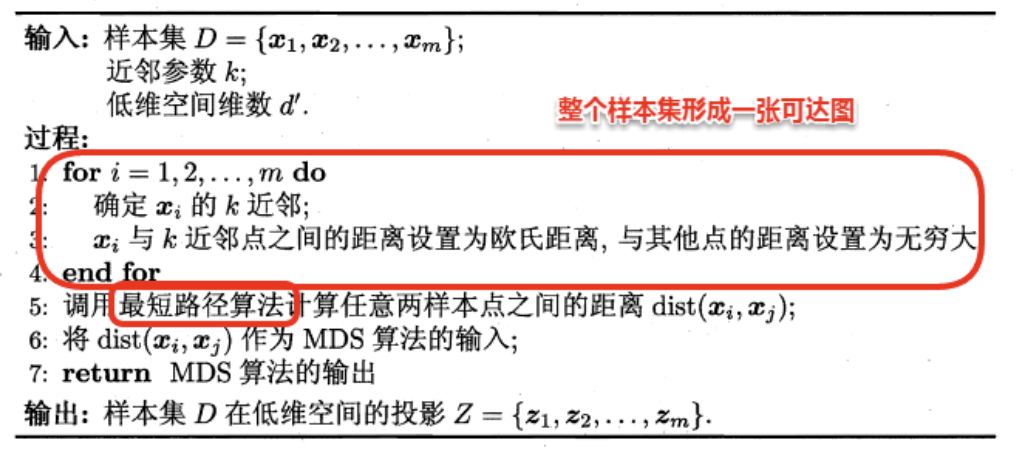
对于近邻图的构建,常用的有两种方法:一种是指定近邻点个数,像kNN一样选取k个最近的邻居;另一种是指定邻域半径,距离小于该阈值的被认为是它的近邻点。但两种方法均会出现下面的问题:
若邻域范围指定过大,则会造成“短路问题”,即本身距离很远却成了近邻,将距离近的那些样本扼杀在摇篮。
若邻域范围指定过小,则会造成“断路问题”,即有些样本点无法可达了,整个世界村被划分为互不可达的小部落。
待学习
1. 核心思想
度量学习(Metric Learning)的核心目标是学习一个合理的距离度量,使得相似样本距离更近,不相似样本距离更远。传统欧式距离(Euclidean Distance)虽然简单,但其固定权重无法反映不同特征的实际重要性。因此,我们引入加权欧式距离,通过可调节的参数(权重)优化距离计算。
2. 欧式距离与加权欧式距离
标准欧式距离:
$$
\text{dist}_{\text{ed}}^2(\boldsymbol{x}_i, \boldsymbol{x}_j) =
\|\boldsymbol{x}_i - \boldsymbol{x}_j\|_2^2 = \sum_{k=1}^d
(\boldsymbol{x}_{i,k} - \boldsymbol{x}_{j,k})^2
$$
每个特征维度对距离的贡献相同,未考虑特征的重要性差异。
加权欧式距离:
distwed2(xi, xj) = (xi − xj)⊤W(xi − xj)
其中,$ = () $ 是对角权重矩阵,$ w_k $ 表示第 $ k $ 个特征的权重。
展开后为: $$
\text{dist}_{\text{wed}}^2(\boldsymbol{x}_i, \boldsymbol{x}_j) =
\sum_{k=1}^d w_k (\boldsymbol{x}_{i,k} - \boldsymbol{x}_{j,k})^2
$$
3. 权重的作用
4. 度量学习的目标
通过学习最优权重 $ ,使以下目标成立: − * * 相似样本 * *:加权距离小( _{}^2(_i, j) )。 − * * 不相似样本 * *:加权距离大( {}^2(_i, _j) $)。
典型优化问题形式: minw ∑(xi, xj) ∈ Sdistwed2(xi, xj) + λ∥w∥22 其中,$ S $ 是相似样本对集合,$ $ 是正则化项防止过拟合。
总结来说,
- 降维是将原高维空间嵌入到一个合适的低维子空间中,接着在低维空间中进行学习任务
- 度量学习则是试图去学习出一个 *距离度量* 来等效降维的效果
1. 核心思想
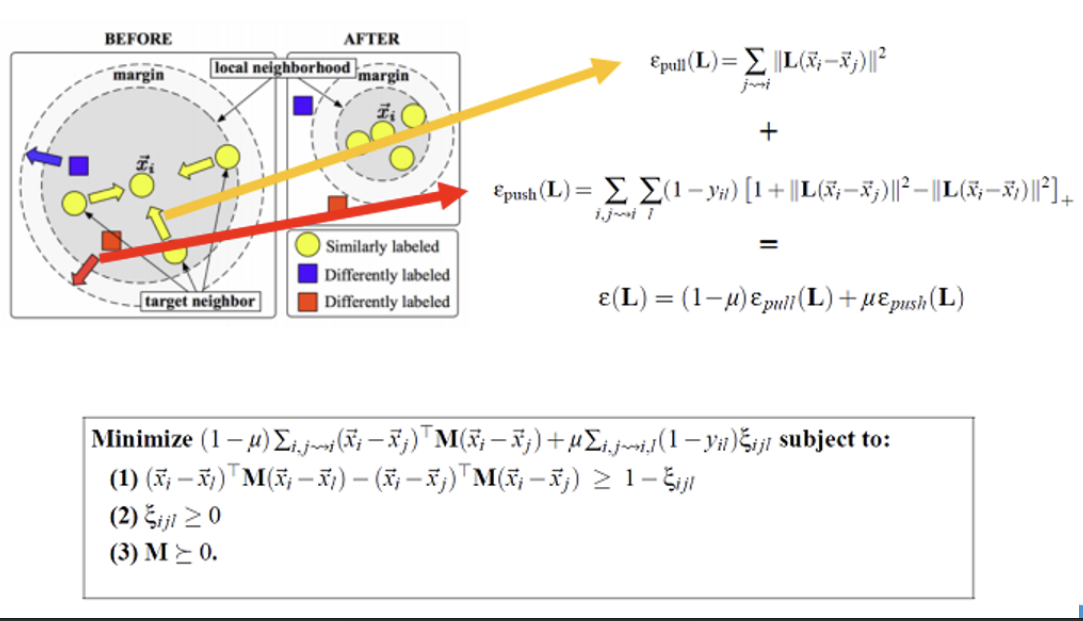
LMNN 是一种监督度量学习方法,其目标是通过学习一个线性变换矩阵 $ $,使同类样本在变换后的空间中更紧密,不同类样本被推开,从而提升KNN等基于距离的算法性能。其核心是引入最大边距(Large Margin)的概念,类似于SVM的分类边界。
2. 损失函数
LMNN 的优化目标由两部分组成: - Pull
Loss(拉力损失):
使同类样本对的距离尽可能小,公式为: $$
\varepsilon_{\text{pull}}(\mathbf{L}) = \sum_{j \sim i}
\|\mathbf{L}(\bar{\boldsymbol{x}}_i - \bar{\boldsymbol{x}}_j)\|^2
$$ 其中,$ j i $ 表示与样本 $ i $ 同类的最近邻样本。
Push Loss(推力损失):
使不同类样本对的距离至少保持一个固定边距 $ {ijl} ,公式为:$
{}() = {i,j,l} (1 - y{il}) + $$ 其中,$ y{il} = 1
$ 表示样本 $ i $ 和 $ l $ 属于同一类,否则为0;$ []_+ $
表示取正值部分。
总损失函数:
ε(L) = (1 − μ)εpull(L) + μεpush(L)
参数 $ $ 控制两类损失的权重。
3. 优化问题
LMNN 的目标是最小化总损失函数,同时满足以下约束: $$
\begin{aligned}
& \min_{\mathbf{M}, \boldsymbol{\xi}} \quad (1 - \mu) \sum_{i,j \sim
i} (\bar{\boldsymbol{x}}_i - \bar{\boldsymbol{x}}_j)^\top \mathbf{M}
(\bar{\boldsymbol{x}}_i - \bar{\boldsymbol{x}}_j) + \mu \sum_{i,j \sim
i,l} (1 - y_{il}) \xi_{ijl} \\
& \text{s.t.} \quad (\bar{\boldsymbol{x}}_i -
\bar{\boldsymbol{x}}_l)^\top \mathbf{M} (\bar{\boldsymbol{x}}_i -
\bar{\boldsymbol{x}}_l) - (\bar{\boldsymbol{x}}_i -
\bar{\boldsymbol{x}}_j)^\top \mathbf{M} (\bar{\boldsymbol{x}}_i -
\bar{\boldsymbol{x}}_j) \geq 1 - \xi_{ijl}, \\
& \quad \quad \quad \xi_{ijl} \geq 0, \quad \mathbf{M} \succeq 0.
\end{aligned}
$$ -
约束(1):确保不同类样本对的距离比同类样本对大至少 $ 1
- {ijl} $。
- 约束(2):松弛变量 $ {ijl} $
允许部分样本对违反约束。
- 约束(3):$ $
必须是半正定矩阵,保证距离的非负性和三角不等式。
数据降维有哪些常用的方法?阐述主成分分析(PCA)算法的计算流程,并讨论PCA 降维之后的维度如何确定?
(1)常用数据降维方法
(2)主成分分析(PCA)的计算流程
(3)PCA降维后维度的确定
度量学习的目标是什么?LMNN算法中三元组损失是什么?如何计算?
(1)度量学习的目标
度量学习旨在学习一个合理的距离度量,使得: -
相似样本:距离尽可能小(如同类样本)。
- 不相似样本:距离尽可能大(如异类样本)。
典型应用包括推荐系统(优化用户-商品相似性)、图像检索(提升匹配精度)和生物识别(增强类间可分性)。
(2)LMNN中的三元组损失
LMNN(Large Margin Nearest Neighbor)是一种监督度量学习方法,其核心思想是通过优化距离度量来提升KNN的分类性能。虽然LMNN本身主要使用对比损失(Contrastive Loss),但三元组损失(Triplet Loss)是深度度量学习中常见的损失函数,其计算方式如下:三元组损失的定义
三元组损失基于锚点(Anchor)、正例(Positive)和负例(Negative)三个样本,目标是使锚点与正例的距离小于锚点与负例的距离,公式为:
ℒ = ∑i, j, lmax (0, ∥zi − zj∥2−∥zi − zl∥2 + m)
- $ _i $:锚点样本的嵌入表示。
- $ _j $:与锚点同类的正例样本。
- $ _l $:与锚点不同类的负例样本。
- $ m $:预设的边界值(Margin),控制正负样本距离的最小差距 。
LMNN的损失函数
LMNN 的损失函数包含两部分: 1. 拉力损失(Pull
Loss):最小化同类样本对的距离:
$$
\varepsilon_{\text{pull}} = \sum_{i,j \sim i}
\|\mathbf{L}(\bar{\boldsymbol{x}}_i - \bar{\boldsymbol{x}}_j)\|^2
$$ 2. 推力损失(Push
Loss):最大化异类样本对的距离:
$$
\varepsilon_{\text{push}} = \sum_{i,j \sim i,l} (1 - y_{il}) \left[1
+ \|\mathbf{L}(\bar{\boldsymbol{x}}_i - \bar{\boldsymbol{x}}_j)\|^2 -
\|\mathbf{L}(\bar{\boldsymbol{x}}_i -
\bar{\boldsymbol{x}}_l)\|^2\right]_+
$$ 其中 $ $ 是线性变换矩阵,$ y_{il} $ 表示样本对是否同类,$
[]_+ $ 表示取正值部分 。
优化目标
LMNN 的总损失为拉力和推力损失的加权和: ε(L) = (1 − μ)εpull + μεpush 参数 $ $ 平衡两类损失的权重,最终通过优化 $ $ 得到最优距离度量 。
监督学习解决现实问题有哪些难点? 1.标记数据获取成本高:在许多领域如医疗,获取标记数据是昂贵且耗时的。 2.未标记数据大量存在且易得:相对而言,未标记数据大量存在且容易获取。 3.提升模型的泛化能力:通过利用未标记数据,可以增强模型的泛化能力。 举例:在医疗领域,获取医生标记的诊断数据非常昂贵,但有大量未标记的病人记录。 半监督学习可以帮助利用这些未标记数据,提高疾病预测模型的准确性。
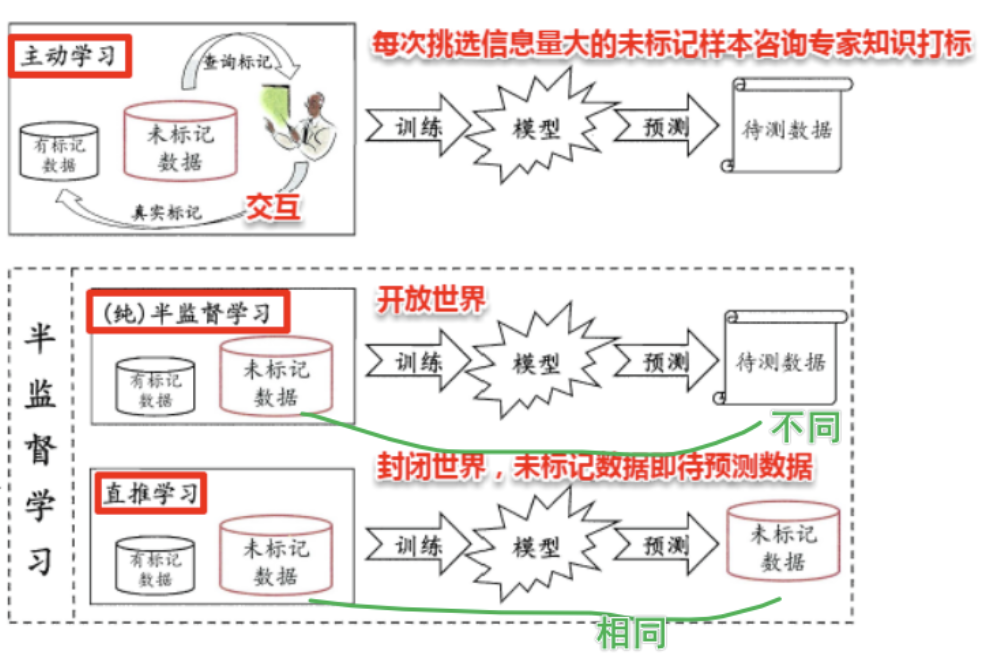 半监督学习结合了有监督学习和无监督学习,半监督学习使用少量的标记数据和大量的未标记数据来训练模型,主要目标是提升模型在未标记数据上的表现。
假设所有数据(无论是否有标记)都是由一个潜在的模型“生成”的。那么无标记的数据可以帮助更准确的估计潜在模型的参数。 比如右图中可以看到数据可以由两个高斯分布近似,则无监督的数据可以被用来更好得做高斯分布的参数估计

监督学习中的SVM试图找到一个划分超平面,使得两侧支持向量之间的间隔最大,即 最大划分间隔 思想。对于半监督SVM (Semi-Supervised Support Vector Machine, S3VM) 则考虑超平面在能将两类标记样本分隔的同时,穿过数据低密度的区域。
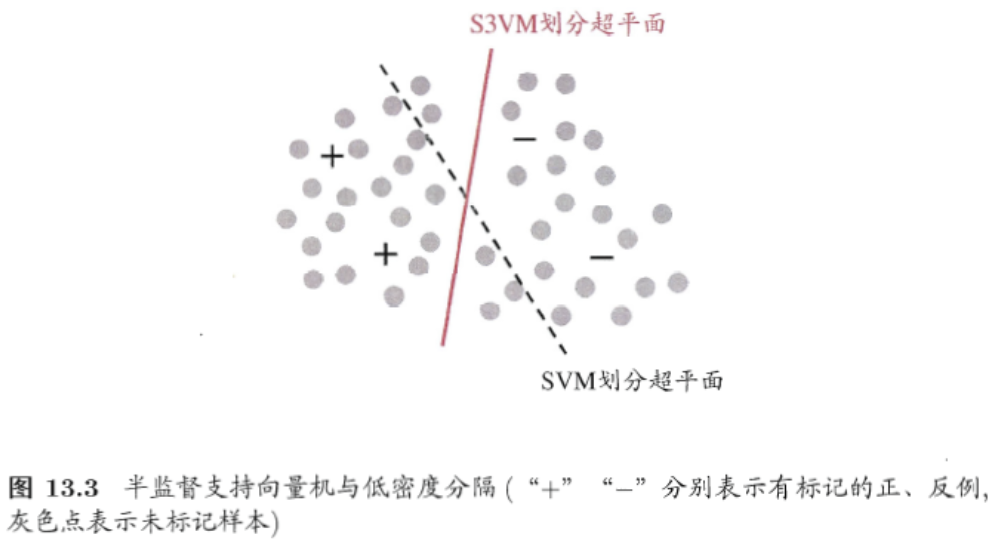
1. 核心思想
TSVM 是一种半监督学习方法,通过结合有标记数据 $ D_l
$ 和未标记数据 $ D_u
$,利用伪标签(Pseudo-labels)和迭代优化策略,最大化分类超平面的间隔。其损失函数需同时考虑:
- 有标记样本:最小化分类错误(Hinge Loss)。
- 未标记样本:通过伪标签引入约束,逐步调整超平面。
2. 损失函数推导
TSVM 的目标是找到一个超平面 $ ^ + b = 0 $,使得: 1.
有标记样本的分类误差最小。
2. 未标记样本的伪标签与超平面预测结果一致。
标准SVM的损失函数为: $$ \min_{\boldsymbol{w}, b, \xi} \quad \frac{1}{2} \|\boldsymbol{w}\|^2 + C \sum_{i=1}^l \xi_i $$ 其中,$ _i $ 是松弛变量,表示样本 $ (_i, y_i) $ 的分类误差。
TSVM的扩展:
引入未标记样本 $ D_u $ 的伪标签 $ j ( j = l+1, , l+u $),并赋予其较小的惩罚系数
$ C_u $(初始阶段 $ C_u C_l ):$
{, b, } ||^2 + C_l _{i=1}^l i + C_u {j=l+1}^{l+u} _j $$
其中: - $ C_l $:有标记样本的惩罚系数。
- $ C_u
$:未标记样本的惩罚系数,初始值很小,逐步增大以增强伪标签的影响。
3. 迭代优化流程
4. 关键数学细节
Hinge Loss:
对每个样本 $ (_i, y_i) ,损失为:$ _i =
(0, 1 - y_i (^_i + b)) $$ 未标记样本的伪标签 $ _j $
同样代入此公式,但惩罚系数为 $ C_u $。
正则化项:
$ ||^2 $ 确保超平面的泛化能力,防止过拟合。
伪标签翻转条件:
当两个未标记样本 $ i, j $ 满足: ŷiŷj < 0 且 ξi > 0, ξj > 0, ξi + ξj > 2
表示它们被错误分类且距离超平面较近,需翻转其中一个标签以减少冲突。
给定一个数据集,我们可将其映射为一个图,数据集中每个样本对应于图结点,若两个样本之间的相似度很高(或相关性很强),则对应的结点之间存在一条边,边的“强度”(strength) 正比于样本之间的相似度(或相关性)。
可将有标记样本所对应的结点想象为染过色,标记样本所对应的结点尚未染色。半监督学习就对应于“颜色”在图上扩散或传播的过程。由于个图对应了一个矩阵,我们就能基于矩阵运算来进行半监督学习算法的推导与分析。
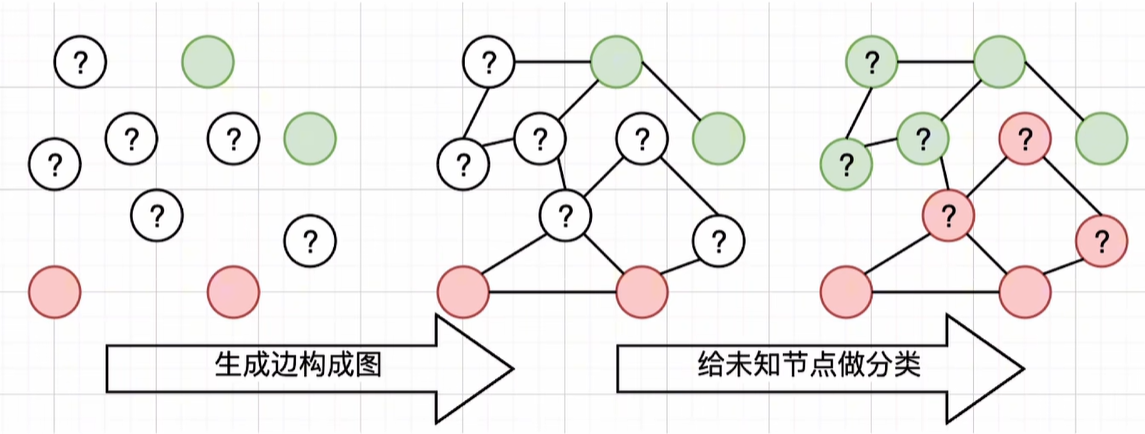
图半监督学习中的能量函数推导详解
1. 图结构与亲和矩阵
给定有标记数据集 $ D_l = {(1, y_1), (2, y_2), , (l, y_l)}
$ 和未标记数据集 $ D_u = {{l+1}, {l+2}, , {l+u}}
$,构建图 $ G = (V, E) : − * * 结点集 * *:
V = {1, , l, {l+1}, , {l+u}} $,包含所有样本。
- 边集:通过亲和矩阵 $ $ 表示,元素定义为: $$
(\mathbf{W})_{ij} =
\begin{cases}
\exp\left(-\frac{\|\boldsymbol{x}_i -
\boldsymbol{x}_j\|^2}{2\sigma^2}\right), & i \neq j \\
0, & \text{otherwise}
\end{cases}
$$ 其中,$ $ 是高斯核的带宽参数,控制邻接关系的敏感性。
2. 能量函数的定义与推导
假设分类模型的输出标记为 $ f(_i) $(取值为类别标签,如 $ $),定义能量函数 $ E(f) $ 为: $$ E(f) = \frac{1}{2} \sum_{i=1}^m \sum_{j=1}^m (\mathbf{W})_{ij} (f(\boldsymbol{x}_i) - f(\boldsymbol{x}_j))^2 $$ 其中 $ m = l + u $ 是总样本数。
3. 能量函数的展开与简化
图半监督学习方法推导详解
1. 分块矩阵表示
将亲和矩阵 $ $ 和度矩阵 $ $ 按有标记数据(前 $ l $
行列)和未标记数据(后 $ u $ 行列)分块: $$
\mathbf{W} =
\begin{bmatrix}
\mathbf{W}_{ll} & \mathbf{W}_{lu} \\
\mathbf{W}_{ul} & \mathbf{W}_{uu}
\end{bmatrix}, \quad
\mathbf{D} =
\begin{bmatrix}
\mathbf{D}_{ll} & \mathbf{0}_{lu} \\
\mathbf{0}_{ul} & \mathbf{D}_{uu}
\end{bmatrix}
$$ 其中: - $ {ll} $:有标记数据间的亲和度。
- $ {lu} $:有标记与未标记数据间的亲和度。
- $ {uu} $:未标记数据间的亲和度。
- $ {ll}, _{uu} $:对应子图的度矩阵。
2. 能量函数的分块展开
能量函数 $ E(f) = ^( - ) $ 可展开为
展开后得到: E(f) = fl⊤(Dll − Wll)fl − 2fu⊤Wulfl + fu⊤(Duu − Wuu)fu
**3. 对未标记数据 $ _u $ 求偏微分**
目标是最小化 $ E(f) $,对 $ _u $ 求偏导并令其为零: $$ \frac{\partial E(f)}{\partial \boldsymbol{f}_u} = -2 \mathbf{W}_{ul} \boldsymbol{f}_l + 2 (\mathbf{D}_{uu} - \mathbf{W}_{uu}) \boldsymbol{f}_u = 0 $$ 解得: fu = (Duu − Wuu)−1Wulfl
协同训练(Co-training)是一种经典的半监督学习方法,由Blum和Mitchell于1998年首次提出,主要用于处理多视图数据(Multi-view Data)。其核心思想是通过多个分类器的协作,利用少量标记数据和大量未标记数据提升模型性能。以下是详细解析:
1. 核心思想与假设
(1)多视图数据
(2)协作机制
2. 算法流程
3. 核心优势
什么是半监督学习?请简要描述其基本思想。半监督学习相比于监督学习和无监督学习有什么优势和应用场景?
(1)定义与基本思想
半监督学习(Semi-Supervised
Learning)是结合监督学习(利用标记数据)和无监督学习(利用未标记数据)的机器学习方法,其核心思想是通过少量标记数据与大量未标记数据的联合训练,提升模型的泛化能力和鲁棒性。
-
监督学习:依赖大量人工标注数据(如分类、回归)。
-
无监督学习:仅利用数据分布规律(如聚类、降维)。
-
半监督学习:在标记数据稀缺时,通过未标记数据挖掘潜在结构,降低标注成本
。
(2)优势
(3)应用场景
协同训练算法的作用是什么?请简述算法主要流程和所需条件。
(1)作用与核心思想
协同训练是一种典型的半监督学习方法,适用于多视图数据(Multi-view Data)。其核心思想是通过多个分类器的协作,利用未标记数据扩展训练集,最终提升模型性能。
(2)算法流程
(3)所需条件
智能天气提醒助手
描述:开发一款web应用,实时获取天气数据并支持个性化提醒(如雨天带伞)。
要求:
调用天气API获取实时数据(如OpenWeatherMap,每天1000次免费调用)
使用前端三件套设计交互界面,展示当前及未来天气信息,空气质量、体感温度、日出日落、月相等信息;
使用fastapi做后端
支持地点设置和天气提醒条件配置,在预设的提醒条件下提醒用户,并且将用户偏好保存至本地文件。
多城市切换、历史天气查询、全球地图展示等额外功能(可选*)。
fastapi,前端三件套(fetchapi),apifox
Fetch API
是现代浏览器提供的标准网络请求接口,允许开发者通过 JavaScript 发起异步
HTTP 请求(如 GET、POST、PUT、DELETE 等),并处理响应数据(如
JSON、文本、图片等)。它是传统
XMLHttpRequest(AJAX)的替代方案,语法更简洁,且支持
Promise 异步编程。
简单来说,就是用作给后端发送请求,实现前后端分离
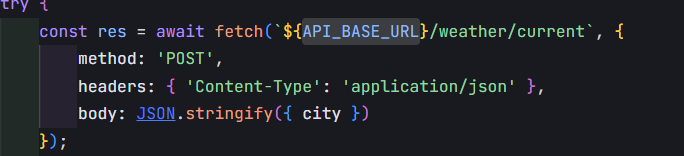
在使用 fetch 发起 HTTP
请求时,method、headers 和 body
是配置请求的核心参数,它们共同决定了请求的行为和数据格式。以下是每个参数的具体作用及示例:
method: 'POST'作用
指定 HTTP 请求的方法(动词),POST
表示向服务器提交数据(如创建资源)。 - 常见方法: -
GET:获取数据(默认方法,无需显式声明)。 -
POST:提交数据(如新增记录)。 -
PUT:更新数据。 - DELETE:删除数据。 -
与后端交互:FastAPI 的路由通过
@app.post()、@app.get()
等装饰器匹配请求方法。
示例
1 | fetch('https://api.example.com/submit', { |
headers
请求头作用
定义请求的元信息,用于告知服务器如何处理请求和数据格式。 -
关键字段: -
Content-Type:指定请求体(body)的数据格式。
- application/json:表示发送 JSON 数据。 -
application/x-www-form-urlencoded:表示表单数据(键值对)。
- multipart/form-data:用于上传文件。 -
Authorization:携带身份凭证(如 Token)。
- Accept:声明客户端期望的响应格式(如
JSON、XML)。
示例
1 | headers: { |
body: JSON.stringify(item)作用
定义请求体(即发送给服务器的数据),需根据 Content-Type
的类型进行格式化。 -
JSON.stringify(item):将 JavaScript
对象转换为 JSON 字符串。 - 因为 HTTP
协议只能传输文本,不能直接传输对象。 - 注意事项: -
若未设置
Content-Type: application/json,服务器可能无法正确解析数据。
- 若使用 FormData 上传文件,需使用
multipart/form-data 格式。
示例
1 | const item = { name: "Apple", price: 1.99 }; |
FastAPI 后端定义
1 | from fastapi import FastAPI |
前端调用
1 | const item = { name: "Banana", price: 0.99 }; |
| 参数 | 作用 | 必填性 |
|---|---|---|
method |
定义请求类型(如 POST) |
必填(非 GET 时) |
headers |
声明数据格式、身份凭证等 | 必填(尤其 Content-Type) |
body |
发送的数据(需格式化为字符串) | 必填(POST/PUT 时) |
关键点:
- POST 请求必须设置 headers['Content-Type'] 和
body。 - JSON.stringify() 是发送 JSON
数据的关键步骤。 - FastAPI 会根据 Content-Type
自动解析请求体并进行数据校验(通过 Pydantic 模型)。
CORS(Cross-Origin Resource Sharing) 是一种浏览器安全机制,用于解决 跨域请求 的问题。它允许服务器明确授权某些跨域请求,从而在保障安全的前提下,实现前后端分离架构中的跨域通信。
1. 同源策略(Same-Origin Policy)
浏览器默认遵循 同源策略,即网页只能请求与自身
同源(相同域名、协议、端口) 的资源。
例如:
http://localhost:3000http://localhost:80002. 跨域场景
跨域是前后端分离架构中的常见问题,例如: - 前端部署在
https://example.com,后端 API 在
https://api.example.com。 -
前端本地开发(localhost:3000)调用后端服务(localhost:8000)。
3. CORS 的作用
CORS 通过 服务器响应头
告诉浏览器:“这个跨域请求是安全的,允许它通过”。
浏览器根据这些响应头决定是否放行请求。
以 FastAPI 为例,配置允许跨域请求的步骤如下:
启用 CORS 中间件
1 | from fastapi import FastAPI |
1. 前后端分离开发
localhost:3000,后端(FastAPI)运行在
localhost:8000。allow_origins=["http://localhost:3000"]
允许跨域通信。2. 第三方 API 调用
Access-Control-Allow-Origin: *
表示允许所有来源。3. 需要凭证的场景
1 | app.add_middleware( |
| 概念 | 作用 | 配置示例 |
|---|---|---|
| 同源策略 | 浏览器安全机制,阻止跨域请求 | 默认启用 |
| CORS | 服务器通过响应头授权跨域请求 | Access-Control-Allow-Origin |
| 预检请求 | OPTIONS 请求,验证复杂跨域请求的合法性 | 自动触发 |
| FastAPI 配置 | 使用 CORSMiddleware 中间件 |
app.add_middleware(...) |
最佳实践: 1.
开发阶段:允许所有来源(allow_origins=["*"]),方便调试。
2.
生产环境:严格限制允许的源、方法、头信息,避免安全风险。
3. 携带凭证:启用 allow_credentials=True
并明确指定允许的源(避免使用 *)。
Nginx(发音为 “engine-x”)是一个高性能的开源 Web 服务器、反向代理服务器、负载均衡器和 HTTP 缓存,广泛用于现代 Web 架构中。它以轻量级、低资源消耗和高并发处理能力著称,常用于优化网站性能、管理流量和提升安全性。
1. Web 服务器
2. 反向代理
3. 负载均衡
4. SSL/TLS 终端
5. 缓存
6. 高可用性和容错
1. 反向代理 FastAPI 服务
1 | # /etc/nginx/sites-available/fastapi.conf |
example.com
的请求转发给运行在 127.0.0.1:8000 的 FastAPI 服务。2. 静态文件托管
1 | location /static/ { |
/var/www/static/
目录下的静态文件(如图片、CSS)。1 | 客户端 -> Nginx(反向代理) -> FastAPI(处理业务逻辑) -> 数据库/其他服务 |
最佳实践:
uvicorn main:app --reload)。通过 Nginx 的反向代理和负载均衡,可以显著提升 FastAPI 应用的性能、安全性和可扩展性。
反向代理(Reverse Proxy) 是一种服务器角色,它位于客户端与服务器之间,接收客户端的请求后,将请求转发给后端服务器(如 FastAPI、Django、Node.js 等),并将后端服务器的响应返回给客户端。它的核心作用是隐藏后端服务器的真实地址,优化请求处理流程,并增强安全性。
反向代理是现代 Web 架构中不可或缺的组件,尤其在前后端分离、微服务、高并发场景下作用显著。通过 Nginx 等工具实现反向代理,可以: - 提升安全性(隐藏后端、过滤攻击)。 - 优化性能(负载均衡、缓存静态资源)。 - 简化运维(集中管理 SSL、日志)。
对于 FastAPI 项目,推荐在生产环境中使用 Nginx 作为反向代理,以充分发挥其高性能和灵活性优势。
二级域名(Second-Level Domain, SLD) 是域名系统(DNS)中的一个层级,通常位于顶级域名(TLD)之下,主域名(一级域名)之上。它是域名结构中的关键部分,用于标识网站或服务的主体。
域名层级结构
域名由多个层级组成,从右向左层级递增,具体如下:
1 | mail.example.com |
1. 顶级域名(TLD)
.com(商业)、.org(非营利组织)、.net(网络服务)、.cn(中国)、.jp(日本)。2. 二级域名(SLD)
example.com
中,example 是二级域名。3. 子域名(Subdomain)
mail.example.com
中,mail 是子域名。二级域名的常见用途
google.com、apple.com。mail.google.com:邮件服务drive.google.com:云存储服务maps.google.com:地图服务fr.wikipedia.org(法语版)zh.wikipedia.org(中文版)DOM(Document Object Model,文档对象模型)
是浏览器将 HTML 或 XML 文档解析为树状结构的编程接口。DOM
元素 是构成这棵树的节点(如
<div>、<p>、<button>
等),它们不仅是页面内容的载体,更是实现动态交互的核心工具。
获取apihttps://home.openweathermap.org/api_keys
api文档Weather API - OpenWeatherMap
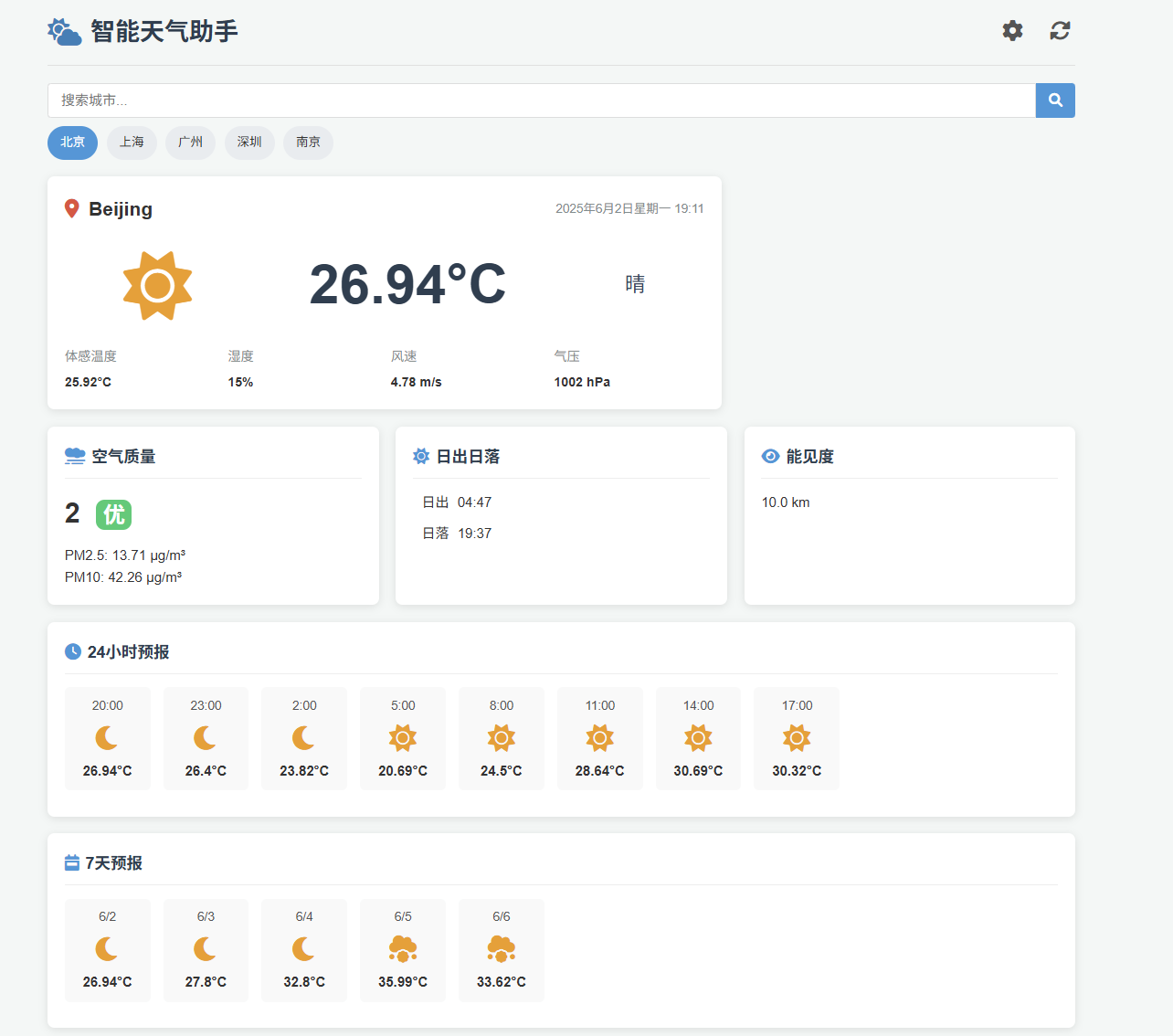
完成基本天气功能的开发
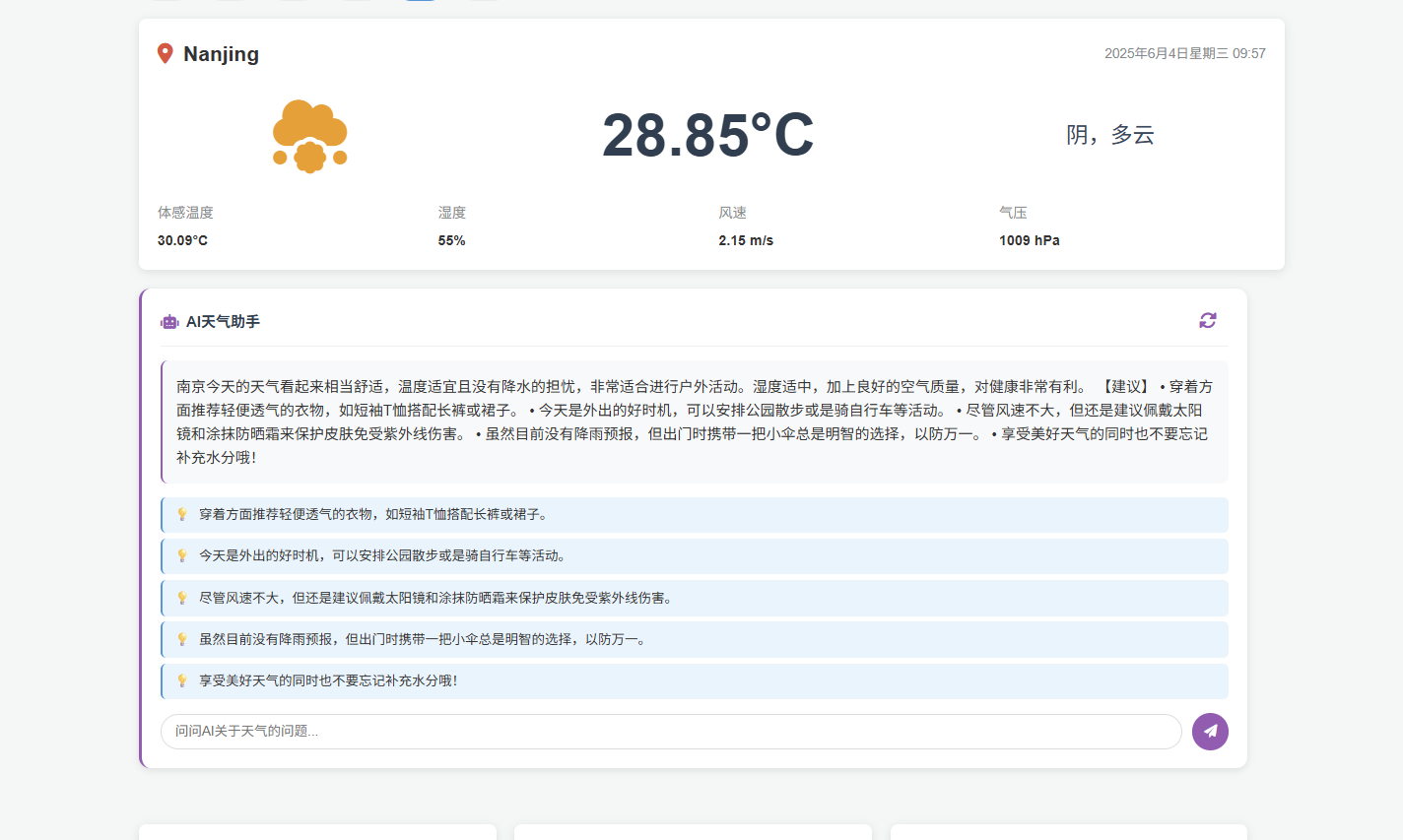
完成ai建议功能
没有一夜暴富的美梦,天下掉馅饼的事情只有可能是诱惑,在得到某些好处前先想一想你配不配。
杜绝心浮气躁,用双手制造财富。
FastAPI 是一个用于构建 API 的现代、快速(高性能)的 web 框架,使用 Python 并基于标准的 Python 类型提示。
关键特性:
Starlette 负责web部分
Starlette 是 FastAPI 的底层 ASGI(异步服务器网关接口)框架,为 FastAPI 提供了异步编程能力和高性能的网络通信支持。
ASGI(Asynchronous Server Gateway Interface )是一种用于连接 Python Web 服务器和应用程序框架的异步接口标准 ,旨在支持现代 Web 协议(如 WebSocket、HTTP/2)和异步编程模型
Pydantic负责
Pydantic 负责 FastAPI 的数据验证、序列化和自动文档生成
HTTP协议 是Hyper Text Transfer Protocol(超文本传输协议)的缩写,是用于万维网(WWW: World Wide Web)服务器与本地浏览器之间传输超文本的传送协议。HTTP是一个属于应用层的面向对象的协议,由于其简捷、快速的方式,适用于分布式超媒体信息系统。它于1990年提出,经过几年的使用与发展,得到不断地完善和扩展。HTTP协议工作于客户端-服务端架构为上。浏览器作为HTTP客户端通过URL向HTTP服务端即WEB服务器发送所有请求。Web服务器根据接收到的请求后,向客户端发送响应信息。
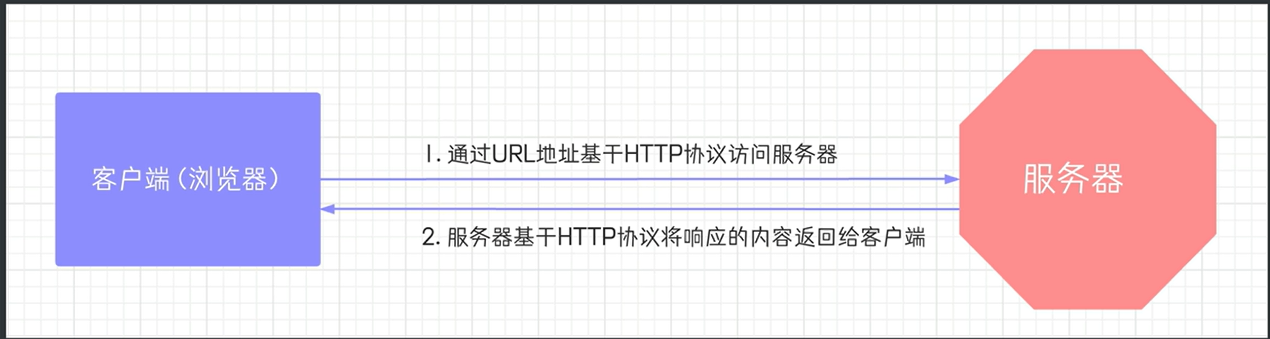
(1)基于 TCP/IP 协议
http 协议是基于 TCP/IP 协议之上的应用层协议。
(2)基于请求 - 响应模式
HTTP 协议规定,请求从客户端发出,最后服务器端响应应该请求并返回。换句话说,肯定是先从客户端开始建立通信的,服务器端在没有接收到请求之前不会发送响应。
(3)无状态保存
HTTP 是一种不保存状态,即无状态(stateless)协议。HTTP 协议自身不对请求和响应之间的通信状态进行保存。也就是说在 HTTP 这个级别,协议对于发送过的请求或响应都不做持久化处理。
使用 HTTP 协议,每当有新的请求发送时,就会有对应的新响应产生。协议本身并不保留之前一切的请求或响应报文的信息。这是为了更快地处理大量事务,确保协议的可伸缩性,而特意把 HTTP 协议设计成如此简单的。
(4)短连接
HTTP 1.0 默认使用的是短连接。浏览器和服务器每进行一次 HTTP 操作,就建立一次连接,任务结束就中断连接。
HTTP 1.1 起,默认使用长连接。要使用长连接,客户端和服务器的 HTTP 首部的 Connection 都要设置为 keep - alive,才能支持长连接。
HTTP 长连接,指的是复用 TCP 连接。多个 HTTP 请求可以复用同一个 TCP 连接,这就节省了 TCP 连接建立和断开的消耗。
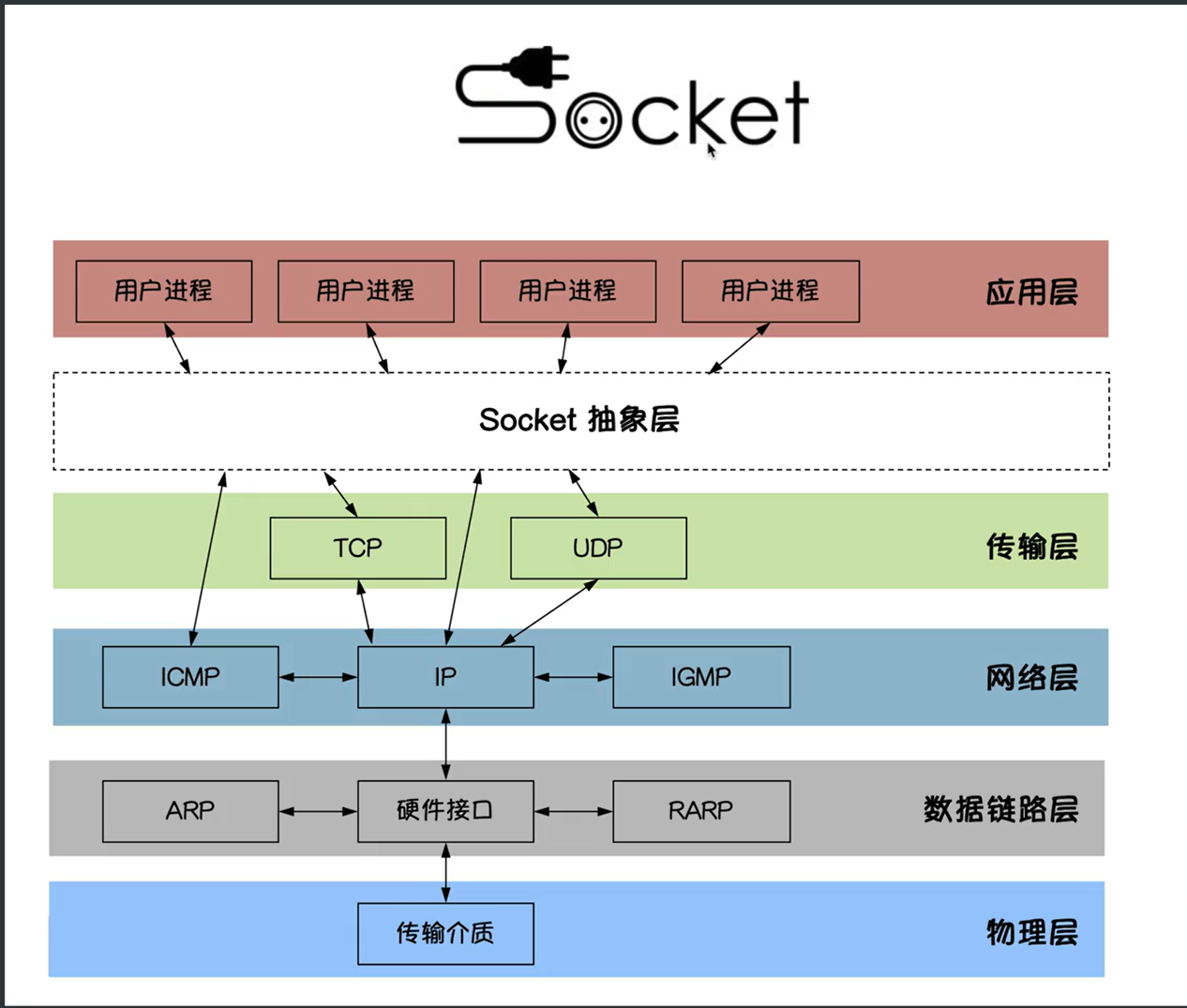
Socket(套接字)是计算机网络中用于实现进程间双向通信的端点抽象,它为应用层进程通过网络协议交换数据提供了统一的接口。具体来说,Socket 是应用层与 TCP/IP 协议族通信的中间软件抽象层,本质上是一组封装了复杂网络协议的接口,简化了开发者对底层通信细节的操作。
从功能上看,Socket 可以看作是网络通信的“电话插座”:两个设备(如客户端与服务器)通过 Socket 建立连接后,即可像电话通话一样进行数据交换,而端口号则类似于插座上的插孔,用于标识具体的通信进程,且不能被其他进程占用。此外,Socket 包含网络通信必需的五种核心信息,例如使用的协议(TCP/UDP)、本地与远程地址、端口等,构成了网络通信的基本操作单元。
总结而言,Socket 既是通信端点的逻辑概念,也是实现网络应用层交互的关键工具,其设计目标是屏蔽底层协议的复杂性,提供统一的编程接口。
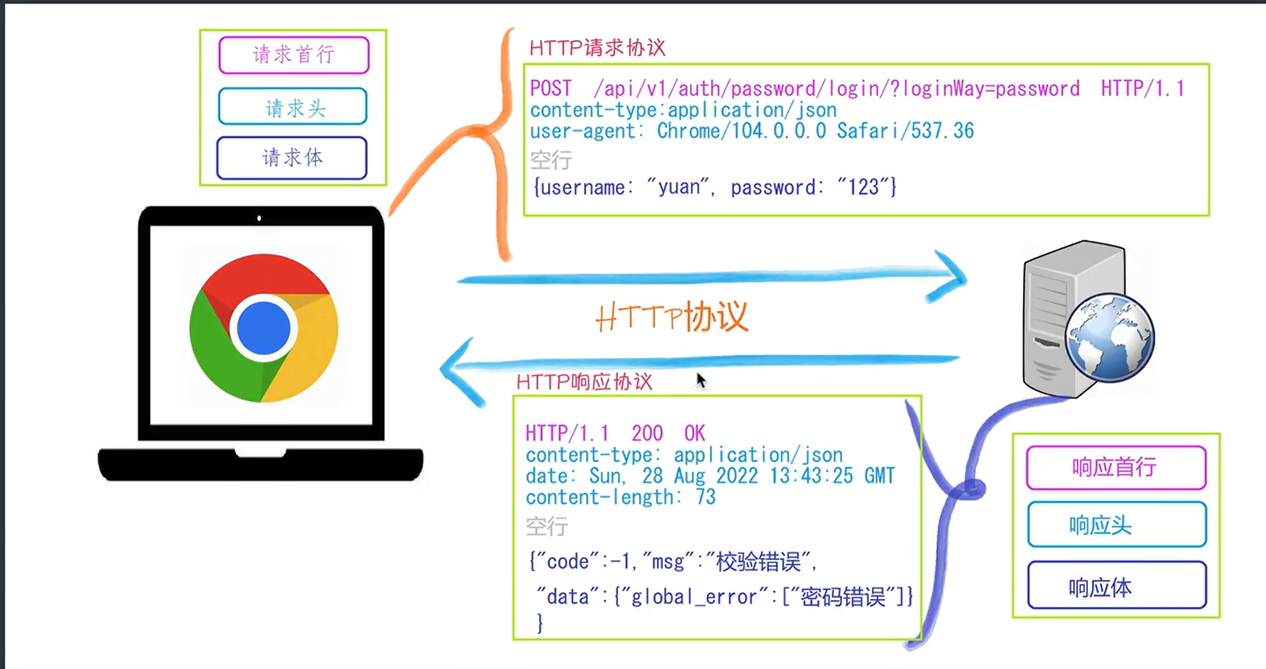
GET :请求参数通过 URL 的查询字符串(Query String)传递,数据暴露在地址栏中,例如:https://example.com ?name=value
POST :请求参数存储在请求体(Body)中传输,相对更安全,且支持传输非字符串数据(如文件、二进制等)
一个完整的URL包括:协议、ip、端口、路径、参数
例如:https://www.baidu.com/s?wd=yuan 其中https是协议,www.baidu.com 是IP,端口默认80,/s是路径,参数是wd=yuan
请求方式:get与post请求
- GET提交的数据会放在URL之后,以?分割URL和传输数据,参数之间以&相连,如EditBook?name=test1&id=123456。POST方法是把提交的数据放在HTTP包的请求体中。
- GET提交的数据大小有限制(因为浏览器对URL的长度有限制),而POST方法提交的数据没有限制
响应状态码:状态码的职责是当客户端向服务器端发送请求时,返回的请求结果。借助状态码,用户可以知道服务器端是正常处理了请求,还是出现了问题。状态码如200 OK,以3位数字和原因组成。
测试http协议格式:请求与响应
1 | #web应用程序:遵循http协议 |
测试post请求:urlencoded格式
1 | import socket |
测试post请求:json格式
1 | import requests |
通过
json=data参数,requests会自动将字典转换为 JSON 字符串,并设置请求头Content-Type: application/json,无需手动调用json.dumps()或配置 headers
SSL 验证是指通过 SSL 证书验证网站身份并确保通信安全的过程。其核心目标是确认服务器的真实性、防止身份伪造,并建立加密连接以保护数据传输的安全性
HTTPS(HyperText Transfer Protocol Secure)是以安全为目标的 HTTP 通道,通过在 HTTP 基础上加入加密和身份认证机制,确保数据传输的隐私性、完整性和服务器身份的真实性
https=http+ssl
通过
Content-Type,服务器可识别请求体(Body)的格式(如 JSON、表单数据),客户端可解析响应数据的类型(如 HTML、图片)例如:conn.send(b”HTTP/1.1 200 ok:zxj*content-type:text/html**hello world<>“)
再例如:‘HTTP/1.1 200 ok:zxj*content-type:application/json**’
在开发web应用中,有两种应用模式:
1.前后端不分离:客户端看到的内容和所有页面效果都是有服务端提供出来的
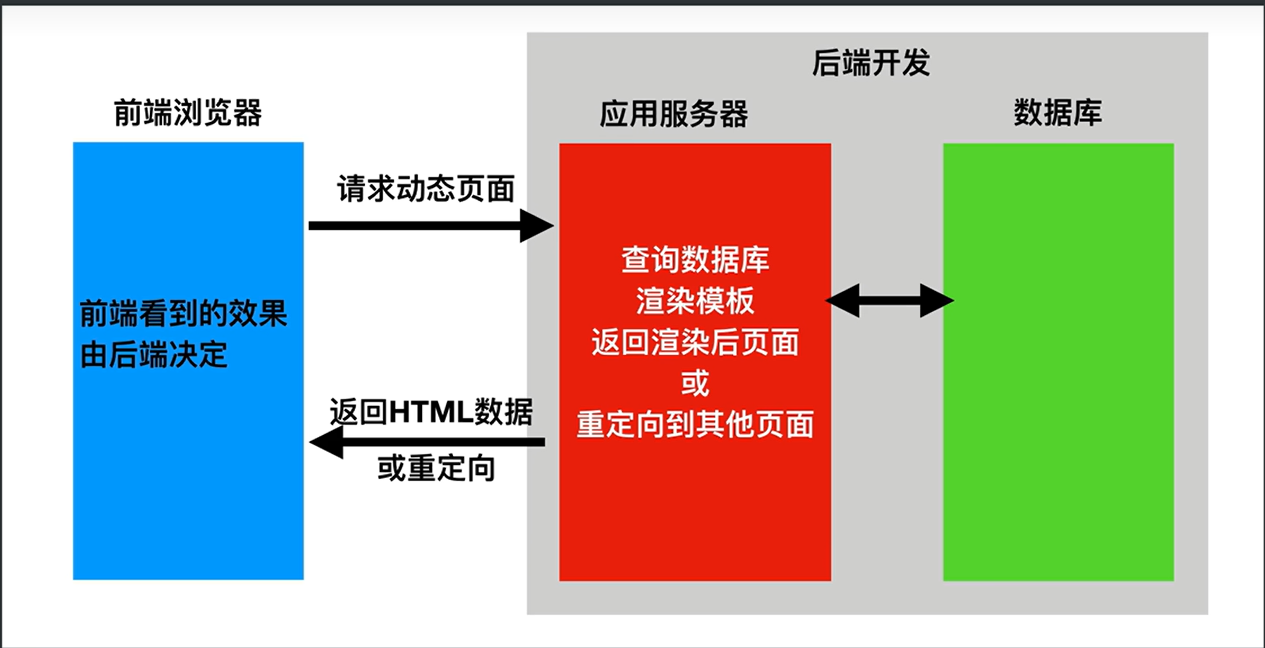
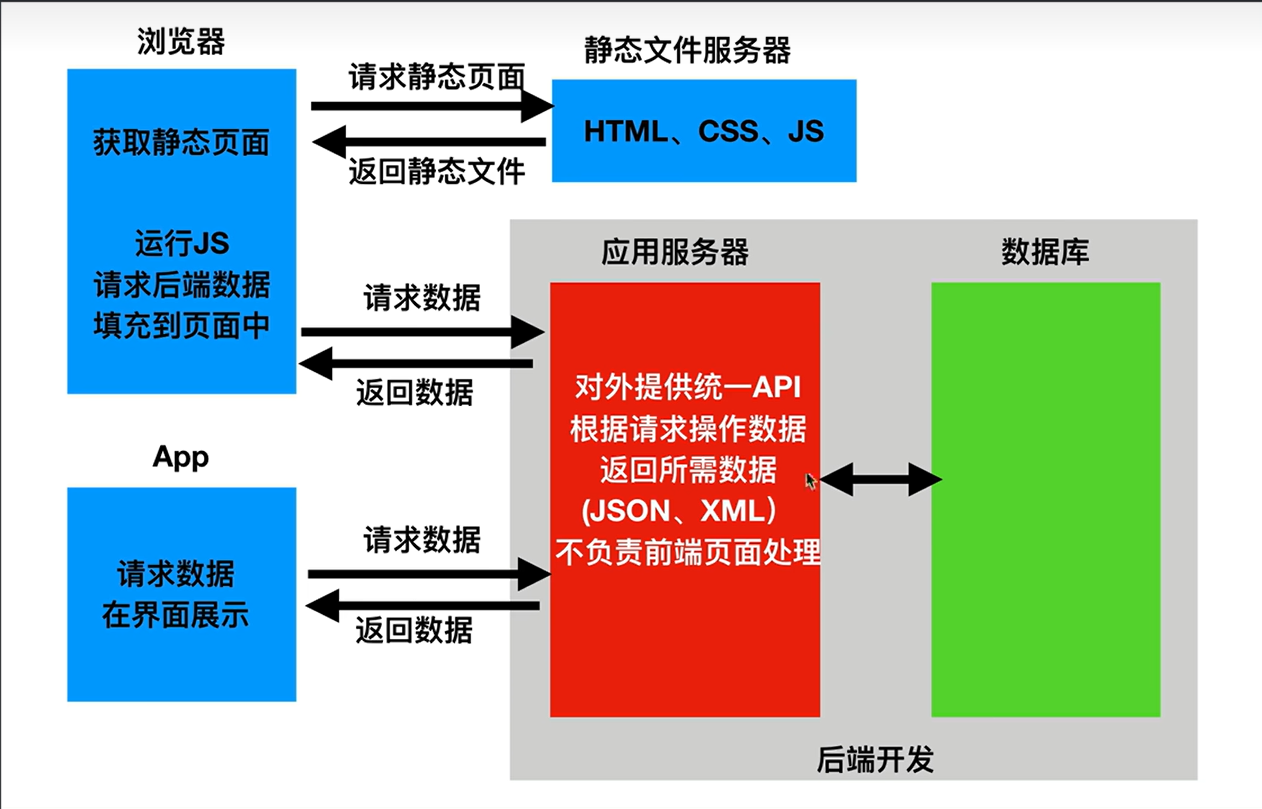
2.前后端分离:把前端的页面效果(html,css,js分离到另一个服务端,python服务端只需要返回数据即可)
前端形成一个独立的网站,服务端构成一个独立的网站
应用程序编程接口(Application Programming Interface,API接口),就是应用程序对外提供了一个操作数据的入口,这个入口可以是一个函数或类方法,也可以是一个url地址或者一个网络地址。当客户端调用这个入口,应用程序则会执行对应代码操作,给客户端完成相对应的功能。
当然,api接口在工作中是比较常见的开发内容,有时候,我们会调用其他人编写的api接口,有时候,我们也需要提供api接口给其他人操作。由此就会带来一个问题,api接口往往都是一个函数、类方法、或者url或其他网络地址,不断是哪一种,当api接口编写过程中,我们都要考虑一个问题就是这个接口应该怎么编写?接口怎么写的更加容易维护和清晰,这就需要大家在调用或者编写api接口的时候要有一个明确的编写规范!!!
为了在团队内部形成共识,防止个人习惯差异引起的混乱,我们都需要找到一种大家都觉得很好的接口实现规范,而且这种规范能够让后端写的接口,用途一目了然,减少客户端和服务端双方之间的合作成本。
目前市面上大部分公司开发人员使用的接口实现规范主要有:restful、RPC。
REST全称是Representational State Transfer,中文意思是表述(编者注:通常译为表征)性状态转移。它首次出现在2000年Roy Fielding的博士论文中。
RESTful是一种专门为Web开发而定义API接口的设计风格,尤其适用于前后端分离的应用模式中。
关键:面向资源开发
这种风格的理念认为后端开发任务就是提供数据的,对外提供的是数据资源的访问接口,所以在定义接口时,客户端访问的URL路径就表示这种要操作的数据资源。
而对于数据资源分别使用POST、DELETE、GET、UPDATE等请求动作来表达对数据的增删查改。
| 请求方法 | 请求地址 | 后端操作 |
|---|---|---|
| POST | /student/ | 增加学生 |
| GET | /student/ | 获取所有学生 |
| GET | /student/1 | 获取id为1的学生 |
| PUT | /student/1 | 修改id为1的学生 |
| DELETE | /student/1 | 删除id为1的学生 |
restful规范是一种通用的规范,不限制语言和开发框架的使用。事实上,我们可以使用任何一门语言,任何一个框架都可以实现符合restful规范的API接口。
安装:pip install fastapi
还需要一个ASGI服务器,生产环境使用Uvicorn:pip install uvicorn
ASGI(Asynchronous Server Gateway Interface )是一种异步服务器网关接口 ,为 Python Web 应用提供了标准接口,使其能够处理现代网络协议(如 WebSocket、HTTP/2 等)的异步请求。与传统的 WSGI 不同,ASGI 支持异步编程模型,允许单个请求处理多个事件(如长连接、双向通信),从而提升高并发场景下的性能
Uvicorn 是一个基于 ASGI 的高性能异步 Web 服务器,专为 Python 异步框架设计。
web应用程序=web框架+自己写的业务逻辑代码
1 | from fastapi import FastAPI#fastapi类 |
启动:uvicorn "04 fastapi_begin:app" --reload
也可以:
1 | import uvicorn |
接口文档
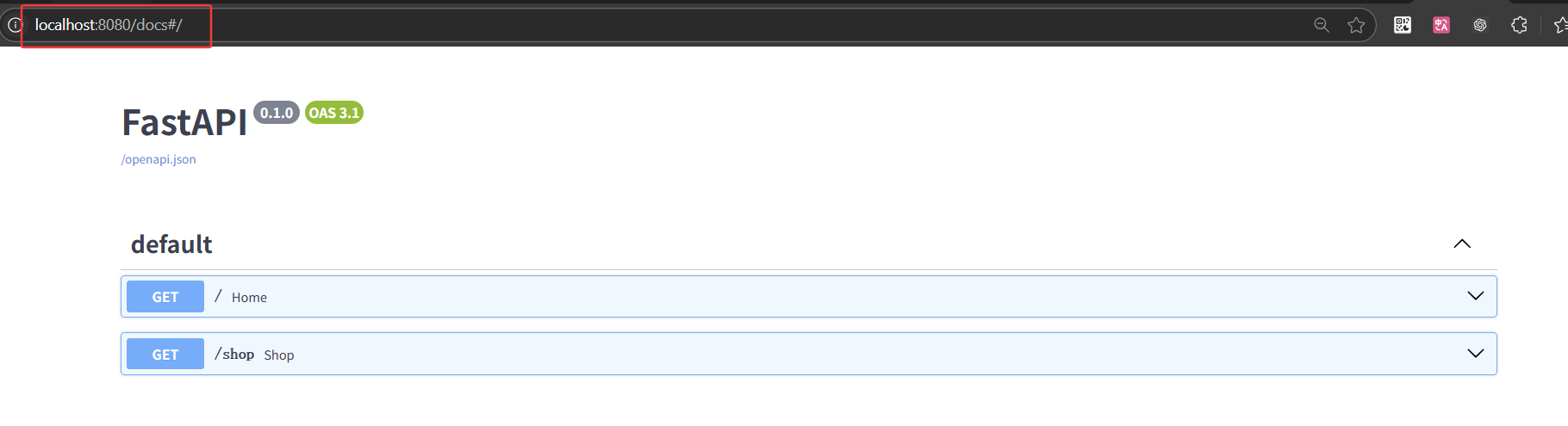
修饰器(Decorator)是 Python 中一种动态修改函数或类行为的高级功能,本质上是一个函数或类,它接受目标函数或类作为参数,并返回包装后的新函数或类对象,从而在不修改原始代码 的前提下为对象添加额外功能
1 |
路径操作修饰器参数
1 | ''' |
文件路径如下
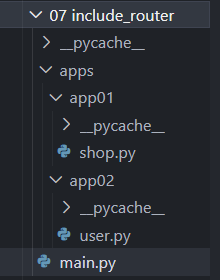
main.py
1 | from fastapi import FastAPI |
shop.py
1 | from fastapi import APIRouter |
user.py
1 | from fastapi import APIRouter |
include_router是 FastAPI 框架中用于整合路由的核心方法,其作用是将通过APIRouter定义的路由模块添加到主应用程序实例中,使这些路由在应用中生效。

以使用与 Python 格式化字符串相同的语法来声明路径”参数”或”变量”:
1 |
|
路径参数 user_id 的值将作为参数 user_id
传递给你的函数。
你可以使用标准的 Python 类型标注为函数中的路径参数声明类型。
1 |
|
在这个例子中,user_id 被声明为 int 类型。
这将为你的函数提供编辑器支持,包括错误检查、代码补全等等。
在创建路径操作时,你会发现有些情况下路径是固定的。
比如
/users/me,我们假设它用来获取关于当前用户的数据。
然后,你还可以使用路径 /user/{username}
来通过用户名获取关于特定用户的数据。
由于路径操作是按顺序依次运行的,你需要确保路径
/user/me 声明在路径 /user/{username}
之前。
如下
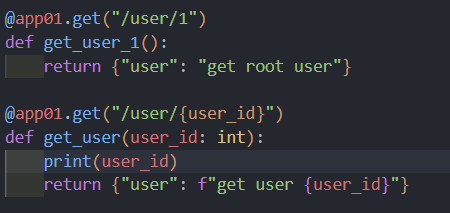

路由(Routing)是指在网络中选择数据传输路径的过程,其核心目标是将数据从源点高效、可靠地传输到目的地
cURL 是一个开源的命令行工具和跨平台的库(libcurl),用于基于 URL 语法在网络协议下进行数据传输。它支持多种协议(如 HTTP、HTTPS、FTP、SMTP 等),能够实现文件上传、下载以及与 Web 服务器的交互,常被开发者用于 API 测试、数据传输等场景
路径函数中声明不属于路径参数的其他函数参数时,它们将被自动解释为查询字符串参数,就是
url?之后用 & 分割的
key-value 键值对。
1 |
|
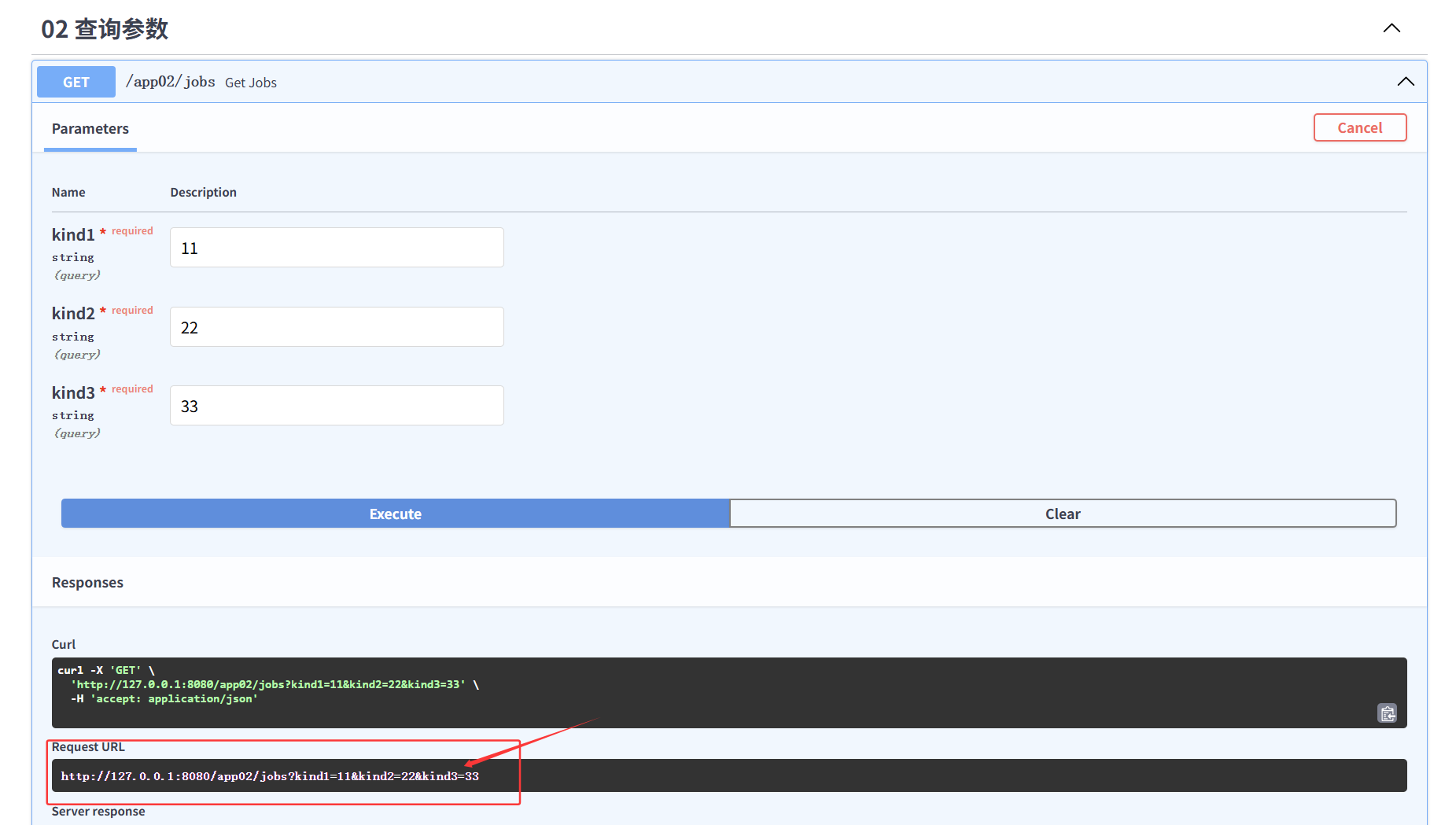
增加路径参数:kind1为路径参数
增加默认参数值
1 |
|
Request URL:
http://127.0.0.1:8080/app02/jobs/11?kind2=22&kind3=33
自python3.5开始,PEP484为python引入了类型注解(type hints),typing的主要作用有:
1.类型检查,防止运行时出现参数、返回值类型不符。
2.作为开发文档附加说明,方便使用者调用时传入和返回参数类型。
3.模块加入不会影响程序的运行不会报正式的错误,pycharm支持typing检查错误时会出现黄色警告。
type hints主要是要指示函数的输入和输出的数据类型,数据类型在typing包中,基本类型有str list dict等等,
Type Hints 是 Python 3.5 引入的功能,通过类型注解增强代码的可读性和可维护性。它允许开发者为变量、函数参数、返回值等指定预期的数据类型,从而帮助静态类型检查工具(如
mypy)捕获潜在错误,并提升 IDE 的智能提示能力。例如:
2
return f"Hello, {name}"此处
name: str表示参数需为字符串类型,-> str表示返回值类型为字符串 。
Union是当有多种可能的数据类型时使用,比如函数有可能根据不同情况有时返回str或返回list,那么就可以写成Union[list, str]
从 Python 3.10 起,
Union[X, Y]可简写为X | Y。例如int | str等价于Union[int, str]。再例如:
kind2:str|None=None
Optional是Union的一个简化,当数据类型中有可能是None时,比如有可能是str也有可能是None,则Optional[str],相当于Union[str,
None]
当你需要将数据从客户端(例如浏览器)发送给 API 时,你将其作为「请求体」发送。请求体是客户端发送给 API 的数据。响应体是 API 发送给客户端的数据。
FastAPI 基于 Pydantic ,Pydantic
主要用来做类型强制检查(校验数据)。不符合类型要求就会抛出异常。
对于 API 服务,支持类型检查非常有用,会让服务更加健壮,也会加快开发速度,因为开发者再也不用自己写一行一行的做类型检查。
安装上手 pip install pydantic
1 | from fastapi import APIRouter |
BaseModel专门用于数据验证、数据转换和序列化。在定义数据结构时继承自 BaseModel,可以:
- 自动校验数据类型:根据类中字段的类型注解,自动校验输入数据是否符合预期类型。
- 数据转换:可以自动将输入数据(例如 JSON 字符串)转换成相应的 Python 数据类型。
- 序列化输出:支持将模型实例转换成 JSON、字典等格式,便于响应输出。
在 Pydantic 中,
Field用于为模型字段提供额外的信息,比如设置默认值、描述信息、约束条件(例如长度、范围等)或别名。这可以帮助自动生成 OpenAPI 文档、增强验证或对字段进行更细粒度的控制。
field_validator是 Pydantic v2 中用于替代旧版@validator的新装饰器,专门用于为模型字段添加自定义验证逻辑。它通过更清晰的命名和更灵活的模式(如mode="before"或mode="after")提升代码可读性和验证逻辑的控制能力
field_validator和model_validator区别
field_validator专门针对单个字段 进行验证,适用于需要校验特定字段的规则(如长度、格式、类型约束)。例如验证用户名长度
model_validator作用于整个模型实例 ,适用于需要跨字段验证或全局逻辑的场景。例如检查两次密码是否一致
在 OAuth2
规范的一种使用方式(密码流)中,需要将用户名、密码作为表单字段发送,而不是
JSON。
FastAPI 可以使用 Form 组件来接收表单数据,需要先使用
pip install python-multipart 命令进行安装。
1 |
|
发送post请求:form表单数据
1 | # 目标 URL |
通过 requests.post() 的 data 参数传递表单数据,该参数接受字典或字符串格式的数据。requests 会自动将其编码为 application/x-www-form-urlencoded 格式
导入必要库
1 | from fastapi import File,UploadFile |
通过字节上传
1 |
|
多文件上传
1 |
|
UploadFile上传,绝对路径
1 |
|
UploadFile是 FastAPI 提供的一个类,用于处理文件上传。与直接将文件内容读取为字节流(例如 bytes相比,UploadFile有以下优点:
- 内存优化:它采用了文件对象的方式处理上传文件,不必将整个文件内容一次性加载到内存中,适合处理大文件。
- 异步支持:支持异步操作,可以用异步方式读取文件内容,提高性能。
- 文件元数据:提供文件名、内容类型等元数据信息,通过属性
filename、content_type获取。- 文件接口:通过 file 属性获取一个类文件对象,可以像操作普通文件一样读取或保存上传的文件。
有些情况下我们希望能直接访问 Request 对象。例如我们在路径操作函数中想获取客户端的 IP 地址,需要在函数中声明 Request 类型的参数,FastAPI 就会自动传递 Request 对象给这个参数,我们就可以获取到 Request 对象及其属性信息,例如 header、url、cookie、session 等。
1 |
|
在 Web 开发中,需要请求很多静态资源文件(不是由服务器生成的文件),如 css/js 和图片文件等。
main.py
1 | from fastapi.staticfiles import StaticFiles |


静态网站
完全由静态文件(HTML、CSS、JavaScript)组成,内容固定不变,所有页面在开发时已预生成,无需动态计算或数据库支持
动态网站
内容根据用户请求实时生成,通常依赖数据库和服务器端编程(如PHP、Python、Node.js),能提供个性化和交互功能
StaticFiles是 FastAPI(实际来自 Starlette)提供的一个类,用于挂载和服务静态文件目录。 它的作用是让你可以通过 HTTP 路径直接访问服务器上的静态资源(如图片、CSS、JS 文件等)。
mount()方法用于将一个完整的应用或静态文件目录挂载到主 FastAPI 应用的某个路径下。这样,访问指定路径时,请求会被转发到挂载的应用或目录。
response_model是 FastAPI 路由装饰器(如
@app.post、@app.get
等)中的一个参数,用于指定接口响应的数据模型。它的作用是:
1 | class UserIn(BaseModel): |
案例:
通过上面的例子,我们学到了如何用 response_model 控制响应体结构,但是,如果它们实际上没有存储,则可能要从结果中忽略它们。例如,如果 model 在 NoSQL 数据库中具有很多可选属性,但是不想发送很长的 JSON 响应,其中包含默认值。
1 | class Item(BaseModel): |
设置后返回为:
1 | item01 |
当你设置
response_model_exclude_unset=True时,返回的响应数据只包含被显式设置过的字段,没有被赋值的(即使用默认值且未传递的)字段不会出现在响应中。
response_model_exclude_defaults 作用:排除所有值为默认值的字段。
response_model_exclude_none 作用:排除所有值为
None 的字段。
response_model_include 作用:只返回指定字段
response_model_exclude 作用:排除指定字段,不在响应中返回。
要了解 jinja2,那么需要先理解模板的概念。模板在 Python 的 web 开发中广泛使用,它能够有效的将业务逻辑和页面逻辑分开,使代码可读性增强、并且更加容易理解和维护。
模板简单来说就是一个其中包涵占位变量表示动态的部分的文件,模板文件在经过动态赋值后,返回给用户。
jinja2 是 Flask 作者开发的一个模板系统,起初是仿 django 模板的一个模板引擎,为 Flask 提供模板支持,由于其灵活,快速和安全等优点被广泛使用。
在 jinja2 中,存在三种语法:
- 变量取值
{{ }}- 控制结构
{% %}
应用于前后端不分离,模板html+数据库,返回动态网站
main.py
1 | from fastapi.templating import Jinja2Templates |
index.html
1 | <!DOCTYPE html> |

变量可以通过“过滤器”进行修改,过滤器可以理解为是 jinja2 里面的内置函数和字符串处理函数。常用的过滤器有:
| 过滤器名称 | 说明 |
|---|---|
| capitalize | 把值的首字母转换成大写,其他字母转换为小写 |
| lower | 把值转换成小写形式 |
| title | 把值中每个单词的首字母都转换成大写 |
| trim | 把值的首尾空格去掉 |
| striptags | 渲染之前把值中所有的 HTML 标签都删掉 |
| join | 拼接多个值为字符串 |
| round | 默认对数字进行四舍五入,也可以用参数进行控制 |
| safe | 渲染时值不转义 |
那么如何使用这些过滤器呢?只需要在变量后面使用管道 (|) 分割,多个过滤器可以链式调用,前一个过滤器的输出会作为后一个过滤器的输入。
例如:<h1>Hello, {{ name|upper }}!</h1>
<li>{{ book|title }}</li>
jinja2中的if语句类似与Python的if语句,它也具有单分支,多分支等多种结构,不同的是,条件语句不需要使用冒号结尾,而结束控制语句,需要使用endif关键字
1 | <p>影视区</p> |
jinja2中的for循环用于迭代Python的数据类型,包括列表、元组和字典。在jinja2中不存在while循环。
1 | {% for book in books %} |
在大型的 Web 开发中,我们肯定会用到数据库操作,那么 FastAPI 也支持数据库的开发,你可以用 PostgreSQL、MySQL、SQLite、Oracle 等。本文用 SQLite 为例。我们看下在 FastAPI 是如何操作设计数据库的。
FastAPI 是一个很优秀的框架,但是缺少一个合适的 ORM,官方代码里面使用的是 SQLAlchemy,Tortoise ORM 是受 Django 启发的易于使用的异步 ORM(对象关系映射器)。
Tortoise ORM 目前支持以下数据库:
安装:pip install tortoise-orm
1. 一对一关系(One-to-One)
2. 一对多关系(One-to-Many)
3. 多对多关系(Many-to-Many)
4. 自引用关系(Self-Referencing)
5. 继承关系(Inheritance)
1 | from tortoise.models import Model |
ORM(Object Relational Mapping,对象关系映射)是一种程序设计技术,主要用于实现面向对象编程语言 与关系型数据库 之间的数据转换。其核心思想是通过对象模型与数据库表结构的映射,将数据库操作转化为面向对象的操作,从而简化开发流程并提升代码的可维护性
Tortoise ORM 是一款专为 Python 异步环境设计的轻量级对象关系映射(ORM)框架,其设计灵感来源于 Django ORM,但专注于异步编程场景,适用于 FastAPI、Sanic 等基于
asyncio的现代 Web 框架。
关系型数据库与非关系型数据库
关系型数据库 以表格形式存储数据,数据按行和列组织,列代表属性(字段),行代表记录。例如,用户表可能包含
id、name、典型代表 :MySQL、Oracle、PostgreSQL。
非关系型数据库(NoSQL) 采用非结构化或半结构化存储,常见的类型包括:
文档型 (如 MongoDB):以 JSON 或 BSON 格式存储数据。
键值型 (如 Redis):通过键直接访问值。
列存储 (如 Cassandra):按列而非行组织数据。
图数据库
(如 Neo4j):以节点和边表示数据关系
docker 安装 mysql:
拉取 MySQL 镜像:docker pull mysql
运行 MySQL 容器:
1 | docker run --name fastapi -e MYSQL_ROOT_PASSWORD=root -p 3306:3306 -d mysql |
-p表示端口映射 –restart=always表示容器退出时总是重启 –name表示容器命名 –privileged=true表示赋予容器权限修改宿主文件权利 -v /home/mysql/log:/var/log/mysql表示容器日志挂载到宿主机 -v /home/mysql/data:/var/lib/mysql表示容器存储文件挂载到宿主机 -v /home/mysql/conf/my.cnf:/etc/mysql/my.cnf表示容器配置文件挂载到宿主机 -e MYSQL_ROOT_PASSWORD=a12bCd3_W45pUq6表示设置mysql的root用户密码,建议用强密码 -d表示后台运行
启动这个 MySQL 容器:docker start fastapi
进入 MySQL 容器:docker exec -it fastapi bash
这条命令的作用是:
docker exec:在已运行的 Docker 容器中执行命令。-it:-i表示交互式操作,-t分配一个伪终端(让你像在终端一样操作)。fastapi:这是你要进入的容器名称(你的 MySQL 容器名)。bash:在容器内启动 bash shell。这条命令会让你进入名为
fastapi的容器,并获得一个 bash 命令行界面,就像登录到一台 Linux 服务器一样,可以在里面执行各种命令(比如登录 MySQL、查看日志等)。
登录 MySQL:mysql -u root -p
从主机直接连接:mysql -h 127.0.0.1 -P 3306 -u root -p
1 | TORTOISE_ORM = { |
aerich 是一种 ORM 迁移工具,需要结合 tortoise 异步 orm 框架使用。安装 aerich
pip install aerich
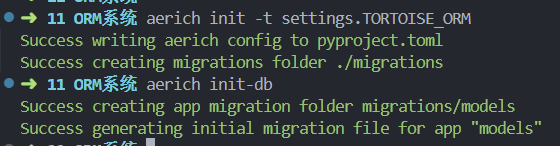
aerich init -t settings.TORTOISE_ORM # TORTOISE_ORM 配置的位置
初始化完会在当前目录生成一个文件:pyproject.toml 和一个文件夹:migrations
- pyproject.toml:保存配置文件路径,低版本可能是 aerich.ini
- migrations:存放迁移文件
aerich init-db
修改model类,重新生成迁移文件
aerich migrate
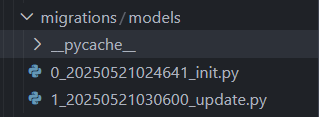
aerich upgrade

aerich downgrade
aerich history
register_tortoise是 Tortoise ORM 提供的一个工具函数,用于在 FastAPI 等异步框架中快速集成和管理 Tortoise ORM 的生命周期(如启动时初始化数据库连接,关闭时释放资源)。其核心作用是简化 Tortoise ORM 的配置和自动化管理,开发者只需一行代码即可完成复杂的初始化流程
api.stud
1 | from fastapi import APIRouter |
在 FastAPI 和 Tortoise ORM 中,
async和await用于异步编程,主要原因如下:
- 异步 I/O 操作 数据库查询(如 Student.all())是耗时的 I/O 操作。使用
async/await可以在等待数据库响应时,不阻塞主线程,提高应用的并发性能。- FastAPI 支持异步路由 FastAPI 支持异步(
async def)的路由函数,这样可以充分利用 Python 的异步特性,提升 Web 服务的吞吐量。- Tortoise ORM 的方法是异步的 Tortoise ORM 的数据库操作方法(如
.all()、.create()等)本身就是异步方法,必须用await调用,并且所在函数必须用async def声明。
FastAPI 的「中间件(middleware)」就是 在请求进入路由函数之前、响应离开路由函数之后 插入的 通用处理逻辑;
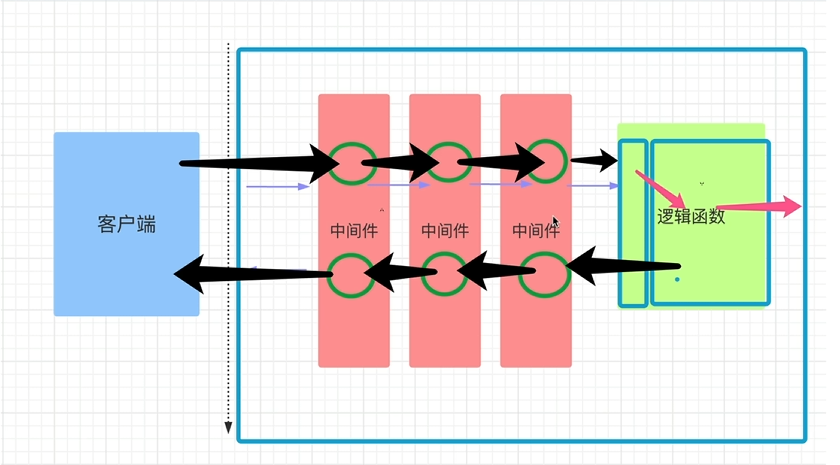
真实场景举例 —— 统一鉴权 + 日志
需求 • 所有 API(/user、/order、/admin …)都必须验证 JWT; • 无论成功或失败,都记录一条结构化日志(URL、耗时、用户 ID、响应码); • 鉴权失败直接 401,不再进入任何路由。
1 | from fastapi import FastAPI, Request |
注意中间件添加的顺序
FastAPI/Starlette 把后添加的中间件包在最外层(洋葱最外层)
所以 mid2 在外层,请求先打印
1 | mid2 request |
CORS(Cross-Origin Resource Sharing,跨源资源共享) 一句话:浏览器为了安全,默认禁止网页去“别的域名/端口/协议”拿数据;CORS 是一套 HTTP 机制,让服务器告诉浏览器“我允许谁来拿、拿什么、怎么拿”。
同源(Same-Origin)
浏览器把下面三个部分合称 “源”(origin):
http: / https:)example.com / sub.example.com
算不同):80 / :8080)只有当 协议 + 域名 + 端口 都完全一致时,才叫同源。 此时前端 JS 可以无限制地访问该源下的资源。
跨域(Cross-Origin)
只要 协议、域名、端口 中的任意一个不同,就是跨域。
正常来说,服务器为了保护数据,会拒绝跨域的响应,但是通过cors可以允许跨域,因此,CORS 不是“绕过”安全限制,而是服务器主动声明的“安全白名单”。
1 | # 为 FastAPI 应用添加 CORS(跨源资源共享)中间件 |
查看所有端口占用情况:netstat -ano
查询特定端口是否被占用:netstat -ano | findstr 8080
使用 taskkill
命令强制结束进程:taskkill /PID 进程ID /F
通过 PID 查找进程:tasklist | findstr PID
获取当前文件的绝对路径:base_dir = os.path.dirname(os.path.abspath(__file__))
拼接路径:img_dir = os.path.join(base_dir, "../imgs")
查看数据库列表:SHOW DATABASES;
选择数据库:USE 数据库名;
删除数据库:DROP DATABASE 数据库名;
创建数据库:CREATE DATABASE 数据库名;
登录 MySQL:mysql -u root -p
退出:exit
linux安装docker:sudo apt-get update && sudo apt-get install docker.io
查看 Docker
版本信息:docker version
查看镜像:docker images
查看所有的容器:docker ps -a
systemctl是 systemd 系统和服务管理器的核心工具,用于管理系统和服务的状态及配置。
mysql-client 是 MySQL
数据库的命令行客户端工具。它允许你通过命令行连接和操作 MySQL
数据库服务器,比如执行 SQL 查询、管理数据库和用户等。
常用命令格式如下:mysql -h 主机地址 -P 端口号 -u 用户名 -p
你可以在终端输入以下命令来检查是否已安装
mysql-client:mysql --version
可以使用以下命令安装:sudo apt-get update sudo apt-get install mysql-client
sudo apt-get update这个命令的作用是更新本地软件包列表。
停止并删除容器:docker stop fastapi docker rm fastapi
fastapi一个项目FastAPI进阶_哔哩哔哩_bilibili
fastapi相关知识的补充Python 异步编程 - 搞明白 async, await (继续解释 yield)_哔哩哔哩_bilibili
复习:这门课程得主要目的是通过真实的数据,以实战的方式了解数据分析的流程和熟悉数据分析python的基本操作。知道了课程的目的之后,我们接下来我们要正式的开始数据分析的实战教学,完成kaggle上泰坦尼克的任务,实战数据分析全流程。 这里有两份资料: 教材《Python for Data Analysis》和 baidu.com & google.com(善用搜索引擎)
数据集下载 https://www.kaggle.com/c/titanic/overview
1 | #写入代码 |
【提示】如果加载失败,学会如何在你的python环境下安装numpy和pandas这两个库
1 | #写入代码 |
1 | #写入代码 |
/workspace/WuTeachingAI/hands-on-data-analysis/myself/titanic/test.csv
/workspace/WuTeachingAI/hands-on-data-analysis/myself/titanic/train.csv| PassengerId | Survived | Pclass | Name | Sex | Age | SibSp | Parch | Ticket | Fare | Cabin | Embarked | |
|---|---|---|---|---|---|---|---|---|---|---|---|---|
| 0 | 1 | 0 | 3 | Braund, Mr. Owen Harris | male | 22.0 | 1 | 0 | A/5 21171 | 7.2500 | NaN | S |
| 1 | 2 | 1 | 1 | Cumings, Mrs. John Bradley (Florence Briggs Th… | female | 38.0 | 1 | 0 | PC 17599 | 71.2833 | C85 | C |
| 2 | 3 | 1 | 3 | Heikkinen, Miss. Laina | female | 26.0 | 0 | 0 | STON/O2. 3101282 | 7.9250 | NaN | S |
| 3 | 4 | 1 | 1 | Futrelle, Mrs. Jacques Heath (Lily May Peel) | female | 35.0 | 1 | 0 | 113803 | 53.1000 | C123 | S |
| 4 | 5 | 0 | 3 | Allen, Mr. William Henry | male | 35.0 | 0 | 0 | 373450 | 8.0500 | NaN | S |
【提示】相对路径载入报错时,尝试使用os.getcwd()查看当前工作目录。
【思考】知道数据加载的方法后,试试pd.read_csv()和pd.read_table()的不同,如果想让他们效果一样,需要怎么做?了解一下’.tsv’和’.csv’的不同,如何加载这两个数据集?
【总结】加载的数据是所有工作的第一步,我们的工作会接触到不同的数据格式(eg:.csv;.tsv;.xlsx),但是加载的方法和思路都是一样的,在以后工作和做项目的过程中,遇到之前没有碰到的问题,要多多查资料吗,使用googel,了解业务逻辑,明白输入和输出是什么。
1 | # pd.read_csv() 和 pd.read_table() 本质上非常相似,主要区别在于默认的分隔符参数。 |
1 | #写入代码 |
PassengerId Survived Pclass \
0 1 0 3
1 2 1 1
2 3 1 3
3 4 1 1
4 5 0 3
.. ... ... ...
886 887 0 2
887 888 1 1
888 889 0 3
889 890 1 1
890 891 0 3
Name Sex Age SibSp \
0 Braund, Mr. Owen Harris male 22.0 1
1 Cumings, Mrs. John Bradley (Florence Briggs Th... female 38.0 1
2 Heikkinen, Miss. Laina female 26.0 0
3 Futrelle, Mrs. Jacques Heath (Lily May Peel) female 35.0 1
4 Allen, Mr. William Henry male 35.0 0
.. ... ... ... ...
886 Montvila, Rev. Juozas male 27.0 0
887 Graham, Miss. Margaret Edith female 19.0 0
888 Johnston, Miss. Catherine Helen "Carrie" female NaN 1
889 Behr, Mr. Karl Howell male 26.0 0
890 Dooley, Mr. Patrick male 32.0 0
Parch Ticket Fare Cabin Embarked
0 0 A/5 21171 7.2500 NaN S
1 0 PC 17599 71.2833 C85 C
2 0 STON/O2. 3101282 7.9250 NaN S
3 0 113803 53.1000 C123 S
4 0 373450 8.0500 NaN S
.. ... ... ... ... ...
886 0 211536 13.0000 NaN S
887 0 112053 30.0000 B42 S
888 2 W./C. 6607 23.4500 NaN S
889 0 111369 30.0000 C148 C
890 0 370376 7.7500 NaN Q
[891 rows x 12 columns]【思考】什么是逐块读取?为什么要逐块读取呢?
【提示】大家可以chunker(数据块)是什么类型?用for循环打印出来出处具体的样子是什么?
1 | # **什么是逐块读取?** |
PassengerId => 乘客ID
Survived => 是否幸存
Pclass => 乘客等级(1/2/3等舱位)
Name => 乘客姓名
Sex => 性别
Age => 年龄
SibSp => 堂兄弟/妹个数
Parch => 父母与小孩个数
Ticket => 船票信息
Fare => 票价
Cabin => 客舱
Embarked => 登船港口
1 | #写入代码 |
| 是否幸存 | 仓位等级 | 姓名 | 性别 | 年龄 | 兄弟姐妹个数 | 父母子女个数 | 船票信息 | 票价 | 客舱 | 登船港口 | |
|---|---|---|---|---|---|---|---|---|---|---|---|
| 乘客ID | |||||||||||
| 1 | 0 | 3 | Braund, Mr. Owen Harris | male | 22.0 | 1 | 0 | A/5 21171 | 7.2500 | NaN | S |
| 2 | 1 | 1 | Cumings, Mrs. John Bradley (Florence Briggs Th… | female | 38.0 | 1 | 0 | PC 17599 | 71.2833 | C85 | C |
| 3 | 1 | 3 | Heikkinen, Miss. Laina | female | 26.0 | 0 | 0 | STON/O2. 3101282 | 7.9250 | NaN | S |
| 4 | 1 | 1 | Futrelle, Mrs. Jacques Heath (Lily May Peel) | female | 35.0 | 1 | 0 | 113803 | 53.1000 | C123 | S |
| 5 | 0 | 3 | Allen, Mr. William Henry | male | 35.0 | 0 | 0 | 373450 | 8.0500 | NaN | S |
【思考】所谓将表头改为中文其中一个思路是:将英文列名表头替换成中文。还有其他的方法吗?
导入数据后,你可能要对数据的整体结构和样例进行概览,比如说,数据大小、有多少列,各列都是什么格式的,是否包含null等
1 | #写入代码 |
<class 'pandas.core.frame.DataFrame'>
Index: 891 entries, 1 to 891
Data columns (total 11 columns):
# Column Non-Null Count Dtype
--- ------ -------------- -----
0 是否幸存 891 non-null int64
1 仓位等级 891 non-null int64
2 姓名 891 non-null object
3 性别 891 non-null object
4 年龄 714 non-null float64
5 兄弟姐妹个数 891 non-null int64
6 父母子女个数 891 non-null int64
7 船票信息 891 non-null object
8 票价 891 non-null float64
9 客舱 204 non-null object
10 登船港口 889 non-null object
dtypes: float64(2), int64(4), object(5)
memory usage: 83.5+ KB| 是否幸存 | 仓位等级 | 年龄 | 兄弟姐妹个数 | 父母子女个数 | 票价 | |
|---|---|---|---|---|---|---|
| count | 891.000000 | 891.000000 | 714.000000 | 891.000000 | 891.000000 | 891.000000 |
| mean | 0.383838 | 2.308642 | 29.699118 | 0.523008 | 0.381594 | 32.204208 |
| std | 0.486592 | 0.836071 | 14.526497 | 1.102743 | 0.806057 | 49.693429 |
| min | 0.000000 | 1.000000 | 0.420000 | 0.000000 | 0.000000 | 0.000000 |
| 25% | 0.000000 | 2.000000 | 20.125000 | 0.000000 | 0.000000 | 7.910400 |
| 50% | 0.000000 | 3.000000 | 28.000000 | 0.000000 | 0.000000 | 14.454200 |
| 75% | 1.000000 | 3.000000 | 38.000000 | 1.000000 | 0.000000 | 31.000000 |
| max | 1.000000 | 3.000000 | 80.000000 | 8.000000 | 6.000000 | 512.329200 |
【提示】有多个函数可以这样做,你可以做一下总结
1 | #写入代码 |
| 是否幸存 | 仓位等级 | 姓名 | 性别 | 年龄 | 兄弟姐妹个数 | 父母子女个数 | 船票信息 | 票价 | 客舱 | 登船港口 | |
|---|---|---|---|---|---|---|---|---|---|---|---|
| 乘客ID | |||||||||||
| 1 | 0 | 3 | Braund, Mr. Owen Harris | male | 22.0 | 1 | 0 | A/5 21171 | 7.2500 | NaN | S |
| 2 | 1 | 1 | Cumings, Mrs. John Bradley (Florence Briggs Th… | female | 38.0 | 1 | 0 | PC 17599 | 71.2833 | C85 | C |
| 3 | 1 | 3 | Heikkinen, Miss. Laina | female | 26.0 | 0 | 0 | STON/O2. 3101282 | 7.9250 | NaN | S |
| 4 | 1 | 1 | Futrelle, Mrs. Jacques Heath (Lily May Peel) | female | 35.0 | 1 | 0 | 113803 | 53.1000 | C123 | S |
| 5 | 0 | 3 | Allen, Mr. William Henry | male | 35.0 | 0 | 0 | 373450 | 8.0500 | NaN | S |
| 6 | 0 | 3 | Moran, Mr. James | male | NaN | 0 | 0 | 330877 | 8.4583 | NaN | Q |
| 7 | 0 | 1 | McCarthy, Mr. Timothy J | male | 54.0 | 0 | 0 | 17463 | 51.8625 | E46 | S |
| 8 | 0 | 3 | Palsson, Master. Gosta Leonard | male | 2.0 | 3 | 1 | 349909 | 21.0750 | NaN | S |
| 9 | 1 | 3 | Johnson, Mrs. Oscar W (Elisabeth Vilhelmina Berg) | female | 27.0 | 0 | 2 | 347742 | 11.1333 | NaN | S |
| 10 | 1 | 2 | Nasser, Mrs. Nicholas (Adele Achem) | female | 14.0 | 1 | 0 | 237736 | 30.0708 | NaN | C |
| 11 | 1 | 3 | Sandstrom, Miss. Marguerite Rut | female | 4.0 | 1 | 1 | PP 9549 | 16.7000 | G6 | S |
| 12 | 1 | 1 | Bonnell, Miss. Elizabeth | female | 58.0 | 0 | 0 | 113783 | 26.5500 | C103 | S |
| 13 | 0 | 3 | Saundercock, Mr. William Henry | male | 20.0 | 0 | 0 | A/5. 2151 | 8.0500 | NaN | S |
| 14 | 0 | 3 | Andersson, Mr. Anders Johan | male | 39.0 | 1 | 5 | 347082 | 31.2750 | NaN | S |
| 15 | 0 | 3 | Vestrom, Miss. Hulda Amanda Adolfina | female | 14.0 | 0 | 0 | 350406 | 7.8542 | NaN | S |
1 | #写入代码 |
1 | #写入代码 |
| 是否幸存 | 仓位等级 | 姓名 | 性别 | 年龄 | 兄弟姐妹个数 | 父母子女个数 | 船票信息 | 票价 | 客舱 | 登船港口 | |
|---|---|---|---|---|---|---|---|---|---|---|---|
| 乘客ID | |||||||||||
| 1 | False | False | False | False | False | False | False | False | False | True | False |
| 2 | False | False | False | False | False | False | False | False | False | False | False |
| 3 | False | False | False | False | False | False | False | False | False | True | False |
| 4 | False | False | False | False | False | False | False | False | False | False | False |
| 5 | False | False | False | False | False | False | False | False | False | True | False |
【总结】上面的操作都是数据分析中对于数据本身的观察
【思考】对于一个数据,还可以从哪些方面来观察?找找答案,这个将对下面的数据分析有很大的帮助
1 | #写入代码 |
【总结】数据的加载以及入门,接下来就要接触数据本身的运算,我们将主要掌握numpy和pandas在工作和项目场景的运用。
复习:数据分析的第一步,加载数据我们已经学习完毕了。当数据展现在我们面前的时候,我们所要做的第一步就是认识他,今天我们要学习的就是了解字段含义以及初步观察数据。
我们学习pandas的基础操作,那么上一节通过pandas加载之后的数据,其数据类型是什么呢?
开始前导入numpy和pandas
1 | import numpy as np |
1 | #我们举的例子 |
Ohio 35000
Texas 71000
Oregon 16000
Utah 5000
dtype: int641 | #我们举的例子 |
| state | year | pop | |
|---|---|---|---|
| 0 | Ohio | 2000 | 1.5 |
| 1 | Ohio | 2001 | 1.7 |
| 2 | Ohio | 2002 | 3.6 |
| 3 | Nevada | 2001 | 2.4 |
| 4 | Nevada | 2002 | 2.9 |
| 5 | Nevada | 2003 | 3.2 |
1 | #写入代码 |
也可以加载上一节课保存的”train_chinese.csv”文件。通过翻译版train_chinese.csv熟悉了这个数据集,然后我们对trian.csv来进行操作 #### 1.4.3 任务三:查看DataFrame数据的每列的名称
1 | #写入代码 |
Index(['PassengerId', 'Survived', 'Pclass', 'Name', 'Sex', 'Age', 'SibSp',
'Parch', 'Ticket', 'Fare', 'Cabin', 'Embarked'],
dtype='object')1 | #写入代码 |
0 NaN
1 C85
2 NaN
3 C123
4 NaN
5 NaN
6 E46
7 NaN
8 NaN
9 NaN
Name: Cabin, dtype: object1 | #写入代码 |
0 NaN
1 C85
2 NaN
3 C123
4 NaN
5 NaN
6 E46
7 NaN
8 NaN
9 NaN
Name: Cabin, dtype: object经过我们的观察发现一个测试集test_1.csv有一列是多余的,我们需要将这个多余的列删去
1 | #写入代码 |
| Unnamed: 0 | PassengerId | Survived | Pclass | Name | Sex | Age | SibSp | Parch | Ticket | Fare | Cabin | Embarked | a | |
|---|---|---|---|---|---|---|---|---|---|---|---|---|---|---|
| 0 | 0 | 1 | 0 | 3 | Braund, Mr. Owen Harris | male | 22.0 | 1 | 0 | A/5 21171 | 7.2500 | NaN | S | 100 |
| 1 | 1 | 2 | 1 | 1 | Cumings, Mrs. John Bradley (Florence Briggs Th… | female | 38.0 | 1 | 0 | PC 17599 | 71.2833 | C85 | C | 100 |
| 2 | 2 | 3 | 1 | 3 | Heikkinen, Miss. Laina | female | 26.0 | 0 | 0 | STON/O2. 3101282 | 7.9250 | NaN | S | 100 |
| 3 | 3 | 4 | 1 | 1 | Futrelle, Mrs. Jacques Heath (Lily May Peel) | female | 35.0 | 1 | 0 | 113803 | 53.1000 | C123 | S | 100 |
| 4 | 4 | 5 | 0 | 3 | Allen, Mr. William Henry | male | 35.0 | 0 | 0 | 373450 | 8.0500 | NaN | S | 100 |
1 | #写入代码 |
Index(['PassengerId', 'Survived', 'Pclass', 'Name', 'Sex', 'Age', 'SibSp',
'Parch', 'Ticket', 'Fare', 'Cabin', 'Embarked', 'a'],
dtype='object')【思考】还有其他的删除多余的列的方式吗?
1 | # 思考回答 |
Index(['PassengerId', 'Survived', 'Pclass', 'Name', 'Sex', 'Age', 'SibSp',
'Parch', 'Ticket', 'Fare', 'Cabin', 'Embarked', 'a'],
dtype='object')1 | #写入代码 |
| Survived | Pclass | Sex | SibSp | Parch | Fare | Cabin | Embarked | |
|---|---|---|---|---|---|---|---|---|
| 0 | 0 | 3 | male | 1 | 0 | 7.2500 | NaN | S |
| 1 | 1 | 1 | female | 1 | 0 | 71.2833 | C85 | C |
| 2 | 1 | 3 | female | 0 | 0 | 7.9250 | NaN | S |
| 3 | 1 | 1 | female | 1 | 0 | 53.1000 | C123 | S |
| 4 | 0 | 3 | male | 0 | 0 | 8.0500 | NaN | S |
| 5 | 0 | 3 | male | 0 | 0 | 8.4583 | NaN | Q |
| 6 | 0 | 1 | male | 0 | 0 | 51.8625 | E46 | S |
| 7 | 0 | 3 | male | 3 | 1 | 21.0750 | NaN | S |
| 8 | 1 | 3 | female | 0 | 2 | 11.1333 | NaN | S |
| 9 | 1 | 2 | female | 1 | 0 | 30.0708 | NaN | C |
【思考】对比任务五和任务六,是不是使用了不一样的方法(函数),如果使用一样的函数如何完成上面的不同的要求呢?
【思考回答】
如果想要完全的删除你的数据结构,使用inplace=True,因为使用inplace就将原数据覆盖了,所以这里没有用
表格数据中,最重要的一个功能就是要具有可筛选的能力,选出我所需要的信息,丢弃无用的信息。
下面我们还是用实战来学习pandas这个功能。
1 | #写入代码 |
0 False
1 False
Name: Age, dtype: bool| PassengerId | Survived | Pclass | Name | Sex | Age | SibSp | Parch | Ticket | Fare | Cabin | Embarked | |
|---|---|---|---|---|---|---|---|---|---|---|---|---|
| 7 | 8 | 0 | 3 | Palsson, Master. Gosta Leonard | male | 2.0 | 3 | 1 | 349909 | 21.075 | NaN | S |
| 10 | 11 | 1 | 3 | Sandstrom, Miss. Marguerite Rut | female | 4.0 | 1 | 1 | PP 9549 | 16.700 | G6 | S |
1 | #写入代码 |
【提示】了解pandas的条件筛选方式以及如何使用交集和并集操作
1 | #写入代码 |
PassengerId Survived Pclass \
0 1 0 3
1 2 1 1
2 3 1 3
3 4 1 1
4 5 0 3
.. ... ... ...
571 886 0 3
572 887 0 2
573 888 1 1
574 890 1 1
575 891 0 3
Name Sex Age SibSp \
0 Braund, Mr. Owen Harris male 22.0 1
1 Cumings, Mrs. John Bradley (Florence Briggs Th... female 38.0 1
2 Heikkinen, Miss. Laina female 26.0 0
3 Futrelle, Mrs. Jacques Heath (Lily May Peel) female 35.0 1
4 Allen, Mr. William Henry male 35.0 0
.. ... ... ... ...
571 Rice, Mrs. William (Margaret Norton) female 39.0 0
572 Montvila, Rev. Juozas male 27.0 0
573 Graham, Miss. Margaret Edith female 19.0 0
574 Behr, Mr. Karl Howell male 26.0 0
575 Dooley, Mr. Patrick male 32.0 0
Parch Ticket Fare Cabin Embarked
0 0 A/5 21171 7.2500 NaN S
1 0 PC 17599 71.2833 C85 C
2 0 STON/O2. 3101282 7.9250 NaN S
3 0 113803 53.1000 C123 S
4 0 373450 8.0500 NaN S
.. ... ... ... ... ...
571 5 382652 29.1250 NaN Q
572 0 211536 13.0000 NaN S
573 0 112053 30.0000 B42 S
574 0 111369 30.0000 C148 C
575 0 370376 7.7500 NaN Q
[576 rows x 12 columns]
Pclass 1
Sex female
Name: 1, dtype: object【提示】在抽取数据中,我们希望数据的相对顺序保持不变,用什么函数可以达到这个效果呢?
1 | #写入代码 |
| Pclass | Name | Sex | |
|---|---|---|---|
| 100 | 2 | Byles, Rev. Thomas Roussel Davids | male |
| 105 | 3 | Cribb, Mr. John Hatfield | male |
| 108 | 3 | Calic, Mr. Jovo | male |
1 | #写入代码 |
| Pclass | Name | Sex | |
|---|---|---|---|
| 149 | 2 | Byles, Rev. Thomas Roussel Davids | male |
| 160 | 3 | Cribb, Mr. John Hatfield | male |
| 163 | 3 | Calic, Mr. Jovo | male |
【思考】对比iloc和loc的异同
1 | # * 当你需要根据**标签名称**(如行索引名或列名)来选取数据时,使用 `loc`。这使得代码更具可读性,因为你可以直接看到你正在操作的标签。 |
根据之前的模型的建模,我们知道如何运用sklearn这个库来完成建模,以及我们知道了的数据集的划分等等操作。那么一个模型我们怎么知道它好不好用呢?以至于我们能不能放心的使用模型给我的结果呢?那么今天的学习的评估,就会很有帮助。
加载下面的库
1 | import pandas as pd |
1 | %matplotlib inline |
1 | plt.rcParams['font.sans-serif'] = ['SimHei'] # 用来正常显示中文标签 |
任务:加载数据并分割测试集和训练集
1 | #写入代码 |
1 | #写入代码 |
1 | #写入代码 |
1 | #写入代码 |
/root/.pyenv/versions/3.11.1/lib/python3.11/site-packages/sklearn/linear_model/_logistic.py:465: ConvergenceWarning: lbfgs failed to converge (status=1):
STOP: TOTAL NO. OF ITERATIONS REACHED LIMIT.

Increase the number of iterations (max_iter) or scale the data as shown in:
    https://scikit-learn.org/stable/modules/preprocessing.html
Please also refer to the documentation for alternative solver options:
    https://scikit-learn.org/stable/modules/linear_model.html#logistic-regression
n_iter_i = _check_optimize_result(【思考】:将上面的概念进一步的理解,大家可以做一下总结
1 | #思考回答: |
1 | #提示:交叉验证 |

sklearn.model_selection1 | #写入代码 |
1 | #写入代码 |
1 | #写入代码 |
Average cross-validation score: 0.781 | #思考回答 |
【思考】什么是二分类问题的混淆矩阵,理解这个概念,知道它主要是运算到什么任务中的
1 | #思考回答 |
1 | #提示:混淆矩阵 |
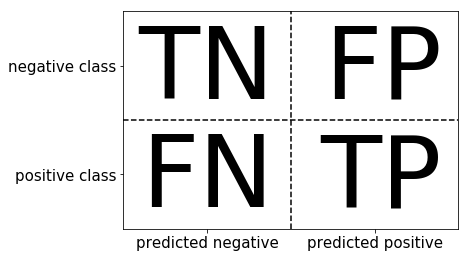
1 | #提示:准确率 (Accuracy),精确度(Precision),Recall,f-分数计算方法 |
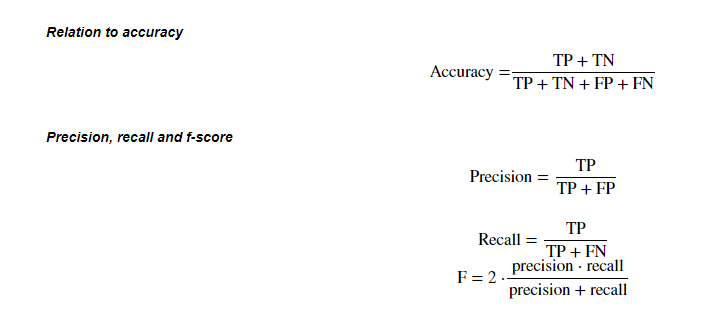
sklearn.metrics模块classification_report模块1 | #写入代码 |
1 | #写入代码 |
/root/.pyenv/versions/3.11.1/lib/python3.11/site-packages/sklearn/linear_model/_logistic.py:465: ConvergenceWarning: lbfgs failed to converge (status=1):
STOP: TOTAL NO. OF ITERATIONS REACHED LIMIT.
Increase the number of iterations (max_iter) or scale the data as shown in:
https://scikit-learn.org/stable/modules/preprocessing.html
Please also refer to the documentation for alternative solver options:
https://scikit-learn.org/stable/modules/linear_model.html#logistic-regression
n_iter_i = _check_optimize_result(1 | #写入代码 |
1 | #写入代码 |
array([[355, 57],
[ 82, 174]])1 | from sklearn.metrics import classification_report |
precision recall f1-score support
0 0.81 0.86 0.84 412
1 0.75 0.68 0.71 256
accuracy 0.79 668
macro avg 0.78 0.77 0.78 668
weighted avg 0.79 0.79 0.79 668【思考】 * 如果自己实现混淆矩阵的时候该注意什么问题
1 | #思考回答 |
【思考】什么是ROC曲线,OCR曲线的存在是为了解决什么问题?
1 | #思考 |
sklearn.metrics1 | #写入代码 |
1 | print(lr.decision_function(X_test)) |
[-1.7776276 -1.68901519 -2.9343385 -2.73339993 -0.7425476 0.1771919
0.42300886 -0.95177507 -2.19297241 -2.09492243 -2.09876666 -2.24379328
-0.72898893 -0.74448703 1.55206252 2.26736362 -3.0615053 -1.45551632
1.82143942 1.10174703 2.80348253 2.20862227 -2.08595792 -1.98565326
-2.62459231 2.61608127 2.52054836 0.46386814 -2.26805651 -1.89799476
-4.40221097 -2.45118004 -2.11507984 0.25727282 1.56507901 -3.49922092
0.09517543 3.1727335 -0.66659502 -2.16889122 -2.31738004 -0.75154631
1.34173247 -0.68691348 -2.38317701 -1.48352807 3.30441868 0.37836543
0.15120699 -2.39554116 0.71230509 -2.94049784 0.0526656 -0.12124772
0.21937853 -0.95736671 -2.91315052 1.73227025 -2.30451919 -0.11949728
-2.40406452 -1.23217853 -3.04709277 -2.51149884 -2.91275507 0.36741872
1.88515182 -1.73344723 1.61180838 -2.64456699 -2.82671595 -1.32885535
-1.89201447 -2.38194062 1.14830497 0.7324757 3.41575634 -0.04718518
1.99047031 0.71098531 -2.5002286 2.11220527 1.35687779 -4.65208202
-0.50164169 -2.21847127 -0.27744568 -2.1098023 -2.28203956 -2.24087733
1.49913758 -0.46745632 -1.76590269 -3.13694507 -2.48969764 -2.52447108
-0.31359417 -2.62456277 0.10812447 -3.22505518 -0.54301462 -1.31398633
-2.45637232 -0.9392769 -1.99910791 -0.01952273 0.16386412 1.17043699
0.83571934 -0.30892412 -2.56236834 -2.52630696 -2.15878988 3.38005162
-1.63316112 -2.0470374 1.16802525 1.96428556 -0.85542758 -0.84711271
-2.3923425 -2.27467461 1.27340371 -0.16738478 2.77379952 -0.91636487
3.49337899 2.22265823 -1.03898765 -1.79576035 3.05405598 -1.72625544
-2.08233698 0.14427761 -2.03826492 -1.87510703 -2.43040363 0.88364821
-2.31722422 1.21479438 -2.19509856 -1.96948465 2.90456606 1.22909197
-0.60993113 -2.40508898 1.79832298 -2.33619419 -1.76964851 0.54894164
0.56920781 -1.65544357 -2.18783672 -2.51890544 -1.1167812 1.85506633
-2.14366192 2.56003678 1.79741811 2.22038003 -0.93948297 2.11029939
3.66773152 3.37255532 -1.62079149 -0.21922341 -2.93532548 -1.8851028
-0.11223495 -0.89402373 -2.79168773 0.58319665 -1.20213471 2.11583429
-1.78550619 -1.21648746 -2.91538781 -2.80005448 -2.74359191 -0.06775047
-1.28645408 -1.17048578 -0.1176852 -1.59958242 -0.65901928 -2.40701243
0.57575073 -3.0756839 1.53932753 -2.49031769 -3.03266822 0.30539932
-0.05523861 -0.24431132 -2.36483723 3.25595248 -2.11664845 -1.97728592
-2.04509461 -3.07727841 -1.11942703 -3.38920295 -2.59088459 -3.55978164
0.22449105 -0.3214215 0.05735696 0.02061023 -3.01544378 -0.77973619
-1.39798016 -3.10075724 -4.80621573 -3.01948006 3.44366918 -2.88193813
-2.01992513 -0.09559774 0.91447527 -1.13270082 -2.45426968 -1.91415803
-0.08403516]1 | #写入代码 |
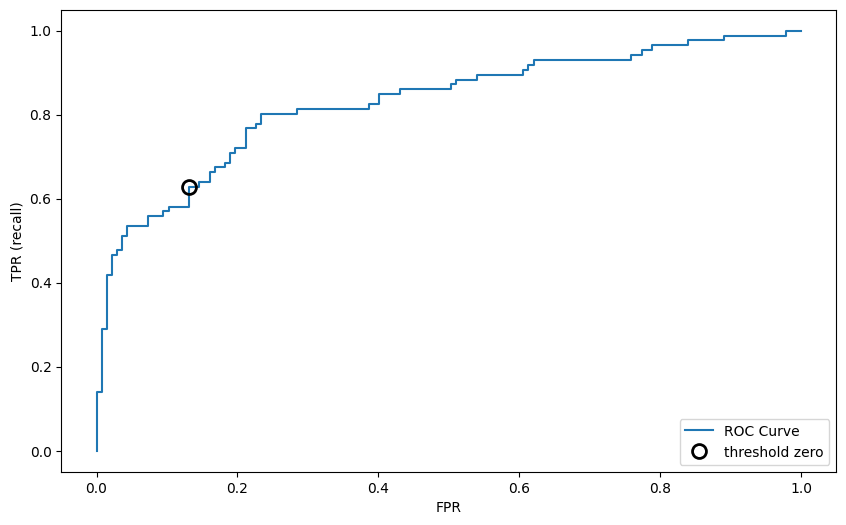
1 | #思考回答 |
【思考】你能从这条OCR曲线的到什么信息?这些信息可以做什么?
1 | #思考回答 |
经过前面的两章的知识点的学习,我可以对数数据的本身进行处理,比如数据本身的增删查补,还可以做必要的清洗工作。那么下面我们就要开始使用我们前面处理好的数据了。这一章我们要做的就是使用数据,我们做数据分析的目的也就是,运用我们的数据以及结合我的业务来得到某些我们需要知道的结果。那么分析的第一步就是建模,搭建一个预测模型或者其他模型;我们从这个模型的到结果之后,我们要分析我的模型是不是足够的可靠,那我就需要评估这个模型。今天我们学习建模,下一节我们学习评估。
我们拥有的泰坦尼克号的数据集,那么我们这次的目的就是,完成泰坦尼克号存活预测这个任务。
1 | import pandas as pd |
1 | %matplotlib inline |
1 | plt.rcParams['font.sans-serif'] = ['SimHei'] # 用来正常显示中文标签 |
载入这些库,如果缺少某些库,请安装他们
【思考】这些库的作用是什么呢?你需要查一查
1 | #思考题回答 |
'\nImage 是 IPython.display 模块的一部分,用于在 Jupyter Notebook 或 IPython 环境中直接显示图像。支持从本地路径或网络 URL 加载图像,并控制显示格式(如宽度、高度、格式类型)\nseaborn 是一个基于 Matplotlib 的高级数据可视化库,专注于统计图形的绘制(如分布图、相关性图、分类图等),能快速生成美观且信息丰富的图表\n'1 | %matplotlib inline |
载入我们提供清洗之后的数据(clear_data.csv),大家也将原始数据载入(train.csv),说说他们有什么不同
1 | #写入代码 |
(891, 12)1 | #写入代码 |
.dataframe tbody tr th {
vertical-align: top;
}
.dataframe thead th {
text-align: right;
}| PassengerId | Survived | Pclass | Name | Sex | Age | SibSp | Parch | Ticket | Fare | Cabin | Embarked | |
|---|---|---|---|---|---|---|---|---|---|---|---|---|
| 0 | 1 | 0 | 3 | Braund, Mr. Owen Harris | male | 22.0 | 1 | 0 | A/5 21171 | 7.2500 | NaN | S |
| 1 | 2 | 1 | 1 | Cumings, Mrs. John Bradley (Florence Briggs Th… | female | 38.0 | 1 | 0 | PC 17599 | 71.2833 | C85 | C |
| 2 | 3 | 1 | 3 | Heikkinen, Miss. Laina | female | 26.0 | 0 | 0 | STON/O2. 3101282 | 7.9250 | NaN | S |
| 3 | 4 | 1 | 1 | Futrelle, Mrs. Jacques Heath (Lily May Peel) | female | 35.0 | 1 | 0 | 113803 | 53.1000 | C123 | S |
| 4 | 5 | 0 | 3 | Allen, Mr. William Henry | male | 35.0 | 0 | 0 | 373450 | 8.0500 | NaN | S |
1 | #写入代码 |
| PassengerId | Pclass | Age | SibSp | Parch | Fare | Sex_female | Sex_male | Embarked_C | Embarked_Q | Embarked_S | |
|---|---|---|---|---|---|---|---|---|---|---|---|
| 0 | 0 | 3 | 22.0 | 1 | 0 | 7.2500 | 0 | 1 | 0 | 0 | 1 |
| 1 | 1 | 1 | 38.0 | 1 | 0 | 71.2833 | 1 | 0 | 1 | 0 | 0 |
| 2 | 2 | 3 | 26.0 | 0 | 0 | 7.9250 | 1 | 0 | 0 | 0 | 1 |
| 3 | 3 | 1 | 35.0 | 1 | 0 | 53.1000 | 1 | 0 | 0 | 0 | 1 |
| 4 | 4 | 3 | 35.0 | 0 | 0 | 8.0500 | 0 | 1 | 0 | 0 | 1 |
这里我的建模,并不是从零开始,自己一个人完成完成所有代码的编译。我们这里使用一个机器学习最常用的一个库(sklearn)来完成我们的模型的搭建
下面给出sklearn的算法选择路径,供大家参考
1 | # sklearn模型算法选择路径图 |
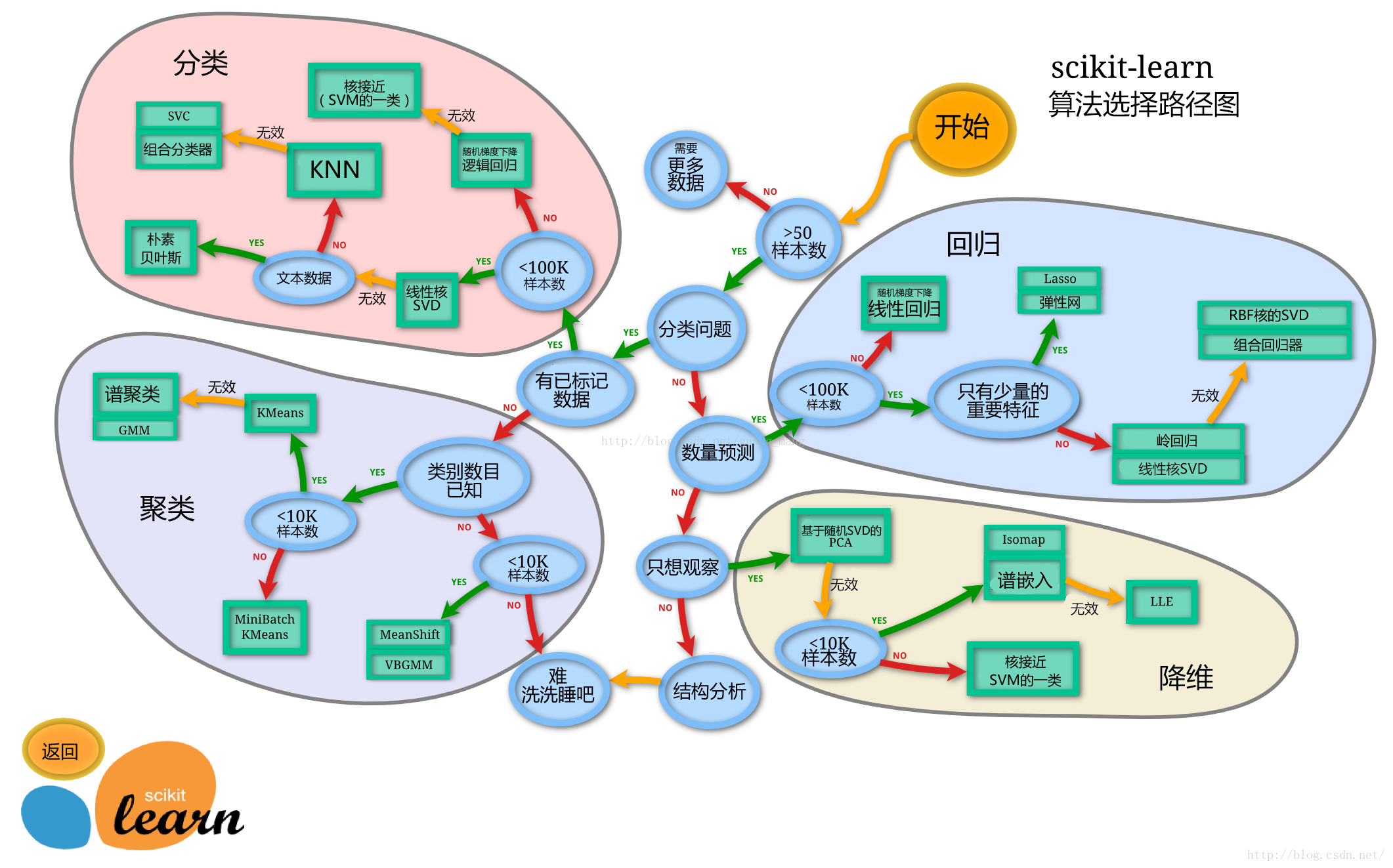
【思考】数据集哪些差异会导致模型在拟合数据是发生变化
1 | #思考回答 |
这里使用留出法划分数据集
【思考】 * 划分数据集的方法有哪些? * 为什么使用分层抽样,这样的好处有什么?
1 | # 划分数据集的方法有哪些? |
train_test_splittrain_test_split?后回车即可看到要从clear_data.csv和train.csv中提取train_test_split()所需的参数
1 | #写入代码 |
1 | #写入代码 |
((668, 11), (223, 11))【思考】 * 什么情况下切割数据集的时候不用进行随机选取
1 | #思考回答 |
LinearRegression混淆sklearn.linear_modelsklearn.ensemble1 | #写入代码 |
1 | #写入代码 |
/root/.pyenv/versions/3.11.1/lib/python3.11/site-packages/sklearn/linear_model/_logistic.py:465: ConvergenceWarning: lbfgs failed to converge (status=1):
STOP: TOTAL NO. OF ITERATIONS REACHED LIMIT.
Increase the number of iterations (max_iter) or scale the data as shown in:
https://scikit-learn.org/stable/modules/preprocessing.html
Please also refer to the documentation for alternative solver options:
https://scikit-learn.org/stable/modules/linear_model.html#logistic-regression
n_iter_i = _check_optimize_result(1 | #写入代码 |
Training set score: 0.80
Testing set score: 0.791 | #写入代码 |
Training set score: 0.79
Testing set score: 0.78
/root/.pyenv/versions/3.11.1/lib/python3.11/site-packages/sklearn/linear_model/_logistic.py:465: ConvergenceWarning: lbfgs failed to converge (status=1):
STOP: TOTAL NO. OF ITERATIONS REACHED LIMIT.
Increase the number of iterations (max_iter) or scale the data as shown in:
https://scikit-learn.org/stable/modules/preprocessing.html
Please also refer to the documentation for alternative solver options:
https://scikit-learn.org/stable/modules/linear_model.html#logistic-regression
n_iter_i = _check_optimize_result(1 | # 默认参数的随机森林分类模型 |
Training set score: 1.00
Testing set score: 0.82【思考】 * 为什么线性模型可以进行分类任务,背后是怎么的数学关系 * 对于多分类问题,线性模型是怎么进行分类的
1 | #思考回答 |
predict能输出预测标签,predict_proba则可以输出标签概率1 | #写入代码 |
1 | #写入代码 |
array([0, 1, 1, 1, 0, 0, 1, 0, 1, 1])1 | #写入代码 |
1 | #写入代码 |
array([[0.60887905, 0.39112095],
[0.17668722, 0.82331278],
[0.40624596, 0.59375404],
[0.18896449, 0.81103551],
[0.87984221, 0.12015779],
[0.91385758, 0.08614242],
[0.13282516, 0.86717484],
[0.90555878, 0.09444122],
[0.05280619, 0.94719381],
[0.10934565, 0.89065435]])【思考】 * 预测标签的概率对我们有什么帮助
1 | #思考回答 |