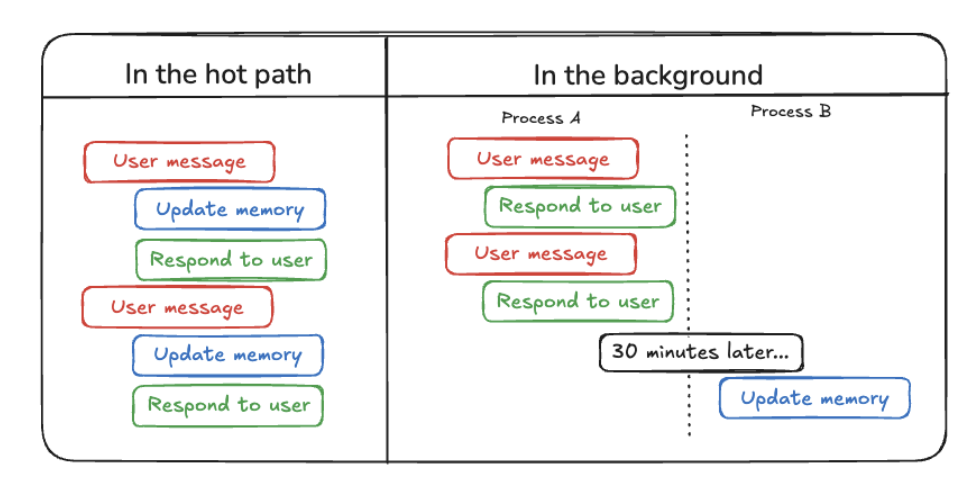
工具 (Tool): 在 AI
应用中,工具是代理(Agent)可以调用的函数或能力。这个函数创建的工具就是一个封装好的、可以被
Agent 调用的函数,用于执行创建、更新、删除记忆的操作。
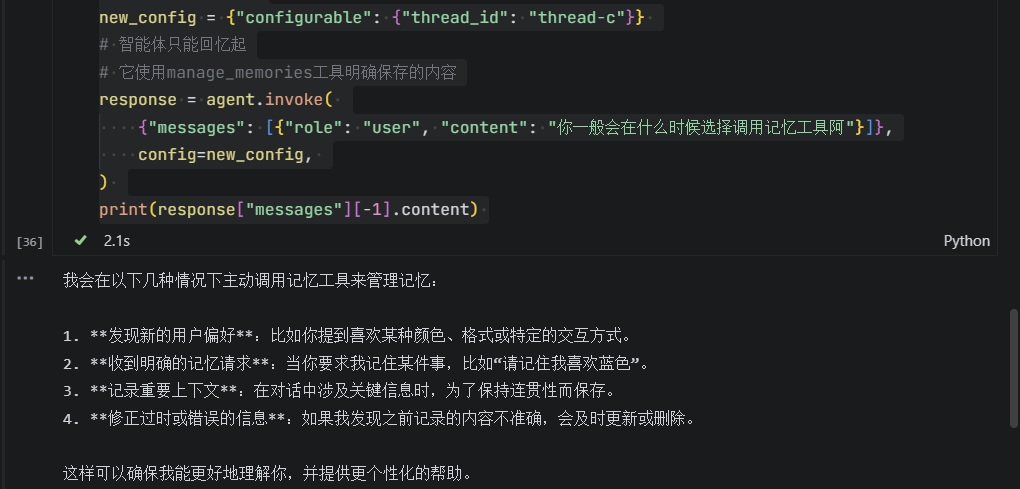
什么时候agent会调用记忆工具
image-20250814163150589
ai是这样回答的,ReAct架构的agent是否调用工具由他自己决定
实战
导入库
1
2
3
4
5
6
7
8
from langgraph.checkpoint.memory import MemorySaver
from langgraph.prebuilt import create_react_agent
from langgraph.store.memory import InMemoryStore
from langgraph.utils.config import get_store
from langmem import (
    # 让智能体创建、更新和删除记忆
    create_manage_memory_tool,
)
返回记忆提示词
1
2
3
4
5
6
7
8
9
10
11
12
13
14
15
16
17
def prompt(state): """为LLM准备消息。""" # 从配置的上下文变量中获取存储; store = get_store() # 与提供给 `create_react_agent` 的相同 memories = store.search( # 在与我们为智能体配置的相同命名空间内搜索 ("memories",), query=state["messages"][-1].content, ) system_msg = f"""You are a helpful assistant.
# This will be the public-facing agent card
public_agent_card = AgentCard(
    name='Hello World Agent',
    description='Just a hello world agent',
    url='http://localhost:9999/',
    version='1.0.0',
 	# 默认输入模式:Agent 能够接收的输入类型列表,这里仅支持纯文本
    default_input_modes=['text'],
    # 默认输出模式:Agent 能够产生的输出类型列表,这里仅返回纯文本
    default_output_modes=['text'],
    # 能力声明:告知调用方 Agent 支持的能力,例如是否支持流式输出(streaming)
    capabilities=AgentCapabilities(streaming=True),
    skills=[skill],  # Only the basic skill for the public card
    supports_authenticated_extended_card=True,
)
这张卡片告诉我们代理名为 “Hello World Agent”,运行在
http://localhost:9999/,支持文本交互,并具有
hello_world
技能。它还表明支持公开认证,意味着无需特定凭证。
{'expected_answer': '14',
 'problem_type': 'has_answer_extracted',
 'problem_source': 'aops_c4_high_school_math',
 'generation_model': 'DeepSeek-R1',
 'pass_rate_72b_tir': '0.96875',
 'problem': 'Given $\\sqrt{x^2+165}-\\sqrt{x^2-52}=7$ and $x$ is positive, find all possible values of $x$.',
 'generated_solution': "<think>\nOkay, let's see. I need to solve the equation √(x² + 165) - √(x² - 52) = 7, a截取部分",
 'inference_mode': 'cot'}
{'conversations': [{'from': 'human',
   'value': 'Explain what boolean operators are, what they do, and provide examples of how they can be used in programming. Additionally, describe the concept of operator precedence and prov截取'},
  {'from': 'gpt',
   'value': 'Boolean operators are logical operators used in programming to manipulate boolean values. The截取'}],
 'source': 'infini-instruct-top-500k',
 'score': 5.212620735168457}
{'text': "<|im_start|>user\nCalculate the pH during a titration when 9.54 mL of a 0.15 M HCl solution has reacted with 22.88 mL of a 0.14 M NaOH solution?<|im_end|>\n<|im_st截取",
 '__index_level_0__': 49038}
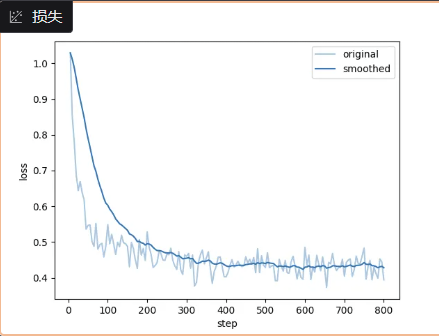
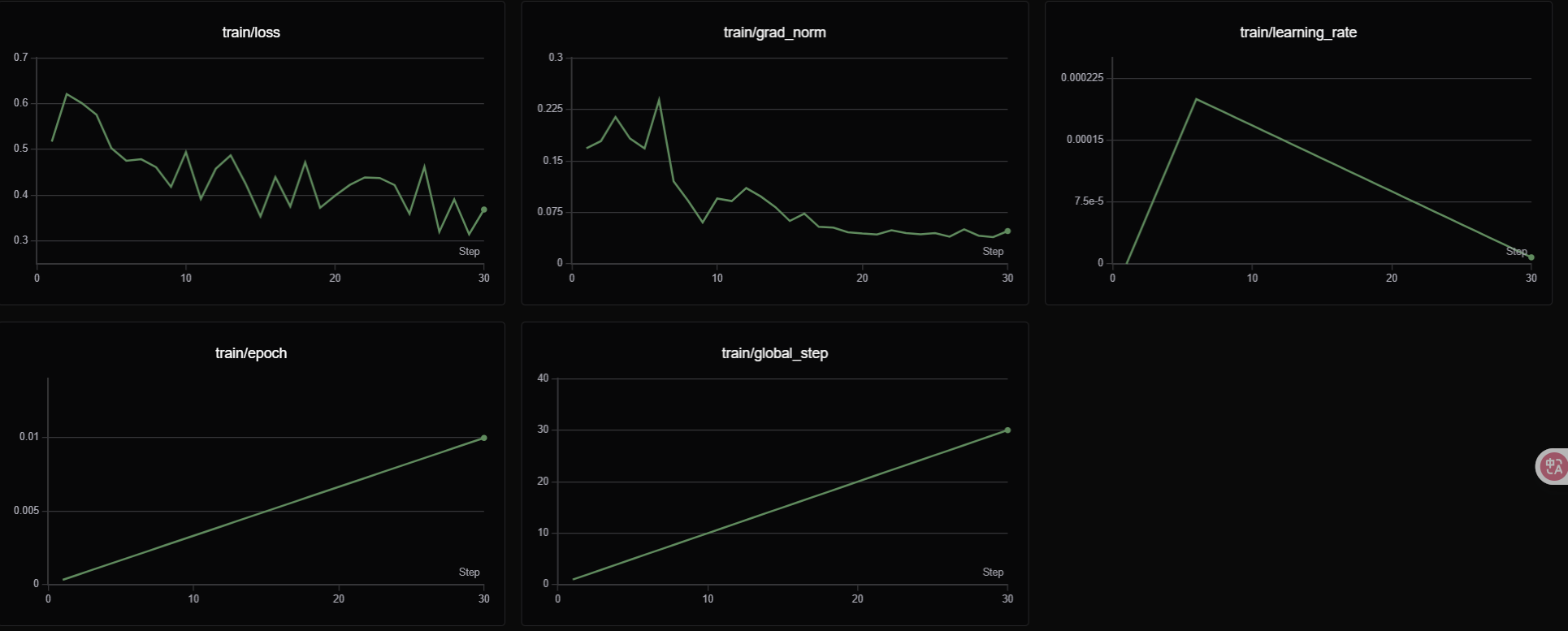
SwanLab 是一款开源、轻量的 AI
模型训练跟踪与可视化工具,提供了一个跟踪、记录、比较、和协作实验的平台。
SwanLab 面向人工智能研究者,设计了友好的Python API
和漂亮的UI界面,并提供训练可视化、自动日志记录、超参数记录、实验对比、多人协同等功能。在SwanLab上,研究者能基于直观的可视化图表发现训练问题,对比多个实验找到研究灵感,并通过在线网页的分享与基于组织的多人协同训练,打破团队沟通的壁垒,提高组织训练效率。
<|im_start|>system
你是天气助手,当用户查询天气时请调用 get_weather 函数。
# Tools
You may call one or more functions to assist with the user query.
You are provided with function signatures within <tools></tools> XML tags:
<tools>
[{"name":"get_weather","description":"查询指定城市的天气信息","parameters":{"type":"object","properties":{"location":{"type":"string","description":"要查询天气的城市名称"}},"required":["location"]}}]
</tools>
<tool_call>
 {"name": <function-name>, "arguments": <args-json-object>}
</tool_call>.
<|im_end|>
<|im_start|>user
北京天气如何?
<|im_end|>
<|im_start|>assistant
<tool_call>{"name":"get_weather","arguments":{"location":"北京"}}</tool_call>
<|im_end|>