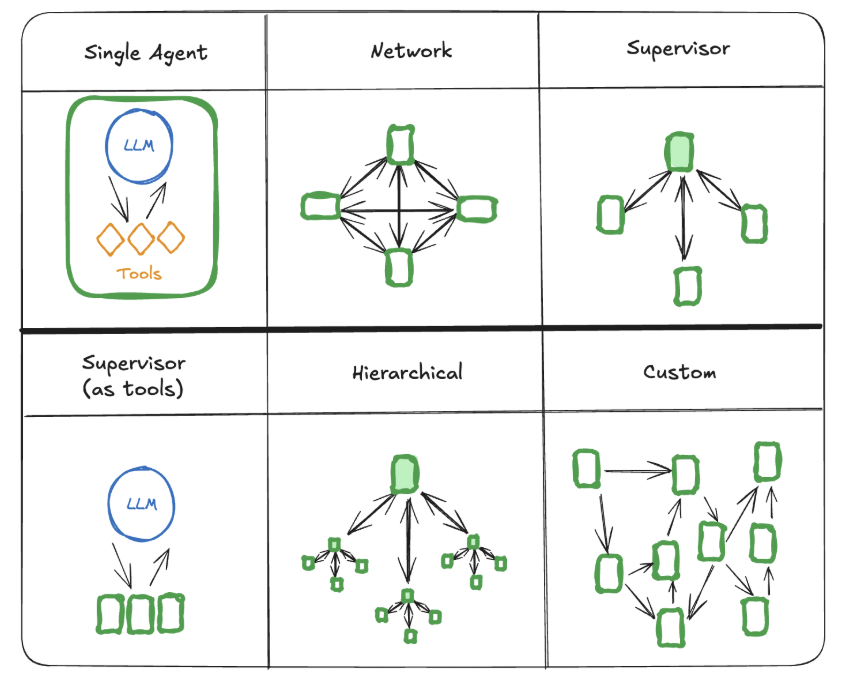
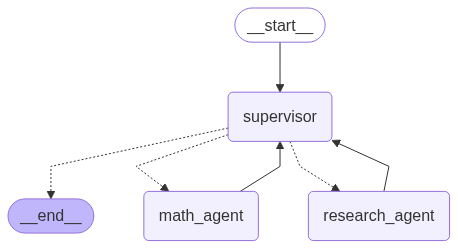
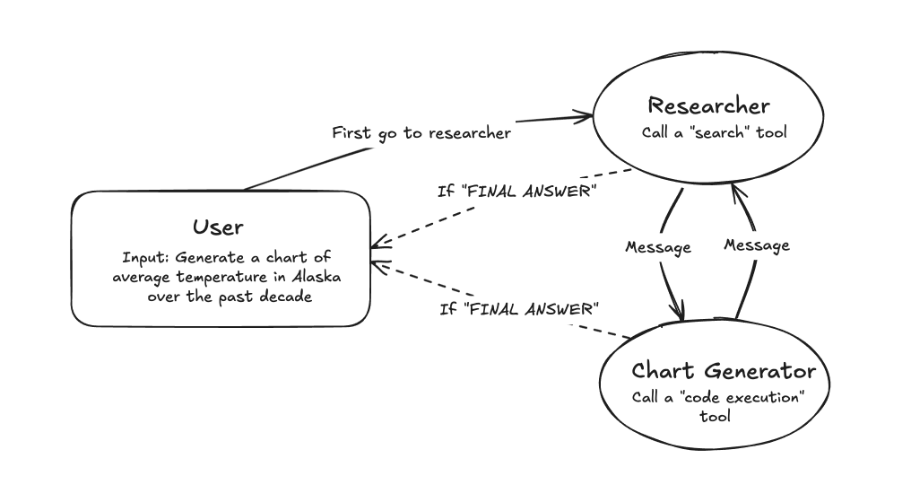
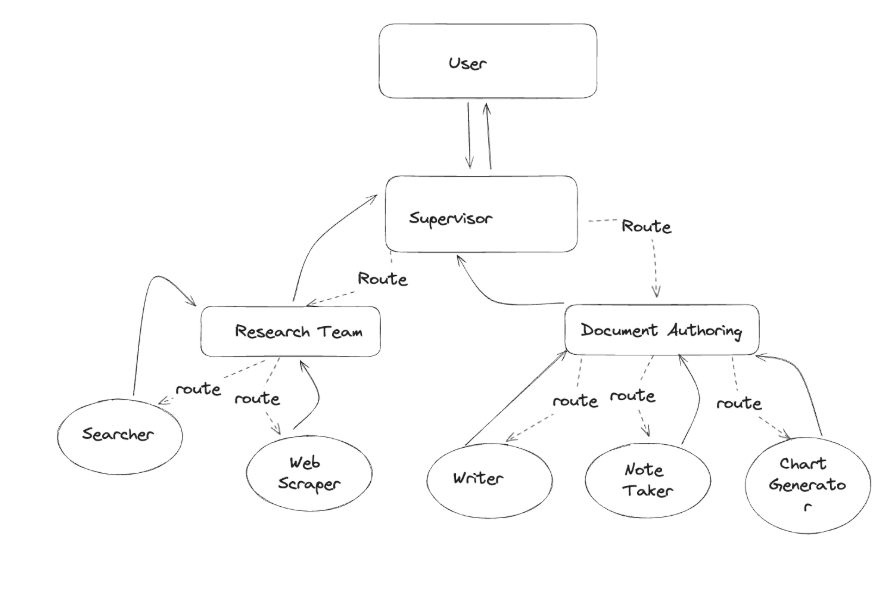
from langchain_core.messages import HumanMessage messages = [HumanMessage(content="你好,2乘2是多少")] messages = graph.invoke({"messages": messages}) for m in messages['messages']: m.pretty_print()
输出
1 2 3 4 5 6 7 8 9 10 11 12 13 14
================================[1m Human Message [0m=================================
# Define nodes: these do the work builder.add_node("assistant", assistant) builder.add_node("tools", ToolNode(tools))
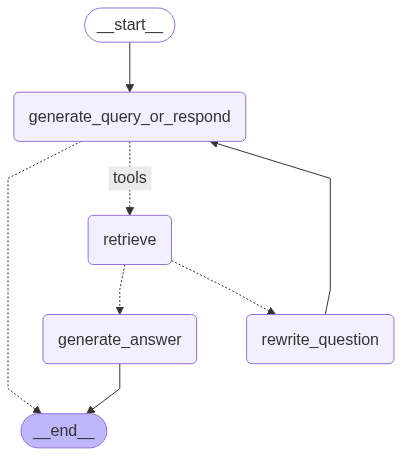
# Define edges: these determine how the control flow moves builder.add_edge(START, "assistant") builder.add_conditional_edges( "assistant", # If the latest message (result) from assistant is a tool call -> tools_condition routes to tools # If the latest message (result) from assistant is a not a tool call -> tools_condition routes to END tools_condition, ) builder.add_edge("tools", "assistant") react_graph = builder.compile()
# Show display(Image(react_graph.get_graph(xray=True).draw_mermaid_png()))
from typing import Annotated from langgraph.graph import MessagesState from langchain_core.messages import AnyMessage from langgraph.graph.message import add_messages
# Initial state initial_messages = [AIMessage(content="Hello! How can I assist you?", name="Model", id="1"), HumanMessage(content="I'm looking for information on marine biology.", name="Lance", id="2") ]
# New message to add new_message = HumanMessage(content="I'm looking for information on whales, specifically", name="Lance", id="2")
# Test add_messages(initial_messages , new_message)
1 2
[AIMessage(content='Hello! How can I assist you?', name='Model', id='1'), HumanMessage(content="I'm looking for information on whales, specifically", name='Lance', id='2')]
# Message list messages = [AIMessage("Hi.", name="Bot", id="1")] messages.append(HumanMessage("Hi.", name="Lance", id="2")) messages.append(AIMessage("So you said you were researching ocean mammals?", name="Bot", id="3")) messages.append(HumanMessage("Yes, I know about whales. But what others should I learn about?", name="Lance", id="4"))
# Isolate messages to delete delete_messages = [RemoveMessage(id=m.id) for m in messages[:-2]] print(delete_messages)
Multiple Schemas 多种状态
Private State 私有状态
首先,让我们讨论在节点之间传递 private state 的情况。这对于图的中间计算逻辑中需要的任何内容都很有用,但与图的整体输入或输出无关。
from IPython.display import Image, display from langgraph.checkpoint.memory import MemorySaver from langgraph.graph import StateGraph, START
# Define a new graph workflow = StateGraph(State) workflow.add_node("conversation", call_model) workflow.add_node("summarize_conversation",summarize_conversation)
# Set the entrypoint as conversation workflow.add_edge(START, "conversation") workflow.add_conditional_edges("conversation", should_continue) workflow.add_edge("summarize_conversation", END)
input_message = HumanMessage(content="我喜欢玩lol,你知道这个游戏吗") output = graph.invoke({"messages": [input_message]}, config) for m in output['messages'][-1:]: m.pretty_print()
当对话大于6,可生成概要
1
graph.get_state(config).values.get("summary","")
Chatbot with message summarization & external DB memory具有消息总结和外部数据库记忆的聊天机器人
# Start conversation for chunk in graph.stream({"messages": [HumanMessage(content="你好我是zxj")]}, config, stream_mode="updates"): chunk['conversation']["messages"].pretty_print()
现在我们直接打印状态更新。
1 2 3
==================================[1m Ai Message [0m==================================
你好呀,zxj!再次见到你真高兴~😊 有什么我可以帮忙的吗?
stream_mode=”values”
1 2 3 4 5 6 7 8 9
# Start conversation, again config = {"configurable": {"thread_id": "2"}}
# Start conversation input_message = HumanMessage(content="你好我是zxj") for event in graph.stream({"messages": [input_message]}, config, stream_mode="values"): for m in event['messages']: m.pretty_print() print("---"*25)
# Run the graph until the first interruption for event in graph.stream(initial_input, thread, stream_mode="values"): event['messages'][-1].pretty_print()
1 2 3 4 5 6 7 8 9 10
================================[1m Human Message [0m=================================
# Run the graph until the first interruption for event in graph.stream(initial_input, thread, stream_mode="values"): event['messages'][-1].pretty_print()
1 2 3
================================[1m Human Message [0m=================================
2乘3
当状态中断时,我们可以直接应用状态更新
记住,对 messages 键的更新将使用 add_messages reducer:
如果我们想覆盖现有的消息,可以提供带有id的消息。 如果我们只想将消息添加到消息列表中,则可以传递未指定 id 的消息,如下所示。
from typing_extensions import TypedDict from langgraph.checkpoint.memory import MemorySaver from langgraph.errors import NodeInterrupt from langgraph.graph import START, END, StateGraph
class State(TypedDict): input: str
def step_1(state: State) -> State: print("---Step 1---") return state
def step_2(state: State) -> State: # 如果输入字符串长度超过5个字符,我们可以选择抛出NodeInterrupt异常 if len(state['input']) > 5: raise NodeInterrupt(f"收到长度超过5个字符的输入: {state['input']}") print("---Step 2---") return state
def step_3(state: State) -> State: print("---Step 3---") return state
from langchain.agents import create_openai_functions_agent, AgentExecutor from langchain.tools import tool from langchain_openai import ChatOpenAI from pydantic import BaseModel, Field
# 1. 定义工具 class WeatherInput(BaseModel): location: str = Field(description="城市名称")
from langchain_core.tools import tool from typing import Literal from langchain_openai import ChatOpenAI from langchain_core.messages import HumanMessage, AIMessage, ToolMessage
defstream_graph_updates(user_input: str): for event in graph.stream({"messages": [{"role": "user", "content": user_input}]}): print(event) #stream 返回的每个 event 通常是一个字典,键是图中节点的名称,值是该节点完成后的状态更新。 for value in event.values(): #消息列表中的最后一条消息的文本内容 print("Assistant:", value["messages"][-1].content)
whileTrue: try: user_input = input("User: ") #退出 if user_input.lower() in ["quit", "exit", "q"]: print("Goodbye!") break #调用 stream_graph_updates(user_input) except: # fallback if input() is not available user_input = "What do you know about LangGraph?" print("User: " + user_input) stream_graph_updates(user_input) break
# The config is the **second positional argument** to stream() or invoke()! events = graph.stream( {"messages": [{"role": "user", "content": user_input}]}, config, stream_mode="values", ) for event in events: event["messages"][-1].pretty_print()
events = graph.stream( {"messages": [{"role": "user", "content": user_input}]}, config, stream_mode="values", ) for event in events: if "messages" in event: event["messages"][-1].pretty_print()
# 遍历 `graph` 在给定 `config` 下的所有历史状态。 # `graph.get_state_history(config)` 会返回一个迭代器,其中包含了从开始到当前的所有状态快照。 for state in graph.get_state_history(config): # 打印当前状态快照中的一些信息,以便我们观察和选择。 # `len(state.values["messages"])` 显示了到该状态为止,对话历史中的消息总数。 # `state.next` 显示了在该状态之后,图将要执行的下一个节点或步骤的名称。 print("Num Messages: ", len(state.values["messages"]), "Next: ", state.next) # 打印一条分隔线,使输出更易读。 print("-" * 80) # 这里是选择“时间旅行”目标点的关键逻辑。 # 我们设定一个条件:当对话历史中的消息数量正好等于4时,我们就找到了想要回到的那个点。 # 这是一个为了演示而设定的任意条件,在实际应用中,您可以根据需要设置更复杂的选择逻辑。 if len(state.values["messages"]) == 4: # We are somewhat arbitrarily selecting a specific state based on the number of chat messages in the state. # 将当前这个符合条件的状态(state)保存到 to_replay 变量中。 # 循环结束后,to_replay 变量将持有我们选中的那个历史时刻的完整状态, # 之后我们就可以用它来恢复或修改执行流程。 to_replay = state
# top level context arg is typed as Context for autocomplete and type checking result = graph.invoke( {'input': 'abc'}, context=Context(user_id='123', db_conn='conn_mock') )
# 处理非流式响应处理 else: try: events = graph.stream({"messages": prompt}, config) for event in events: for value in event.values(): result = value["messages"][-1].content except Exception as e: logger.info(f"Error processing response: {str(e)}")
template = """You are an assistant for question-answering tasks. Use the following pieces of retrieved context to answer the question. If you don't know the answer, just say that you don't know.
from datasets import Dataset #构建问题与标准答案(黄金数据集) questions = ["What is faithfulness ?", "How many pages are included in the WikiEval dataset, and which years do they cover information from?", "Why is evaluating Retrieval Augmented Generation (RAG) systems challenging?", ] ground_truths = ["Faithfulness refers to the idea that the answer should be grounded in the given context.", " To construct the dataset, we first selected 50 Wikipedia pages covering events that have happened since the start of 2022.", "Evaluating RAG architectures is, however, challenging because there are several dimensions to consider: the ability of the retrieval system to identify relevant and focused context passages, the ability of the LLM to exploit such passages in a faithful way, or the quality of the generation itself."] answers = [] contexts = []
# 生成答案 for query in questions: answers.append(rag_chain.invoke(query)) contexts.append([docs.page_content for docs in base_retriever.get_relevant_documents(query)])
from ragas.llms import LangchainLLMWrapper evaluator_llm = LangchainLLMWrapper(llm)
调用
1 2 3 4
from ragas.metrics import LLMContextRecall, Faithfulness, FactualCorrectness from ragas import evaluate result = evaluate(dataset=evaluation_dataset,metrics=[LLMContextRecall(), Faithfulness(), FactualCorrectness()],llm=evaluator_llm) result
查看结果
1 2 3 4 5
import pandas as pd pd.set_option("display.max_colwidth", None)
[Document(metadata={'Header 1': 'Foo', 'Header 2': 'Bar'}, page_content='Hi this is Jim \nHi this is Joe'), Document(metadata={'Header 1': 'Foo', 'Header 2': 'Bar', 'Header 3': 'Boo'}, page_content='Hi this is Lance'), Document(metadata={'Header 1': 'Foo', 'Header 2': 'Baz'}, page_content='Hi this is Molly')]
''' 将文本划分成单句,可以按照标点符号划分 ''' single_sentences_list = re.split(r'(?<=[。!?])', essay) # 移除可能存在的空字符串 single_sentences_list = [s.strip() for s in single_sentences_list if s.strip()]
''' 我们需要为单个句子拼接更多的句子,但是 `list` 添加比较困难。因此将其转换为字典列(`List[dict]`) { 'sentence' : XXX , 'index' : 0} ''' sentences = [{'sentence': x, 'index' : i} for i, x inenumerate(single_sentences_list)]
#利用滑动窗口分段 defcombine_sentences(sentences, buffer_size=1): combined_sentences = [ ' '.join(sentences[j]['sentence'] for j inrange(max(i - buffer_size, 0), min(i + buffer_size + 1, len(sentences)))) for i inrange(len(sentences)) ] # 更新原始字典列表,添加组合后的句子 for i, combined_sentence inenumerate(combined_sentences): sentences[i]['combined_sentence'] = combined_sentence
#根据阈值划分 breakpoint_percentile_threshold = 95 breakpoint_distance_threshold = np.percentile(distances, breakpoint_percentile_threshold) print("距离的第95个百分位阈值是:", breakpoint_distance_threshold) # 找到所有距离大于阈值的点的索引,这些索引就是我们的切分点 indices_above_thresh = [i for i, x inenumerate(distances) if x > breakpoint_distance_threshold]